-->

Friday, January 3, 2014

Computer Programming : How to Generate random number in ASP.NET, Example

You can generate random number using Random class. According to msdn library:
Represents a pseudo-random number generator, a device that produces a sequence of numbers that meet certain statistical requirements for randomness.
A Random class exists in System namespace, used to display pseudo-random numbers. The Class has many methods, such as Next() method. Overloaded Next method take different parameters such as zero argument, one argument and two argument.

Random class instance . Next () : Following Code gives Non-negative integer number like 1 to further.
Random class instance . Next (Int32) : You can specify a number, which is maximum for generated output.
Random class instance . Next (Int32, Int32): You can specify minimum and maximum number in parameter, following output generated between specified argument.

Application

  1. Mathematical CAPTCHA Design
  2. Kids Game.

Lets take an simple example

 <%@ Page Language="C#" AutoEventWireup="true" CodeFile="Default2.aspx.cs" Inherits="Default2" %>

<!DOCTYPE html PUBLIC "-//W3C//DTD XHTML 1.0 Transitional//EN" "http://www.w3.org/TR/xhtml1/DTD/xhtml1-transitional.dtd">

<html xmlns="http://www.w3.org/1999/xhtml">
<head runat="server">
    <title>Random Number</title>
</head>
<body>
    <form id="form1" runat="server">
    <div>
        <asp:Label ID="Label1" runat="server"></asp:Label>
        <br />
        <br />
        <asp:Button ID="Button1" runat="server" Height="37px" onclick="Button1_Click" 
            Text="Random Number " />
    </div>
    </form>
</body>
</html>
using System;
using System.Collections.Generic;
using System.Linq;
using System.Web;
using System.Web.UI;
using System.Web.UI.WebControls;

public partial class Default2 : System.Web.UI.Page
{
    protected void Page_Load(object sender, EventArgs e)
    {


    }
    protected void Button1_Click(object sender, EventArgs e)
    {
        Random r1 = new Random();
        string s = r1.Next(10, 100).ToString ();
        Label1.Text = s;


    }

}


Code generate following output

Computer Programming : How to Generate random number in ASP.NET, Example

Computer Programming : How to Generate random number in ASP.NET, Example
      

Computer Programming : How to get System information in ASP.NET, Example

Computer Programming : Easily you can get operating System information using OperatingSystem Class. This class exist in System Namespace. It has single constructor with specified platform identifier and version object. Also contain four public properties, such as Platform, ServicePack, Version and VersionString.

Need of it  

  1. Install driver online, if you know about operating system.
Note : Output depends on class constructor parameter.

Lets take a simple

        <%@ Page Language="C#" AutoEventWireup="true" CodeFile="Default2.aspx.cs" Inherits="Default2" %>

<!DOCTYPE html PUBLIC "-//W3C//DTD XHTML 1.0 Transitional//EN" "http://www.w3.org/TR/xhtml1/DTD/xhtml1-transitional.dtd">

<html xmlns="http://www.w3.org/1999/xhtml">
<head runat="server">
    <title>Operating System Information</title>
</head>
<body>
    <form id="form1" runat="server">
    <div>
        <asp:Label ID="Label1" runat="server"></asp:Label>
        <br />
        <br />
        <asp:Button ID="Button1" runat="server" Height="37px" onclick="Button1_Click" 
            Text="System Information " />
    </div>
    </form>
</body>
</html>
using System;
using System.Collections.Generic;
using System.Linq;
using System.Web;
using System.Web.UI;
using System.Web.UI.WebControls;

public partial class Default2 : System.Web.UI.Page
{
    protected void Page_Load(object sender, EventArgs e)
    {


    }
    protected void Button1_Click(object sender, EventArgs e)
    {
        Version ver = new Version();

        OperatingSystem os = new OperatingSystem(PlatformID.Win32S, ver);

        string version = os.Version.ToString();
        string StringVersion = os.VersionString;
        string platform = os.Platform.ToString();
        string servicepack = os.ServicePack.ToString();
        Label1.Text = "Operating System Version=" + version + "<br/>version String=" + StringVersion + "<br/>platform=" + platform + "<br/>Service Pack=" + servicepack;


    }
}

Code generates the following outputs
computer Programming: get operating system information

Thursday, January 2, 2014

Computer Programming : Different DateTime format in ASP.NET, Example

DateTime class is used to print date and time of the system/server. Its very useful class in application development or project development. Suppose you want to print current date and time of the system, use DateTime class with Now property.

Label1.Text = DateTime.Now.ToString();


Dotprogramming : Print current date and time
If you want to print only date with special format like date/month/year. Now, use dd/MM/yyyy in ToString() method. Lets take an simple example

Label1.Text = DateTime.Now.ToString("dd/MM/yyyy");

Dotprogramming : print date with specific format

 Similarly again, if you want to print only day of current date then you should take only "dd" in the string parameter.

Label1.Text = DateTime.Now.ToString("dd");

day of the current datetime in asp.net

Monday, December 30, 2013

Mathematical Functions to Work with Numerical Values in Sql Server: SQL Programming

In SQL Programming, mathematical functions are used to operate with numeric values. Programmer can easily perform all type of scientific functions as well as simple arithmetic operations using these mathematical functions.

Programmer can use mathematical functions to manipulate the numeric values in a result set. You can perform various numeric and arithmetic operations on the numeric values. For example, you can calculate the absolute value of a number or you can calculate the square or square root of a value.

The following table lists the mathematical functions provided by SQL Server 2005.

  • Abs, Returns an absolute value
  • Acos, asin and atan, returns the angle in radians whose cosine, sine, or tangent is a floating-point value
  • Cos, sin, cot and tan, returns the cosine, sine, cotangent, or tangent of the angle in radians
  • Degrees, returns the smallest integer greater than or equal to the specified value
  • Exp, returns the exponential value of the specified value
  • Floor, returns the largest integer less than or equal to the specified volume
  • Log, returns the natural logarithm of the specified value
  • Log10, returns the base-10 logarithm of the specified value
  • Pi, returns the constant value of 3.141592653589793
  • Power, returns the value of numeric_expression to the value of y
  • Radians, converts from degrees to radians
  • Rand, returns a random float number between 0 and 1
  • Round, returns a numeric expression rounded off to the length specified as an integer expression
  • Sign, returns positive, negative, or zero
  • Sqrt, returns the square root of the specified value
For example, to calculate the round off value of any number, you can use the round mathematical function. The round mathematical function calculates and returns the numeric value based on the input values provided as an argument.

The syntax of the round function is:
round (numeric_expression, length)

where

  • numeric_expression is the numeric expression to be rounded off.
  • Length is the precision to which the expression is to be rounded off.
The following SQL query retrieves the EmployeeID and Rate for a specified employee id from the EmployeePayHistory table:

SELECT BusinessEntityID, 'Hourly Pay Rate' = round (Rate, 2)
FROM HumanResources.EmployeePayHistory WHERE BusinessEntityID =3

In the result set, the value of the Rate column is rounded off to two decimal places.

Mathematical Functions to Work with Numerical Values in Sql Server: SQL Programming

While using the round function, if the length is positive, then the expression is rounded to the right of the decimal point. If the length is negative then the expression is rounded to the left of the decimal point. SQL Server provides the following usage of the round function.

  • Round (1234.567, 2) outputs 1234.570
  • Round (1234.567, 1) outputs 1234.600
  • Round (1234.567, 0) outputs 1235.000
  • Round (1234.567, -1) outputs 1230.000
  • Round (1234.567, -2) outputs 1200.000
  • Round (1234.567, -3) outputs 1000.000

Use Date Functions to Operate with Date Values in Sql Server: SQL Programming

In SQL Programming, programmer can use the date functions of the SQL Server to manipulate date-time values. You can either perform arithmetic operations on date values or parse the date values. Date parsing includes extracting components, such as the day, the month, and the year from a date value.

Programmer can also retrieve the system date and use the value in the date manipulation operations. To retrieve the current system date, you can use the getdate function. The following statement displays the current date:

SELECT getdate ( )

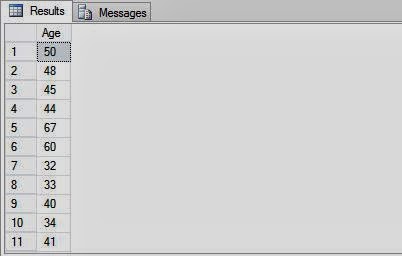
The following SQL query uses the datediff function to calculate the difference between the current date and the date of birth of employees in AdventureWorks, Inc. The date of birth of employees is stored in the BirthDate column of the Employee table.

SELECT datediff (yy, BirthDate, getdate()) AS 'Age'
FROM HumanResources.Employee

Outputs:

Use Date Functions to Operate with Date Values in Sql Server: SQL Programming

The following table lists the date functions provided by SQL Server.

  • dateadd, adds the number of date parts to the date
  • datediff, calculates the number of date parts between two dates
  • datename, returns date part from the listed date, as a character value (for example, October)
  • datepart, returns date part from the listed date as an integer
  • getdate(), returns the current date and time, day, (date), returns an integer, which represents the day getutcdate, returns the current date of the system in Universal Time Coordinate (UTC) time. UTC time is also known as the Greenwich Mean Time (GMT)
  • month, returns an integer, which represents the month
  • year, returns an integer which represents the year

SQL Server provides the following abbreviation and values of the datepart function

  • Year, Abbreviation -- (yy,yyyy),  may have values (1753-9999)
  • Qartr, Abbreviation -- (qq, q), may have values (1-4)
  • Month, Abbreviation -- (mm, m), may have values (1-12)
  • Day of year, Abbreviation -- (dy, y), may have values (1-366)

Sunday, December 29, 2013

Computer Programming: Add item with value in code file, ASP.NET Example

<%@ Page Language="C#" AutoEventWireup="true" CodeFile="itemwithvalue.aspx.cs" Inherits="itemwithvalue" %>
<!DOCTYPE html>
<html xmlns="http://www.w3.org/1999/xhtml">
<head runat="server">
    <title></title>
</head>
<body>
    <form id="form1" runat="server">
    <div>
   
        <asp:RadioButtonList ID="RadioButtonList1" runat="server" Height="65px" Width="235px">
        </asp:RadioButtonList>
   
    </div>
    </form>
</body>
</html>

Code File
using System;
using System.Collections.Generic;
using System.Linq;
using System.Web;
using System.Web.UI;
using System.Web.UI.WebControls;

public partial class itemwithvalue : System.Web.UI.Page
{
    protected void Page_Load(object sender, EventArgs e)
    {
        if (!Page.IsPostBack)
        {
            RadioButtonList1.Items.Add(new ListItem("ASP.NET", "FIRST NUMBER"));
            RadioButtonList1.Items.Add(new ListItem("WINFORMS", "SECOND NUMBER"));
            RadioButtonList1.Items.Add(new ListItem("WPF", "THIRD NUMBER"));
            RadioButtonList1.Items.Add(new ListItem("WCF", "FORTH NUMBER"));
           
        }
    }
}

Output
Computer Programming: Add item with value in code file, ASP.NET Example
 

Computer Programming : TextBox WatermarkExtender control in Ajax with example

Computer Programming : TextBox WatermarkExtender is used to provide a tip to the user that specifies the type of parameter entered within the text box. This extender attaches to a TextBox control and displays a text within the text box when the web page render for the first time. When the user clicks the text box to insert values, the default text gets hidden.

Public Properties of TextBox Watermark Extender are

TargetControlID : Sets the .ID of the TextBox control to which you want to attach the extender
WatermarkText  : Sets the text to display when the value in the text box is empty.
watermarkCssClass : Sets the CSS class for the text box when it is empty.
 

Lets take a simple example

<%@ Page Language="C#" AutoEventWireup="true" CodeFile="watermark-example.aspx.cs" Inherits="watermark_example" %>
<%@ Register assembly="AjaxControlToolkit" namespace="AjaxControlToolkit" tagprefix="asp" %>
<!DOCTYPE html>
<html xmlns="http://www.w3.org/1999/xhtml">
<head runat="server">
    <title></title>
</head>
<body>
    <form id="form1" runat="server">
        <asp:ScriptManager ID="ScriptManager1" runat="server"></asp:ScriptManager>
    <div>
   
        <asp:TextBox ID="TextBox1" runat="server" Height="18px" Width="205px"></asp:TextBox>
        <asp:TextBoxWatermarkExtender ID="TextBox1_TextBoxWatermarkExtender" runat="server" Enabled="True" TargetControlID="TextBox1" WatermarkText="Use ; as a separator">
        </asp:TextBoxWatermarkExtender>
        <asp:Button ID="Button1" runat="server" Text="Search" BorderColor="Black" BorderStyle="Solid" BorderWidth="2px" Width="71px" />
   
    </div>
    </form>
</body>
</html>
Output
Computer Programming : Watermark Textbox example in asp.net
© Copyright 2013 Computer Programming | All Right Reserved