-->

Sunday, January 12, 2014

Computer Programming: Change Profile Value at runtime in asp.net with example

We already discussed about create profile for authenticated/anonymous user. This article will cover, Disable profile and save it either automatic or manually in asp.net. If you want to save profile in asp.net, follow some steps
Step-1: Add this code in web.config file
<system.web>
      <authentication mode="Windows" />
      <profile automaticSaveEnabled="false" >
        <properties>
          <add name="DOB" />          
        </properties>
      </profile>      
        <compilation debug="false" targetFramework="4.0" />
    </system.web>

Step-2: Add a web form into your project.
Step-3: First manually save some string into Profile property on Page_Load() method. Programmer can also use Profile.save() method.

Profile.DOB = "19/april/1986";
Profile.Save();

Step-4: Add  a TextBox, Button and a label Control to the Design window.
Step-5: Change Profile Property using TextBox at runtime

Default.aspx page 


<%@ Page Language="C#" %>

<!DOCTYPE html PUBLIC "-//W3C//DTD XHTML 1.0 Transitional//EN" "http://www.w3.org/TR/xhtml1/DTD/xhtml1-transitional.dtd">

<script runat="server">

    protected void Button1_Click(object sender, EventArgs e)
    {
        Profile.DOB = TextBox1.Text;
        Profile.Save();
        Label1.Text = "Update DOB is :" + Profile.DOB;
    }

    protected void Page_Load(object sender, EventArgs e)
    {
        if (!Page .IsPostBack )
        {
            Profile.DOB = "19/april/1986";
            Profile.Save();
            Label1.Text = "Your DOB is:" + Profile.DOB;
            
        }
    }
</script>

<html xmlns="http://www.w3.org/1999/xhtml">
<head runat="server">
    <title></title>
</head>
<body>
    <form id="form1" runat="server">
    <div>
    Profile Data :
        <asp:Label ID="Label1" runat="server" Text=""></asp:Label>
    
        <br />
        Enter DOB :
        <asp:TextBox ID="TextBox1" runat="server"></asp:TextBox>
        <br />
        <asp:Button ID="Button1" runat="server" onclick="Button1_Click" Text="Button" />
    
    </div>
    </form>
</body>
</html>
Code generate the following output

Computer Programming : How to save profile in asp.net
Computer Programming : Before changing the profile data

After change at runtime, Code generate the following output

Computer Programming : After changing the profile data

Computer Programming:  After change profile data


Friday, January 10, 2014

How to Perform Grouping of Data Matching a Criteria: SQL Programming

At times, you need to view data matching specific criteria to be displayed together in the result set. For example, you want to view a list of all the employees with details of employees of each department displayed together.

Grouping can be performed by following clauses:

GROUP BY

The GROUP BY clause summarizes the result set into groups as defined in the query by using aggregate functions. The HAVING clause further restricts the result set to produce the data based on a condition. The syntax of the GROUP BY clause is:

SELECT column_list
FROM table_name
WHERE condition
[GROUP BY [ALL] expression [, expression]
[HAVING search_condition]

Where,
  • ALL is a keyword used to include those groups that do not meet the search condition.
  • expression specifies the column name(s) or expression(s) on which the result set of the SELECT statement is to be grouped.
  • search_condition is the conditional expression on which the result is to be produced.
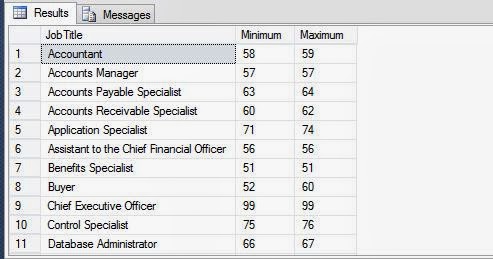
The following SQL query returns the minimum and maximum values of vacation hours for the different types of titles when the vacation hours are greater than 20:

SELECT JobTitle, Minimum = min (VacationHours), Maximum = max (VacationHours)
FROM HumanResources.Employee
WHERE VacationHours > 20 GROUP BY JobTitle

Outputs:

How to Perform Grouping of Data Matching a Criteria: SQL Programming

The GROUP BY ……..HAVING clause is same as the SELECT….WHERE clause. The result set produced with the GROUP BY clause eliminates all the records and values that do not meet the condition specified in the HAVING clause. The GROUP BY clause collects data that matches the condition, and summarizes it into an expression to produce a single value for each group. The HAVING clause eliminates all those groups that do not match the condition.

The following SQL query retrieves all the titles along with their average vacation hours when the vacation hours are more than 30 and the group average value is greater than 55:

SELECT Title, ‘Average Vacation Hours’ = avg (VacationHours) FROM HumanResources.Employee WHERE VacationHours > 30 GROUP BY Title HAVING avg (VacationHours) >55

The ALL keyword of the GROUP BY clause is used to display all groups, including those which are excluded by the WHERE clause. The ALL keyword is meaningful to those queries that contain the WHERE clause. If ALL is not used, the GROUP BY clause does not show the groups for which there are no matching rows. However, the GROUP BY ALL shows all rows, even if the groups have no rows meeting the search conditions.

The following SQL query retrieves the records for the employee titles that are eliminated in the WHERE condition:

SELECT Title, VacationHours = sum (VacationHours) FROM HumanResources.Employee WHERE Title IN (‘Recruiter’, ‘Stocker’,’Design Engineer’) GROUP BY ALL Title

How to Get Summarizing Data from Database: SQL Programming

Summary of the data contains aggregated values that help in data analysis at a broader level. For example, to analyse the sales, the users might want to view the average sales or total sales for a specified time period. The SQL Server provides aggregate functions to generate summarized data.

The users might also want to view the summarized data in different group based on specific criteria. For example, the users want to view the average sales data region-wise or product-wise. In such a case, the sales data of each region will be displayed together. You can group the data by using the GROUP BY clause of the SELECT statement. You can also use aggregate function to summarize data when grouping it.

Summarizing Data by Using Aggregate Functions

At times, you need to calculate the summarized values of a column based on a set of rows. For example, the salary of employees is stored in the Rate column of the EmployeePayHistory table and you need to calculate the average salary earned by the employees.

The aggregate functions, on execution, summarize the values for a column or a group of columns, and produce a single value. The syntax of an aggregated function is:

SELECT aggregate_function ([ALL|DISTINCT] expression) FROM table_name

Where,

  • All specifies that the aggregate function is applied to all the values in the specified column.
  • DISTINCT specifies that the aggregate function is applied to only unique values in the specified column.
  • expression specifies a column or an expression with operators.

Avg Returns the average of values on a numeric expression, either all or distinct.
Count: Returns the number of values in an expression, either all or distinct. The count function also accepts (*) as its parameter, but it counts the number of rows returned by the query.

Min Returns the lowest value in the expression. The following SQL query retrieves the minimum value from the Rate column of the EmployeePayHistory table with a user-defined heading:

SELECT ‘Minimum Rate’ = min (Rate) FROM HumanResources.EmployeePayHistory

Max Return the highest value in the expression.

Sum Returns the sum total of values in a numeric expression, either all or distinct. 

Steps to Customize the Result Set with Example: SQL Programming

SQL Server management studio needs to connect to a server to perform any query with it. The article will describe about to customize the result set using sql programming.

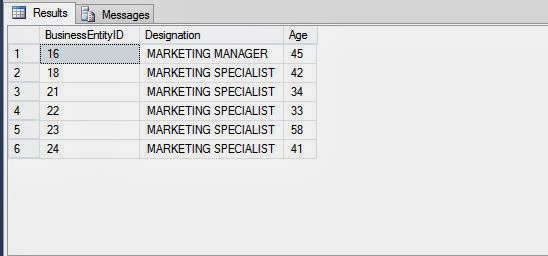
The management at Adventure Works. Inc. wants to view a report that displays the employee ID, designation, and age of the employees who are working as a marketing manager or a marketing specialist. The data should be displayed in uppercase. The employee details are stored in the Employee table in the Adventure Works database.

To solve the problem, programmer need to perform the following tasks:

Creating a Query

To display the age of the employees, you need to use the datediff function to calculate the difference between their birth date and the current date. In addition, to retrieve the data for a marketing manager or a marketing specialist, you need to use the OR logical operator.

Type the following query in the Query Editor window of the Microsoft SQL Server Management Studio window:

SELECT BusinessEntityID, upper (JobTitle) As
Designation,datediff (yy, Birthdate, getdate ( )) As Age
FROM HumanResources.Employee WHERE JobTitle='Marketing Manager'
OR JobTitle ='Marketing Specialist'

Executing the Query to Display Data

Press the F5 key or click the Execute button to execute the query and view the result set. The following figure displays the output.

Steps to Customize the Result Set with Example: SQL Programming

Thursday, January 9, 2014

Computer programming: create connection using provider factory,c# code

The new ADO.NET classes that allow for generic data access functionality-such as DBConnection, DbCommand, and so on -are grouped under the System.Data.Common namespace.
The first step in implementing database-agnostic data access is to use the DBProviderFactory class to create a new database provider factory object.

 DbProviderFactory factory = DbProviderFactories.GetFactory("System.Data.SqlCient");

This piece of code, because of the System.Data.SqlClient parameter passed, will have the factory object contain a SQLServer database provider factory ( the term factory generally refers to a class that builds class instances, or objects, for you). The System.Data.SqlClient string parameter is kept in a configuration file, allowing you to have c# code that really doesn't know what kind of database it's dealing with.

The database provider factory class is capable of creating a database-specific connection object through its CreateConnection method. However, you'll keep the reference to the connection object stored using the generic DbConnection reference:

 DbConnection conn = factory.CreateConnection();

The connection object will actually contain a SqlConnection object if the backend database in SQLServer, an OracleConnection if the backend database is Oracle, and so on. However, instead of working with SqlConnection or OracleConnection objects, we simply use DbConnection and let it decide at runtime what kind of object to create in the background.


You cannot save changes that would result in one or more tables being re-created

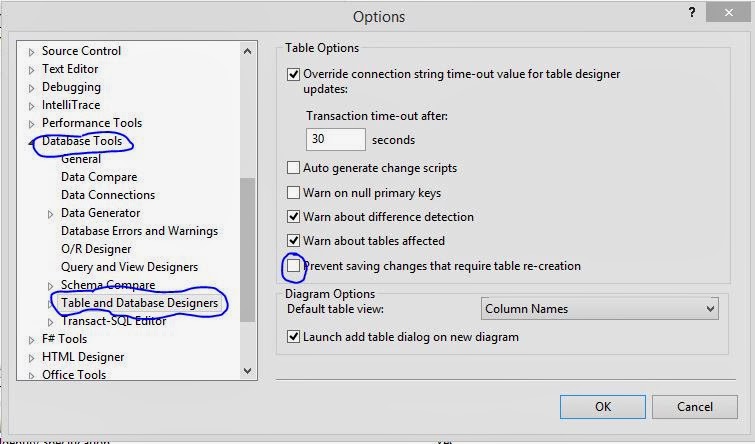
You cannot save changes that would result in one or more tables being re-created. You can override this behavior by changing your configuration options. Open the Tools menu, click Options.

Options link in tool tab , asp.net

 In the Options dialog box, expand the Database Tools node and click Table and Database Designers.

Database designer tools options

You can clear the "prevent saving changes that require table re-creation" check box and then retry the save operation. The save operation might take a long time because the data in the affected tables must be copied to temporary tables.

Your pending changes require the following tables to be dropped and re-created.

Wednesday, January 8, 2014

System Functions used to Query System Tables in Sql Server: SQL Programming

In SQL Programming, system functions are used to query on system tables. Programmer can easily perform all type of system functions to generate sequential numbers for each row based on specific criteria.

The system functions are used to query the system tables. System tables are a set of tables that are used by the SQL Server to store information about users, databases, tables and security. The system functions are used to access the SQL Server databases or user-related information. For example, to view the host ID of the terminal on which you are logged onto, you can use the following query:

SELECT host_id ( )

The following table lists the system function provided by SQL Server

  • host_id (), Returns the current host process ID number of a client process
  • host_name (), Returns the current host computer name of a client process
  • suser_sid ([‘login_name’]), Returns the security identification (SID) number corresponding to the log on name of the user
  • suser_id ([‘login_name’]), Returns the log on identification (ID) number corresponding to the log on name of the user
  • suser_sname ([server_user_id]), Returns the log on name of the user corresponding to the security identification number
  • user_id ([‘name_in_db’]), Returns the database identification number corresponding to the user name
  • user_name ([user_id]), Returns the user name corresponding to the database identification number
  • db_id ([‘db_name’]), Returns the database identification number of the database
  • db_name ([db_id]), Returns the database name
  • object_id (‘objname’), Returns the database object ID number
  • object_name (‘obj_id), Returns the database object name


© Copyright 2013 Computer Programming | All Right Reserved