-->

Sunday, February 2, 2014

How to use Substitution Control in ASP.NET

The substitution control is used to specify a section on an output-cached Web page where you want to substitute the dynamic content for the control. This control provides a simplified solution to partial page caching for pages where the majority of the content is cached. You can output  cache the entire page, and then use the Substitution control to specify the sections of the page that are exempted from caching.

Public Properties of the Substitution class

MethodName : Callback method to call up when the Substitution control executes.

<%@ Page Language="C#" AutoEventWireup="true" CodeFile="substitution.aspx.cs" Inherits="substitution" %>
<%@ OutputCache Duration="300" VaryByParam="none" %>
<!DOCTYPE html PUBLIC "-//W3C//DTD XHTML 1.0 Transitional//EN" "http://www.w3.org/TR/xhtml1/DTD/xhtml1-transitional.dtd">

<html xmlns="http://www.w3.org/1999/xhtml">
<head runat="server">
<script runat="server">  
    static string dotprogramming(HttpContext context) {

        string name = DateTime.Now.ToString();
        return name;
          
    }  
</script>
    <title></title>
</head>
<body>
    <form id="form1" runat="server">
    <div>
    Page Cached DateTime<br />
&nbsp; <%= DateTime.Now.ToString() %> 
        <br />
        Current Time without cache<br />
&nbsp;<asp:Label ID="Label2" runat="server" Text=""></asp:Label>
        <asp:Substitution ID="Substitution1" runat="server" 
            MethodName="dotprogramming" />
    </div>
    </form>
</body>
</html>

In this example page cached for 300 seconds using OutputCache directive , But you can refresh content using Substitution control.
Code Generate the following Output
How to use Substitution Control in ASP.NET

How to use Substitution Control in ASP.NET

How to use HiddenField Control in ASP.NET

The HiddenField control is used to store a value that needs to persist across posts to the server. Normally, view-state, session-state, and cookies are used to maintain the state of the Web form page. In case, if these methods are disabled or are not available, you can use the HiddenField  control to store state values. Here is the class hierarchy for the HiddenField class :

System.Object
   System.Web.UI.Control
      System.Web.UI.WebControls.HiddenField

Public Properties of the HiddenField Class

EnableTheming : Check, Whether theme is apply or not onto this control.
SkinID : Retrieve specific style from skin file and apply to the control.
Value : value of the HiddenField

Lets take an simple example 

<%@ Page Language="C#" AutoEventWireup="true" CodeFile="Default2.aspx.cs" Inherits="Default2" %>

<!DOCTYPE html PUBLIC "-//W3C//DTD XHTML 1.0 Transitional//EN" "http://www.w3.org/TR/xhtml1/DTD/xhtml1-transitional.dtd">

<html xmlns="http://www.w3.org/1999/xhtml">
<head runat="server">
    <title></title>
</head>
<body>
    <form id="form1" runat="server">
    <div>
    <h2>Hidden Field Contro Example</h2>
        <p>
            <asp:Button ID="Button1" runat="server" onclick="Button1_Click" 
                Text="Click Me!" />
        </p>
    </div>
    <asp:HiddenField ID="HiddenField1" runat="server" />
    <br />
    <asp:Label ID="Label1" runat="server"></asp:Label>
    </form>
</body>
</html>

// Code Behind Code

using System;
using System.Collections.Generic;
using System.Linq;
using System.Web;
using System.Web.UI;
using System.Web.UI.WebControls;

public partial class Default2 : System.Web.UI.Page
{
    protected void Page_Load(object sender, EventArgs e)
    {
        HiddenField1.Value = "Welcome to dotprogramming";

    }

    protected void Button1_Click(object sender, EventArgs e)
    {
        Label1.Text = HiddenField1.Value;

    }
}
Code Generate the following output
How to use HiddenField Control in ASP.NET

How to use PlaceHolder Control in ASP.NET

The PlaceHolder Control
The PlaceHolder control is used as a container to store server controls that are added to the Web page at runtime. The PlaceHolder control does not produce any visible output and is used only as a container for other controls on the Web page.

Example of PlaceHolder control

 
<%@ Page Language="C#" %>
<!DOCTYPE html>
<script runat="server">
    protected void Button1_Click(object sender, EventArgs e)
    {
        TextBox text = new TextBox();
        text.Text = "This is the runtime textbox";
        text.Style["width"] = "300px";
        PlaceHolder1.Controls.Add(text);       
           
    }
</script>
<html xmlns="http://www.w3.org/1999/xhtml">
<head runat="server">
    <title></title>
</head>
<body>
    <form id="form1" runat="server">
    <div>
        <asp:Button ID="Button1" runat="server" Text="Click to add TextBox" OnClick="Button1_Click" />
        <br />
        <br />
        <br/>
        <asp:PlaceHolder ID="PlaceHolder1" runat="server"></asp:PlaceHolder>
    </div>
    </form>
</body>
</html>
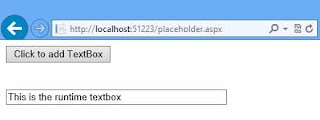
Output
Add Textbox on runtime

Saturday, February 1, 2014

Dynamic and Static Memory Allocation in C Programming


Memory is allocated to the respective data variables (of any type of data structure) in two manners that are dynamic and static.
The memory if it allocated to the variables declared, during the compilation process is called as a static memory allocation whereas the allocated to the variables, during the execution of the program is called as dynamic memory allocation.
Once the memory is allocated statically it cannot be altered during the execution of the program. So the programmer may need the memory that is to be allocated as per the request during the program execution. So there comes dynamic memory allocation. Dynamic memory allocation is possible only when pointers are used. A pointer variable is used to store the base address of dynamically allocated memory.

      void main()
          {
            int array[20];
            . . . . .
         }

In this case when the program is compiled, main memory is allocated to the array. So it is static memory allocation. Once the memory is allocated to “array”, it cannot be altered during execution. Here if the programmer wishes to store more numbers of elements in the array it is not possible. He can change the size of array, only before compilation. Now if he is decides the size of array as 50 and if he is stored only few elements then there is wastage of main memory. Usually if the elements that are to be stored in an array is not decided before compilation and it is decided during the execution of the program then the static memory allocation has a major drawback.


In the order to overcome the above-mentioned problem now programmer can request the required memory during the execution of program using pointer variable. It is dynamic memory allocation.
For example, consider the following program segment:-
      
void main()
          {
            int *arr, size;
            /* user can get size of the array during execution */
           arr= (int *) malloc (size of (int) * size);
            . . . .
         }

In this case the dynamic memory is allocated by the malloc function during the execution of program and the base is returned is stored in a pointer variable arr. With the help of arr now it is possible to refer as many elements as user wishes during the execution of the program. That is the major concept of dynamic memory allocation.

Concept of Memory Allocation in C Programming


As the stored program concept specifies, the data and instructions that are to be processed should be stored in main memory of the computer, the memory allocation comes into picture. The data that is to be processed must be stored in main memory so that is readily available to the processor and can fetched and stores in internal registers for processing. Reserving space in main memory for the data variables and used for storing data in it later through assignment or input is called as memory allocation. So once the data structure is decided and variables are declared in the declaration part of the program (in case of C language) memory is allocated to the variables of the respective data structured by the compiler. This is called as memory allocation. For example, consider the following C program:-
           void main()
          {
            int a, b, c;
            . . . . .
         }
When the above  program is compiled memory of two bytes each is allocated to the variables a, b and c respectively. These memory locations are used to store two bytes signed integers (data). In the program the data are referred through variables names (identifiers). Consider another example,
         void main()
          {
            int arr[20];
            . . . . .
         }

When this program is compiled 40 bytes of consecutive memory is allocated to store 20 integers and all the integers are referred by a single variable “arr” with the proper index.
         void main()
          {
            int *arr; int size=20;
            arr= (int *) malloc (2 * size);
         }
When the above program is executed 40 bytes of memory is allocated during execution and the base address is stored in a pointer variable arr. With the help of arr now it is possible to refer 20 integers.
           The above mentioned all examples explain basic concept of memory allocation.


Delete Element from Array in PHP Programming


Delete  element in PHP array:-  If we wish to delete an item or element from PHP array then we have three choices first is remove the element  from starting position ,second is remove the elements  from last position and third is remove the element at any desire position of an array. Here following code is showing that how to implement above three operations.

Remove the element from starting position: - This can be possible to use  array_shift() PHP function. Syntax of this method is follows:-

mixed array_shift(array array);
this can be understood with the help of following code.
Let we  have an array 
$name =array(“weilems”, “jon”,”jacob”);

If we want  to remove the first name from this array then we can use array_shift() function such that
 Array_shift($name);
After execute this statement the start index value of this array is removed and the index of next elements is decremented by 1 this can be use for associative array.

Remove the element from ending position: - This can be possible to use array_pop() PHP function. Syntax of this method is follows:-

mixed array_pop(array target_array) 
this can be understood with the help of following code.
Let we  have an array 
$name =array(“jack”,“jon”,”jackren”);

If we want  to remove the last name from this array then we can use array_pop() function such that
 Array_pop($name);
After execute this statement the last index value of this array is removed. And the array becomes $name =array(“jack”,“jon”);

Remove the element at any desire position:- This is possible by using PHP unset() method. The syntax of this method is follows:-

unset(mixed vriable);
for example let we have an array such that
$branch=array(“CS”,”IT”,EE”);

And we want to remeove IT branch from this array then we can use unset() function in following way.
Unset ($branch [1]);
After execute this statement value stored at first index of array $branch will be unset and removed.

Friday, January 31, 2014

DropdownList SelectedIndexChanged page reload but value not change

Introduction 

If you want to bind one DropdownList from another DropdownList. But you notice that your first DropdownList take same result, After PostBack your page will refreshed, again Page_Load function will be run.

The reason behind

Because your first Dropdownlist bind on Page_Load Event  with both postback and without postback mode.

Solution of the problem is 

 Bind first DropDownList on Page_Load event with withoutPostBack mode.

Lets take an simple example to demonstrate it

<%@ Page Language="C#" AutoEventWireup="true" CodeFile="Default2.aspx.cs" Inherits="Default2" %>

<!DOCTYPE html PUBLIC "-//W3C//DTD XHTML 1.0 Transitional//EN" "http://www.w3.org/TR/xhtml1/DTD/xhtml1-transitional.dtd">

<html xmlns="http://www.w3.org/1999/xhtml">
<head runat="server">
    <title></title>
</head>
<body>
    <form id="form1" runat="server">
    <div>
    Select Country
        <asp:DropDownList ID="DropDownList1" runat="server" AutoPostBack="True" 
            Height="52px" onselectedindexchanged="DropDownList1_SelectedIndexChanged" 
            Width="279px">
        </asp:DropDownList>
        <br />
        <br />
        Select state
        <asp:DropDownList ID="DropDownList2" runat="server" Height="33px" Width="299px" 
            Visible="False">
        </asp:DropDownList>
    </div>
    </form>
</body>
</html>
using System;
using System.Collections.Generic;
using System.Linq;
using System.Web;
using System.Web.UI;
using System.Web.UI.WebControls;
using System.Data.SqlClient;
using System.Data;
using System.Configuration;


public partial class Default2 : System.Web.UI.Page
{
    protected void Page_Load(object sender, EventArgs e)
    {
        if (!Page.IsPostBack )
        {
            SqlConnection con = new SqlConnection();
            con.ConnectionString = ConfigurationManager.ConnectionStrings["ConnectionString"].ToString();
            con.Open();
            SqlCommand cmd = new SqlCommand();
            cmd.CommandText = "Select * from country";
            cmd.Connection = con;
            SqlDataAdapter da = new SqlDataAdapter(cmd);
            DataSet ds = new DataSet();
            da.Fill(ds);
            DropDownList1.DataSource = ds;
            DropDownList1.DataTextField = "countryname";
            DropDownList1.DataValueField = "countryid";
           
            DropDownList1.DataBind();
            DropDownList1.Items.Insert(0, "select any country");
            con.Close();
            
        }


    }
    protected void DropDownList1_SelectedIndexChanged(object sender, EventArgs e)
    {
        DropDownList2.Visible = true;

        SqlConnection con = new SqlConnection();
        con.ConnectionString = ConfigurationManager.ConnectionStrings["ConnectionString"].ToString();
        con.Open();
        SqlCommand cmd = new SqlCommand();
        cmd.CommandText = "Select * from state where countryid='"+DropDownList1 .SelectedValue+"'";
        cmd.Connection = con;
        SqlDataAdapter da = new SqlDataAdapter(cmd);
        DataSet ds = new DataSet();
        da.Fill(ds);
        DropDownList2.DataSource = ds;
        DropDownList2.DataTextField = "statename";
        DropDownList2.DataValueField = "Stateid";
        DropDownList2.DataBind();
        con.Close();

    }

}

Code Generate the following output
DropdownList SelectedIndexChanged page reload but value not change

© Copyright 2013 Computer Programming | All Right Reserved