-->

Thursday, February 6, 2014

How to Querying Data by using Subqueries in SQL Programming

In SQL programming, while using subqueries, you can use the =,>, and < comparison operators to create a condition that checks the value returned by the subquery. When a subquery returns more than one value, you might need to apply the operators to all the values returned by the subquery. To perform this task, you can modify the comparison operators in the subquery. The SQL Server provides the ALL and ANY keywords that can be used to modify the existing comparison operators.

The ALL keyword returns a TRUE value, if all the values that are retrieved by the subquery satisfy the comparison operator. It returns a FALSE value if only some values satisfy the comparison operator or if the subquery does not return any rows to the outer statement.

The ANY keyword returns a TRUE value if any value that is retrieved by the subquery satisfies the comparison operator. It returns a FALSE value if no values in the subquery satisfy the comparison operator or if the subquery does not return any rows to the outer statement.

The following list shows the operators that can be used with the ALL and ANY keywords:

  • >ALL, greater than the maximum value in the list.
    The expression|column_name> ALL (10, 20, 30) means ‘greater than 30’
  • >ANY, greater than the minimum value in the list.
    The expression|column_name >ANY (10, 20, 30) means ‘greater than 10’
  • =ANY, any of the values in the list. It acts in the same way as the IN clause.
    The expression|column_name = ANY (10, 20, 30) means ‘equal to either 10 or 20 or 30’
  • <>ANY, not equal to any value in the list.
    The expression|column_name <>ANY (10, 20, 30) means ‘not equal to 10 or 20 or 30’
  • <>ALL, not equal to all the values in the list. It cats in the same way as the NOT IN clause.
    The expression|column_name <>ALL (10, 20, 30) means ‘not equal to 10 and 20 and 30’

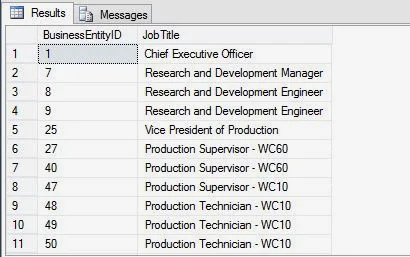
The following example displays the employee ID column and the title of all the employees whose vacation hours are more than the vacation hours of employees designated as Recruiter:

SELECT BusinessEntityID, JobTitle
FROM HumanResources.Employee
WHERE VacationHours >ALL (SELECT VacationHours
FROM HumanResources.Employee WHERE JobTitle = 'Recruiter')

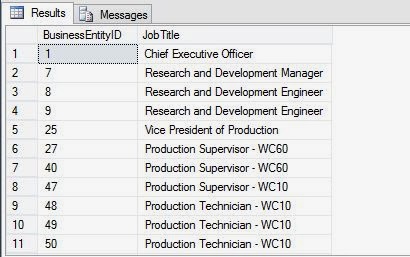
In the preceding example, the inner query returns the vacation hours of all the employees who are titled as recruiter. The outer query uses the ‘>ALL’ comparison operator. This retrieves the details of those employees who have vacation hours greater than all the employees titled as recruiter.

The output of the query is displayed in the following figure.
How to Querying Data by using Subqueries in SQL Programming

Wednesday, February 5, 2014

How to Querying Data by using Subqueries in SQL Programming

IN

In SQL programming, if a subquery returns more than one value, you might need to execute the outer query if the values within the column specified in the condition match any value in the result set of the subquery. To perform this task, you need to use the IN keyword.
The syntax of using the IN keyword is:

SELECT column, column [,column]
FROM table_name
WHERE column [ NOT ] IN
(SELECT column FROM table_name [WHERE
Conditional_expression])

Consider an example. You need to retrieve the BusinessEntityID attribute of all the employees who live in Bothell, from the EmoloyeAddress table in the Adventure Works database.

To perform this task, you need to use a query to obtain the AddressID of all the addresses that contain the word Bothell. You can then obtain the BusinessEntityID from the Employee table where the AddresID matches any of the AddressIDs returned by the previous query.
To perform this task, you can use the following query:

SELECT BusinessEntityID FROM Person.BusinessEntityAddress
WHERE AddressID IN (SELECT AddressID FROM Person.Address WHERE City = 'Bothell')

The output of the subquery will show all the ID falls in the category.

EXISTS

You can also use a subquery to check if a set of records exist. For this, you need to use the EXISTS clause with a subquery. The EXISTS keyword, always returns a TRUE or FALSE value.
The EXISTS clause checks for the existence of rows according to the condition specified in the inner query and passes the existence status to the outer query. The subquery returns a TRUE value if the result of the subquery contains any row.

The query introduced with the EXISTS keyword differs from other queries. The EXISTS keyword is not preceded by any column name, constant, or other expression, and it contains an asterisk (*) in the SELECT list of the inner query. The syntax of the EXISTS keyword in the SELECT query is:

SELECT column, column [column]
FROM table_name
WHERE EXISTS (SELECT column FROM table_name [WHERE
Conditional_expression] )

Consider an example. The users of AdventureWorks, Inc. need a list containing the BusinessEntityID and Title of all the employees who have worked in the Marketing department at any point of time. The department ID of the Marketing department is 4.
To generate the required list, you can write the following query by using the EXISTS keyword:

SELECT BusinessEntityID, Title FROM HumanResources.Employee
WHERE EXISTS
(SELECT * FROM HumanResources.EmployeeDepartmentHistory WHERE
BusinessEntityID = HumanResources.Employee. BusinessEntityID AND DepartmentID = 4)

The following figure displays the output generated by the query.

How to Querying Data by using Subqueries in SQL Programming

A subquery must be enclosed within parentheses and cannot use the ORDER BY or the COMPUTE BY clause.

Make Shutdown timer in C# winforms

Introduction

First of all, I would like to thank all of the readers who have read my previous articles. What a great support i have got from you people.I really felt great when binding navigator article was displayed on the dotprogramming page. Today we will learn, How to create Shutdown timer in c#

Design pattern

Step-1 : Add One timer control onto the winform. Also set two property

Enabled =True;
Interval=1000

Step-2 : Add Two NumericUpDown control onto the form.

Code Pattern

Step-1 : Handle Timer_Tick Event . Copy this code and paste into your Timer_Tick event.

            int a = DateTime.Now.Minute;
            int b = DateTime.Now.Hour;
            int c = Convert.ToInt32 (numericUpDown1.Value);
            int d = Convert.ToInt32(numericUpDown2.Value);


            if (a == d && b == c)
            {
                Process.Start("shutdown", "/s /t 0");
            }

Note : Add  System.Diagnostics namespace for Process class. Here DateTime class use 24 hour time , i want to tell you that your system watch display 8:20 PM.
 Here DateTime Class represents Hour and minute. look like
8 pm (System watch)   = 20 (According to DateTime class)


Code generate the following output
Make Shutdown timer in C# winforms

Tuesday, February 4, 2014

How to Querying Data by using Subqueries in SQL Programming: Part 1

In SQL programming, while querying data from multiple tables, you might need to use the result of one query as an input for the condition of another query. For example, in the Adventure Works database, you need to view the designation of all the employees who earn more than the average salary. In such cases, you can use subqueries to assign values to the expressions in other queries.

A subquery is an SQL statement that is used within another SQL statement. Subqueries are nested inside the WHERE or HAVING clause of the SELECT, INSERT, UPDATE, and DELETE statements. The query that represents the parent query is called an outer query, and the query that represents the subquery is called an inner query. The database engine executes the inner query first and returns the result to the outer query to calculate the result set.

Depending on the output generated by the subquery and the purpose for which it is to be used in the outer query, you can use different keywords, operators, and functions in subqueries.

Using the IN and EXISTS keywords

A subquery returns values that are used by the outer query. A subquery can return one or more values. Depending on the requirement, you can use these values in different ways in the outer query.

For example, in the Adventure Works database, you need to display the department name for an employee whose BusinessEntityID is 46. To perform this task, you can use the following query:

SELECT Name FROM HumanResources.Department
WHERE DepartmentID =
(SELECT DepartmentID FROM HumanResources.EmployeeDepartmentHistory WHERE BusinessEntityID = 46 AND EndDate IS NULL)

In the preceding query, the inner subquery returns the DepartmentID column of the emoloyee with BusinessEntityID as 46. Using this DepartmentID, the outer query returns the name of the department from the Department table i.e. Production.

In this query, EndDate is NULL Signifying that you need to extract the ID of the department where the emoloyee is currently working.

In the preceding example, the subquery returns a single value. However, at times, you need to return more than one value from the subquery. In addition, you might need to use a subquery only to check the existence of some records and based on that you need to execute the outer query.

You can specify different kinds of conditions on subqueries by using the following keywords:

Comments in c# console application

Comments are non-executale statements. Generally created for making user-friendly application. If we talk about c# comments, there are three types.

first one single line second one is multi-line and last one is XML documentation comments. Look like

Single-line Comments   --- // (created through double slash)
Multi-line Comments  ---- /*   */  
XML Documentation comments --- ///

Note : Don't try to comment every line of code. Use comments only for code, which is difficult to understand.

If you want to create comment in c# application , you can use keyboard shortcut. CTRL+K with C for comment, CTRL+K with U for un-comment.

Lets create a simple application demo for understanding  all types of comments.

using System;
using System.Collections.Generic;
using System.Linq;
using System.Text;

namespace ConsoleApplication1
{
    class Program
    {
        static void Main(string[] args)
        {
            Addtwonumber qd = new Addtwonumber();

            //int number = 10;

            /*if (number == 10)
            {
                Console.WriteLine(number);


            }*/
        }
    }
  /// <summary>
  /// This class is designed for adding two number
  /// </summary>
    public class Addtwonumber
    {

    }
}
Code generate the following output
This example cover all types of comments. According to screen snap, you can better understand XML comments. If you don't use XML comment , before creating the class. Intellisense doesn't dispay the summary of the class. 

ASP.NET Bind Gridview with SqlDataSource in code file

There are various methods, Here we take SqlDataSource in code file. In previous articles, which is written on Gridview. Most of the article cover SqlDataSource for binding purpose, Now , again we use sqldatasource for binding but different style.

Behind the algorithm 

Step-1 : First of all design front-end. Add GridView onto the webform.
Step-2 : Create columns with asp:Bound field, like 

<asp:GridView ID="GridView1" runat="server" AutoGenerateColumns ="false">
        <Columns >
        <asp:BoundField HeaderText ="Serial Number" DataField ="int" />
        <asp:BoundField HeaderText ="Name" DataField ="name" />
        <asp:BoundField HeaderText ="Address" DataField ="address" />

        </Columns>
        </asp:GridView>

Step-3 : Create a object for SqlDataSource control class, also add necessary properties.
Step-4 : Add SqlDataSource object into page.

Now, your code look like 

 SqlDataSource sq = new SqlDataSource();
            sq.ID = "SqlData";
            sq.ConnectionString = ConfigurationManager.ConnectionStrings["DatabaseConnectionString"].ToString();

            sq.SelectCommand = "Select * from [Table1]";
            Page .Controls .Add (sq);

Step-5 : Bind GridView with SqlDataSource object.
Step-6 : Run your application. Code Generate the following output
 
ASP.NET Bind Gridview with SqlDataSource in code file

Now your complete code is

<%@ Page Language="C#" AutoEventWireup="true" CodeFile="Default4.aspx.cs" Inherits="Default4" %>

<!DOCTYPE html PUBLIC "-//W3C//DTD XHTML 1.0 Transitional//EN" "http://www.w3.org/TR/xhtml1/DTD/xhtml1-transitional.dtd">

<html xmlns="http://www.w3.org/1999/xhtml">
<head runat="server">
    <title></title>
</head>
<body>
    <form id="form1" runat="server">
    <div>
    
        <asp:GridView ID="GridView1" runat="server" AutoGenerateColumns ="false">
        <Columns >
        <asp:BoundField HeaderText ="Serial Number" DataField ="int" />
        <asp:BoundField HeaderText ="Name" DataField ="name" />
        <asp:BoundField HeaderText ="Address" DataField ="address" />

        </Columns>
        </asp:GridView>
    
    </div>
    </form>
</body>
</html>

using System;
using System.Collections.Generic;
using System.Linq;
using System.Web;
using System.Web.UI;
using System.Web.UI.WebControls;
using System.Configuration;

public partial class Default4 : System.Web.UI.Page
{
    protected void Page_Load(object sender, EventArgs e)
    {
        if (!Page.IsPostBack)
        {
            SqlDataSource sq = new SqlDataSource();
            sq.ID = "SqlData";
            sq.ConnectionString = ConfigurationManager.ConnectionStrings["DatabaseConnectionString"].ToString();

            sq.SelectCommand = "Select * from [Table1]";
            Page .Controls .Add (sq);

            GridView1.DataSource = sq;
            GridView1.DataBind();

        }
    }
}

Monday, February 3, 2014

How to Perform Text Interaction with GUI in JAVA Programming

Java programming have a lot to learn and we have done some part with our earlier articles like variables, Data types. Now we are going to be designing of a GUI application involving these concepts. But wait, you need to know something more than this in order to design a GUI, application with full understanding. You need to know about to obtain/set the text from/into GUI components. Don’t worry; this section is here to serve this purpose.

For text interaction in GUI, you need to use basically four types of method:

getText()

A getText() method returns the text currently stored in a text based GUI components. The Swing components that support getText() method includes: Text Field, Text Area, Button, Label, Check Box and Radio Button.

Consider the example where you want to concatenate the contents of title, first name and last name fields, you must obtain the text in these fields. This you can do it with the help of getText() method.

To obtain text from title text field, you need to write:
titlezTF.getText()

The getText() returns a value of string type, so we must store the value returned by getText() in String type variable. Thus, complete statement to obtain text from title TF field would be
String str1 = titleTextField.getText();

Now you can manipulate the variable str1 (that now contains the text inside titleTF field) in the way you want.

Parse…()

Sometimes, you use text type components in a GUI but you intend to use it for obtaining numeric values e.g. you may want to read age of a person through a text fields. Since a text field return text i.e., string type of Data you need a method that helps you extract/convert this textual data into a numeric type. For this, parse…() methods are very useful. There are many parse…() methods that help you parse string into different numeric types.

These are
  • Byte.parseByte(String s) convert a sting s into a byte type value
  • Short.parseShort(String s) convert a String into a short type value
  • Integer.parseInt(String s) convert a String into an int type value
  • Long.parseLong(String s) convert a String into a long type value
  • Float.parseFloat(String s) convert a String into Float type value
  • Double.parseDouble(String s) converts a String into Double type value
To obtain a float value, you may use
Float.parseFloat(<text obtain from field>)
To obtain a double value, you my use
Double.parseDouble(<text obtained from field>)
To obtain a long value, you may use
Long.parseLong(<textobtained from field>)
And so on for other data types.
© Copyright 2013 Computer Programming | All Right Reserved