-->

Tuesday, February 18, 2014

Circular Linked List for Data Structure in C Programming

Circular Linked List

A little variation applied to linear linked list gives another type of linked list called as circular linked list. You might have observed in the linear linked list that the last node always points to the invalid address such as NULL address. Practically speaking the memory is wasted. Instead of NULL address if we think to keep the valid address in that field such as the address of the first node available in external pointer ROOT, then the linear linked list becomes circular linked list. As the last point in the circular linked list always points to the first node this type of linked list carries the name circular. The implementation is straightforward.
Whenever you create the circular linked list always assign the pointer field of the newly added node with the first node address given by ROOT(external pointer).

Algorithm to create a circular linked list:
         CREATECLL
         ROOT<--NULL;       CHOICE<--‘Y’
         Repeat While CHOICE=’Y’
            If AVAIL=NULL Then:
               Write: ’Memory Allocation Error’
               Exit.
            Else:
              NEW<--AVAIL
              NEW-->INFO<--Information
              AVAIL<--AVAIL-->LINK
           [End of if]
           If ROOT=NULL Then:
             ROOT<--NEW;   TEMP<--NEW
           Else:
             TEMP-->LINK<--NEW;    TEMP<--NEW
           [End of If]
           NEW-->LINK<--ROOT
           Write: ‘Do you want to add another node?(Y/N)’
           Read: CHOICE
          [End of while]
        Exit.

How to use Correlated Subqueries in SQL Programming

In SQL programming, a correlated subquery can be defined as a query that depends on the outer query for its evaluation. In a correlated subquery, the WHERE clause references a table in the FROM clause. This means that the inner query is evaluated for each row of the table specified in the outer query.

For example, the following query displays the employee ID, designation, and number of hours spent on vacation for all the employees whose vacation hours are greater than the average vacation hours identified for their title:

SELECT BusinessEntityID, JobTitle, VacationHours
FROM HumanREsources.Employee el WHERE el.VacationHours>
(SELECT AVG(e2.VacationHours)
FROM HumanResources.Employee e2 WHERE el.JobTitle = e2.JobTitle)

In the preceding example, the inner query returns the Titles of the employees, from the Employee table, whose vacation hours are equal to the average vacation hours of all employees. The outer query retrieves the Employee ID, Title, and VacationHours of all the employees whose vacation hours is greater than the average vacation hours retrieved by the inner query. The output of the correlated subquery is shown in the following figure.

How to use Correlated Subqueries in SQL Programming

Custom Login control with session and cookies in ASP.NET

Introduction

Cookies is a Text file , which is sent by web server and saved on client machine. As Well as Session saved on server machine. Here we take a simple example, first we will create a sessionId, After that saved it into cookies.

Designing pattern 

Step-1 : Create Database table with some column , these are

sno  int  primary_key column with automatic increment
username  nvarchar(50)
password nvarchar(50)
userID  nvarchar(max)

Step-2 : Fill this table with some data.
Step-3 : Design Login Control with proper validation, look like
Design Login Control with proper validation

Code View

using System;
using System.Collections.Generic;
using System.Linq;
using System.Web;
using System.Web.UI;
using System.Web.UI.WebControls;
using System.Data.SqlClient;
using System.Configuration;


public partial class logincontrol : System.Web.UI.Page
{
    protected void Page_Load(object sender, EventArgs e)
    {
    

        if (Request.Cookies["mycookie"]!= null)
        {
            Response.Redirect("~/welcome.aspx");

        }

    }
    protected void Button1_Click(object sender, EventArgs e)
    {
        bool flag = true;

        SqlConnection con = new SqlConnection();
                con.ConnectionString =ConfigurationManager .ConnectionStrings ["ConnectionString"].ToString ();
        con.Open ();
        SqlCommand cmd=new SqlCommand ();
        cmd.CommandText ="select * from usertable";
        cmd.Connection =con;
        SqlDataReader rd=cmd.ExecuteReader ();
        while (rd.Read ())
{
        if (TextBox1 .Text ==rd["username"].ToString () && TextBox2 .Text ==rd["password"].ToString ())
{
        Session["userID"] = rd["userID"].ToString ();
        flag = false;
        break;

}
}
        if (flag == false)
        {
            if (CheckBox1.Checked)
            {
                HttpCookie mycookie = new HttpCookie("mycookie");

                Response.Cookies["mycookie"]["userID"] = Session["userID"].ToString();
                Response.Redirect("~/welcome.aspx");
               

            }
            else
            {
                Response.Redirect("~/welcome.aspx");

            }


        }
        else
        {
            Label1.Text = "username and password wrong";
            Label1.ForeColor = System.Drawing.Color.Red;
        }
        
    }
}

Code generate the following output

Custom Login control with session and cookies in ASP.NET

Custom Login control with session and cookies in ASP.NET

First check cookies on page_load method, if exists in browser, directly you can navigate to welcome page. If doesn't then you will interface with login page. Create session and save into cookies after select checkbox.

Monday, February 17, 2014

Datetime difference in days in C# Programming

Source Code 

<%@ Page Language="C#" AutoEventWireup="true" CodeFile="Default5.aspx.cs" Inherits="Default5" %>

<!DOCTYPE html PUBLIC "-//W3C//DTD XHTML 1.0 Transitional//EN" "http://www.w3.org/TR/xhtml1/DTD/xhtml1-transitional.dtd">

<html xmlns="http://www.w3.org/1999/xhtml">
<head runat="server">
    <title></title>
</head>
<body>
    <form id="form1" runat="server">
    <div>
        <asp:Label ID="Label1" runat="server" Text=""></asp:Label>
    </div>
    </form>
</body>
</html>

//Code behind code

using System;
using System.Collections.Generic;
using System.Linq;
using System.Web;
using System.Web.UI;
using System.Web.UI.WebControls;

public partial class Default5 : System.Web.UI.Page
{
    protected void Page_Load(object sender, EventArgs e)
    {
        DateTime currenttime = DateTime.Now;


        DateTime after14days = currenttime.AddDays(14);

        TimeSpan ts = after14days - currenttime;


        Label1.Text += "current Date and Time is " + currenttime.ToString () + "<br/>";
        Label1.Text += "After 14 days Date and time are " + after14days+"<br/>";
        Label1.Text += "Remaining Days are" + ts;

          
    }
}

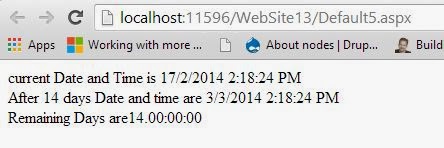
Code generate the following output

Datetime difference in days in C# Programming

Deletion Opration in Linked List for Data Structure in C Programming

Deletion
Removing a node from the linked list is called deletion. Get the Information of the node, which is to be     removed. Compare the Information with the INFO of ROOT . If it is equal update ROOT with LINK of ROOT, otherwise set pervious location PLOC with ROOT and location LOC with LINK of ROOT. Compare the information with that of INFO of LOC, if it is not equal then copy LOC in PLOC and update LOC with LINK of LOC. If the node is found then come out and set LINK of PLOC with LINK of LOC, and the deletion is over. Add the deleted node to Free Pool, by assigning LINK of LOC with AVAIL and AVAIL with LOC.
       If the PLOC is assigned with LOC, then when the list is traversed automatically the node with address LOC is skipped, that is why PLOC is used in this case.

         For example consider the below linked list:


       If a node with information 20 is to be deleted, the operation is done as shown below:


       The original list after deletion of the node with information 20 is shown e:


Algorithm to delete a node from the Linked List:

DELETIONLL(ROOT, INFO)
If INFO=ROOT-->INFO Then:
LOC<--ROOT
ROOT<--ROOT-->LINK
Else:
 PLOC<--ROOT
 LOC<--ROOT-->LINK
Repeat While LOC< >NULL AND INFO< >LOC-->INFO
 PLOC<--LOC
 LOC<--LOC-->LINK
[End of While]
PLOC--> LINK<-- LOC-->LINK
[End of If]
[Following statements to add deleted node to free pool]
 LOC-->LINK<--AVAIL
AVAIL<--LOC
Exit.


Sunday, February 16, 2014

DateTime difference in minutes in C# Programming

Source Code

<%@ Page Language="C#" AutoEventWireup="true" CodeFile="Default5.aspx.cs" Inherits="Default5" %>

<!DOCTYPE html PUBLIC "-//W3C//DTD XHTML 1.0 Transitional//EN" "http://www.w3.org/TR/xhtml1/DTD/xhtml1-transitional.dtd">

<html xmlns="http://www.w3.org/1999/xhtml">
<head runat="server">
    <title></title>
</head>
<body>
    <form id="form1" runat="server">
    <div>
        <asp:Label ID="Label1" runat="server" Text=""></asp:Label>
    </div>
    </form>
</body>
</html>

// Code behind Code

using System;
using System.Collections.Generic;
using System.Linq;
using System.Web;
using System.Web.UI;
using System.Web.UI.WebControls;

public partial class Default5 : System.Web.UI.Page
{
    protected void Page_Load(object sender, EventArgs e)
    {
        DateTime currenttime = DateTime.Now;

        Label1.Text = "At Time : " + currenttime.ToString();

        DateTime Timeafter4minute = currenttime.AddMinutes(4);

        TimeSpan totalTime = Timeafter4minute - currenttime;

        int minute = (int)totalTime.TotalMinutes;
        
        Label1.Text += "<br ><br />after 4 minutes: ";
        Label1.Text += Timeafter4minute.ToString();

        Label1.Text += "<br ><br />minute,difference between to datetime object : ";
        Label1.Text += minute;  
    }
}

Code generate the following output

DateTime difference in minutes in C# Programming

Insertion in an ordered LINKED LIST Data Structure in C programmong

Insertion in an ordered LINKED LIST

Here in this case to find the location LOC, the list is traversed, by comparing the Information to be stored with the information of the nodes. First compare the NEW node information with that of the information of the first node. If it is less then the first node information, insert the new node as the first node by copying the address of new node NEW in ROOT before that copy ROOT in LINK of NEW. So initially set LOC with LINK of ROOT and another pointer variable TEMP with ROOT. Traverse till LOC < >NULL or till the Information of the NEW node less than the Information of any node by updating TEMP with LOC and LOC with LINK of LOC. Once the location LOC is found, copy LOC, the address of the node before which insertion is to be done in LINK of NEW and copy address of the previous node given by LINK of TEMP with NEW.

    For example consider the below Linked List in which the node are stored in ascending order.


If a NEW node is to be inserted with Information 15, first create the NEW node and store the Information part of it with 15 and initialize LINK with NULL. Compare 15 with information of first node i.e. 10. 15 is not less than 10. So set LOC with LINK of ROOT and TEMP with ROOT. Compare INFO of NEW node with INFO of node pointer by LOC. So 15 is not greater than 20, come out LOC is the location at which the NEW node is to be inserted. Copy LINK of NEW with LOC and copy LINK of TEMP with NEW. Insertion is over.


Algorithm to Insert node in an ordered linked list when the location LOC is not given:

NSERTOLL(ROOT)
If AVAIL=NULL Then:
  write: ‘Memory Allocation Error’
  Exit.
[End of If]
NEW<--AVAIL
AVAIL<--AVAIL-->LINK
NEW-->LINK<--NULL
NEW-->INFO<--Information
[Information is the data to be stored in node]
If NEW-->INFO < ROOT-->INFO Then
NEW-->LINK<--ROOT
ROOT<--NEW
Else:
TEMP<--ROOT
LOC<--ROOT-->LINK
Repeat While LOC< >NULL AND NEW-->INFO > LOC-->INFO
  TEMP<--LOC, LOC<--LOC-->LINK
[End of While]
NEW-->LINK<--LOC
TEMP-->LINK<--NEW
[End of If]
Exit.

© Copyright 2013 Computer Programming | All Right Reserved