-->

Monday, December 1, 2014

How to create aspx page at run time in ASP.NET

ASPX stands for active server page extension. We know that visual studio create a aspx page for dynamic application. Also one another page is created for business logics. If you want to create both pages(presentation+business logic) through code file then first to create two array for both pages. After that save the file through file handling in same solution.

Source Code

<%@ Page Language="C#" AutoEventWireup="true" CodeFile="Default2.aspx.cs" Inherits="Default2" %>
<html xmlns="http://www.w3.org/1999/xhtml">
<head runat="server">
    <title></title>
 

</head>
<body>
    <form id="form1" runat="server">
      Enter page Name  <asp:TextBox ID="TextBox1" runat="server"></asp:TextBox><br />
        <asp:Button ID="Button1" runat="server" Text="Button" OnClick="Button1_Click" />

        <br />
        <br />
        <asp:Button ID="Button2" runat="server" OnClick="Button2_Click" Text="Created Page" />

    </form>


</body>
</html>

Code Behind file

using System;
using System.Collections.Generic;
using System.IO;
using System.Linq;
using System.Web;
using System.Web.UI;
using System.Web.UI.WebControls;

public partial class Default2 : System.Web.UI.Page
{
    protected void Page_Load(object sender, EventArgs e)
    {
      
    }


    protected void Button1_Click(object sender, EventArgs e)
    {

        String[] sourcecode ={"<%@ Page Language=\"C#\" AutoEventWireup=\"true\" CodeFile=\""+  TextBox1.Text.Trim()+".aspx.cs\" Inherits=\""+ TextBox1.Text.Trim()+"\" %>",
                                 "<html xmlns=\"http://www.w3.org/1999/xhtml\">",
                                 "<head runat=\"server\">",
                                 "<title></title>",
                                " </head>",
"<body>",
    "<form id=\"form1\" runat=\"server\">",
    "</form>",
    "</body>",
"</html>"
                             };

        String[] codefile = {
                                "using System;",
"using System.Collections.Generic;",
"using System.IO;",
"using System.Linq;",
"using System.Web;",
"using System.Web.UI;",
"using System.Web.UI.WebControls;",

"public partial class "+ TextBox1.Text.Trim()+" : System.Web.UI.Page",
"{",
    "protected void Page_Load(object sender, EventArgs e)",
    "{",
      
    "}",
    "}"};

        File.WriteAllLines(Server.MapPath("" + TextBox1.Text.Trim() + ".aspx"), sourcecode);
        File.WriteAllLines(Server.MapPath("" + TextBox1.Text.Trim() + ".aspx.cs"), codefile);
        Response.Write("Page Created");

    }
    protected void Button2_Click(object sender, EventArgs e)
    {
        Response.Redirect("~/" + TextBox1.Text);
    }
}

Code generate the following output

Windows Form: How to create child node of selected root node of treeview in c#

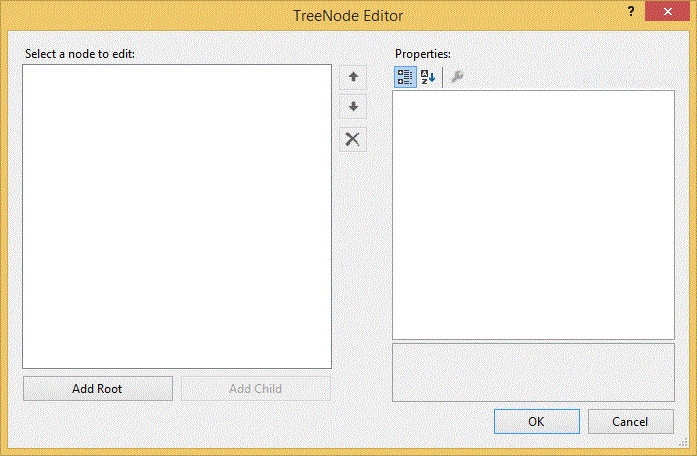
Basically Tree View contains two things, first one is root node and second one is child node. If you want to create root node in the Tree View then use Tree Node class. Now in this example, we want to create a child node inside the existing root node. So first to create the root node, Follow these instruction to create the root node inside the tree view control.

  1. Add Tree View control in the design form.
  2. Add Root Node in it by right click on Control.
Windows Form: How to create child node of selected root node of treeview in c#


3. Add one Button control and one TextBox control in the design form.
4. Raise the Button Click event, Copy this code and paste into Button_Click event handler

 private void button1_Click(object sender, EventArgs e)
        {
            TreeNode node = treeView1.SelectedNode;
            node.Nodes.Add(textBox1.Text);
        }

Code generate the following output


Windows Form: How to create child node of selected root node of treeview in c#

Program Testing and Debugging in C

Testing and debugging refer to the tasks of detecting and removing errors in a program, so that the program produces the desired results on all occasions. Every programmer should be aware of the fact that rarely does a program run perfectly for the first time. It does not matter how thoroughly the design is carried out, and how much care is taken in coding. One can never argue that program would be 100 percent errorless. It is therefore, necessary to make efforts to detect, isolate and correct any errors that are likely to be present in the program.

Wednesday, November 26, 2014

Example of SQL Injection attack

SQL Injection means, Inject the database by the SQL Query, this query executed by the input control like TextBox, URL etc. Suppose we have a table department and we want to retrieve some data from the table by the TextBox. You want to retrieve all the rows, which is related to first department no. Now, you should to enter 1 in the TextBox, then you will get rows, which is related to putted number in the TextBox. If you want to put some number like:

1 or 1=1 then you will get all rows which is available in the table.
If this query is executed it means deletion is also possible with the table.Like
1;Drop table table_name

Source Code
<%@ Page Language="C#" AutoEventWireup="true" CodeFile="my.aspx.cs" Inherits="my" %>
<html xmlns="http://www.w3.org/1999/xhtml">
<head runat="server">
<title></title>
 </head>
<body>
<form id="form1" runat="server">

    Enter Department_No :
    <asp:TextBox ID="TextBox1" runat="server" Width="220px"></asp:TextBox>
    <br />
    <br />
    <asp:Button ID="Button1" runat="server" OnClick="Button1_Click" Text="Search Data" />
    <asp:GridView ID="GridView1" runat="server">
    </asp:GridView>

</form>
</body>
</html> 

Code Behind

using System;
using System.Collections.Generic;
using System.Configuration;
using System.Data;
using System.Data.SqlClient;
using System.IO;
using System.Linq;
using System.Web;
using System.Web.UI;
using System.Web.UI.WebControls;
public partial class my : System.Web.UI.Page
{
protected void Page_Load(object sender, EventArgs e)
{
}
protected void Button1_Click(object sender, EventArgs e)
{
    SqlConnection con = new SqlConnection();
    con.ConnectionString =ConfigurationManager.ConnectionStrings["ConnectionString"].ToString();
    con.Open();

    SqlCommand cmd = new SqlCommand();
    cmd.CommandText = "select * from [Department] where dept_no=" + TextBox1.Text;
    cmd.Connection = con;
    DataSet ds = new DataSet();
    SqlDataAdapter da = new SqlDataAdapter(cmd);
    da.Fill(ds);
    GridView1.DataSource = ds;
    GridView1.DataBind();


}
}
Now code Generate the following output

Wednesday, November 19, 2014

Data Modification Language (DML) Triggers in SQL

A DML trigger is fired when data in the underlying table is affected by DML statements, such as INSERT, UPDATE, or DELETE. These triggers help in maintaining consistent, reliable, and correct data in tables. They enable the performance of complex action and cascade these actions to other dependent tables. Cascading is the process of reflecting the changes made in a table in the other related tables.
The DML triggers have the following characteristics:
Fired automatically by the SQL Server whenever any data modification statement is issued.
Cannot be explicitly invoked or executed, as in the case of the stored procedures.
Prevents incorrect, unauthorized, and inconsistent changes in data.
Cannot return data to the user.
Can be nested up to 32 levels. The nesting of triggers occurs when a trigger performs an action that initiates another trigger.

Whenever a trigger is fired in response to the INSERT, DELETE, or UPDATE statement, the SQL Server creates two temporary tables, called magic tables. The magic tables are called inserted and deleted. The magic tables are conceptual tables and are similar in structure to the table on which the trigger is defined.
The inserted tale contains a copy of all records that are inserted in the trigger table. The Deleted table contains all records that have been deleted from the trigger table. Whenever you update data in a table, the trigger uses both the inserted and the deleted tables.
Depending on the operation that is performed, the DML trigger can be further categorized as:
Insert trigger: is fired whenever and attempt is made to insert a row in the trigger table. When an INSERT statement is executed, a new row is added to both the trigger and the inserted tables.
Delete trigger: is fired whenever an attempt is made to delete a row from the trigger table. When a DELETE statement is executed, the specified rows from the trigger table are deleted and are added to the deleted table. The deleted and trigger tables do not have any rows in common, as in the case of the inserted and trigger tables.
There are three ways of implementing referential integrity by using a DELETE trigger. These are:
The cascade method: Deletes records from the dependent tables whenever a record is deleted from the master table.
The restrict method: Restricts the deletion of records from the master table if the related records are present in the dependent tables.
The nullify method: Nullifies the values in the specified columns of the dependent tables whenever a record is deleted form the master table.
Update trigger: Is fired when a UPDATE statement is executed in the trigger table. It uses two logical tables for its operations, the deleted table that contains the original rows (the rows with the values before updating) and the inserted table that stores the new tows (the modified rows). After all the rows are updated, the deleted and inserted tables are populated and the trigger is fired.
For example, you have a table with three columns. The table stores the details of hardware devices. You updated a value in column 2 from ‘Printer’ to ‘Lex New Printer’. During the update process, the deleted table holds the original row (the row with the values before updating), and inserted table stores the new row (the modified row) with the value ‘Lex New Printer’ in Column2.

Sunday, November 16, 2014

How to add controls dynamically in windows form c#

Visual studio provide the best features to design the form. By the designer window, you can add the controls from the toolBox. After added the items, you can set the properties by the property window. Same this things, you can do this by the code window. Follow some steps to add controls dynamically.


  Step-1 : Open Code window that is form1.cs file, create a object for controls like

TextBox t1 = new TextBox();

Step-2 : Associate properties of the TextBox class with the current object like

 t1.Name = "Text1";
    t1.Width = 300;
            t1.Text = " Dynamically added Control";
            t1.Location = new Point(10, 10);

Here Point is a class, in which you have to define the coordinates of x-axis and y-axis, where you want to add the TextBox.

Step-3 : Add this instance in the form by following line of code.

 this.Controls.Add(t1);

 Now code Generate the following output:
How to add controls dynamically in windows form c#

Friday, November 14, 2014

Design a program to find largest of four numbers

The logic behind the program is, Take four variable like a, b, c, d for numbers also take another variable like large for comparing among three numbers. First of all, assign the value of variable a into the large variable. Compare among three numbers with the large variable. If any one is find larger then you have to assign this variable value into the larger variable.

Example

#include <stdio.h>
#include<conio.h>
main()
{
int a,b,c,d;
int large;

clrscr();
printf("Enter four numbers:\n");
scanf("%d%d%d%d",&a,&b,&c,&d);
large=a;
if(b>large)
large=b;
if(c>large)
large=c;
if(d>large)
large=d;
printf("The largest number is %d",large);
}

Output Of the Given program is

© Copyright 2013 Computer Programming | All Right Reserved