-->

Thursday, January 29, 2015

What is Variable Length String Format in C Language

As the name implies, variable–length strings don’t have a pre-defined length. In this string, neither the precise length nor maximum length is known at the time of creating it. The array storage structure for a string can expand or shrink to accommodate any number of characters. But, there should be a mechanism to indicate the end of the string. The two common techniques to implement variable length strings are described in the article.

Length Controlled String

A length controlled string is a string whose length is stored as part of the string itself. This technique uses a count that specifies string length. The count is normally stored as the first byte followed by the string. This count is used by the string manipulation functions to determine the actual length of the string data.
For example, the strings "DOT" and "PROGRAM" are stored using length controlled format are:

What is Varaible Length String Format in Computer Programming: C Language

Note: The first byte contains string length. Since its length is 1 byte (* bits) w can have a string length whose range is from 0 to 255. So, the string length should not exceed 255 characters.

The disadvantages can be overcome using delimited string. As we use various delimiters such as semicolons, colon, comma, period (.), in a sentence in English, the string can also be ended with delimiters.

Delimited String

In a variable length string, the string ends with a delimiter NULL (denoted by '0') character. This string which ends with a delimiter denoting the end of the string is called delimited string.

For example, the string "DOT" and "PROGRAM" are stored using a delimiter as shown here.

What is Varaible Length String Format in Computer Programming: C Language


Bubble Sort Algorithm in C Language

More often in computer programming, programmers works with large amount of data and it may be necessary to arrange them in ascending or descending order. This process of arranging the given elements in a order is called sorting, the order may be ascending or descending.

For example, consider the unsorted elements:
10, 60, 50, 20, 30, 70, 40
After arranging them in ascending order, the elements are rearranged as shown below:
10, 20, 30, 40, 50, 60, 70
After arranging them in descending order, the elements are rearranged as shown below:
70, 60, 50, 40, 30, 20, 10

The two important and simple sorting techniques are described below with example:

Bubble sort

This is the simplest and easiest sorting technique. In this technique, the two successive items or elements arr[i] and arr[i+1] are exchanged whenever the condition arr[i]>arr[i+1] will be true. For example, consider the elements shown below:

Bubble Sort Algorithm in Computer Programming: C

In the first pass 50 is compared with 40 and they are exchanged since 50 is greater than 40. Next 50 is compared with 30 and they are exchanged since 50 is greater than 30. If we proceed in the same manner, at the end of the first pass the largest item occupies the last position. On each successive pass, the items with the next largest value will be moves to the bottom and thus elements are arranged in ascending order.

Note: Observe that after each pass, the larger values sink to the bottom or next position of the array and hence it is also called sinking sort. The following figure shows the output of each pass:

Bubble Sort Algorithm in Computer Programming: C

Note: Observe that at the end of each pass, smaller values gradually "bubble" up to the top (like air bubble moving to surface of water). So, this sorting technique is called bubble sort.

The comparisons that are performed in each pass are as follows:

In general, we can say i = 0 to n-(j+1) or i=0 to n-j-1. Here, j=1 to 4 represent pass numbers. In general j=1 to n-1. So, the partial code can be written as follows:
for(j=1; j<n; j++)
{
  for(i=0; i<n-j; i++)
   {
     if(arr[i]>arr[i+1])
     {
       exchange (arr[i], arr[i+1])
      }
   }
}

Algorithm

Step 1:    [Input number of items]
Read: n
Step 2:    [Read n items]
    for I = 0 to n-1
        Read: arr[i]
    [End of for]
Step 3:    for j = 1 to n-1 do
          for i = 0 to n-j do
        if(arr[i] >= arr[i+1])
             temp = arr[i]
             arr[i] = arr[i+1]
             arr[i+1] = temp
        [End of if]
          [End of for]
    [End of for]
Step 4:    for i = 0 to n-1
          Write: arr[i]
    [End of for]
Step 5:    Exit

C Program.

main()
{
 int n,i,j,temp,arr[10];
 clrscr();
printf("Enter the number of items:");
scanf("%d",&n);
printf("Enter the items:");
for(i=0;i<n;i++)
scanf("%d",&arr[i]);
for(j=0;j<n;j++)
{
 for(i=0;i<n-j;i++)
{
 if(arr[i]>=arr[i+1])
{
temp=arr[i];
arr[i]=arr[i+1];
arr[i+1]=temp;
}
}
}
printf("The sorted items are:\n");
for(i=0;i<n;i++)
printf("%d\n",arr[i]);
getch();
}

Bubble Sort Algorithm in Computer Programming: C

Advantages

  • Very simple and easy to program
  • Straight forward and approach

Disadvantages

  • It runs slowly and hence it is not efficient. More efficient sorting techniques are present.
  • Even if the elements are sorted, n-1 passes are required to sort.


Selection Sort in C

STACK in C Language

  • It’s special data structure based on LIFO (Last In First Out Concept).
  • It can be implemented using One dimensional Array as well as Singly linked list.
  • TOP  is the external pointer points to last node element pushed.
  • There are two operation which is performed on stack i.e., Push (Insertion) and Pop (Deletion).
  • Push and Pop operation is performed through TOP end.( means insertion and deletion is restricted through one end i.e., TOP end)

Write an algorithm to perform push operation.

PUSH(TOP)
[ PUSH is the name of algorithm and TOP is the external pointer points to last inserted node. ]
NEW<--FREE
FREE <--  FREE --> NEXT
If NEW=NULL Then:
    Write : ‘ Memory allocation errot’
     Exit
[ End of If]
Read : NEW-->INFO
NEW -->  NEXT <-- TOP
TOP <--NEW
END

Write an algorithm to perform pop operation.

POP(TOP)
[ POP is the name of algorithm]
If TOP = NULL Then:
   Write: ‘ Stack is empty’
   Exit
[ End of If]

I <-- TOP --> INFO
Write: ‘Poped element is’, TOP -->  INFO
TOP <-- TOP --> NEXT
END

Write the program to perform PUSH and POP operation:

#include<stdio.h>
#include<conio.h>

struct node
{
   int info;
      struct node *next;
};
struct node *top=NULL;

void push(int i);
{
 struct node *new;
 if(new==NULL)
{
    printf(“Memory allocation error\n”);
    exit(0);
 }
new->info=i;
new->next=top;
top=new;
}

void pop(void)
{
  if(top==NULL)
  {
    printf(“Stack is empty”);
    exit(0);
  }
  printf(“%d->”,top->info);
  top=top->next;
}

void main()
{
  int i;
 char ch;
  clrscr();
  do
  {
     printf(“Enter your choice\n”);
     printf(“1. PUSH\n”);
     printf(“2. POP\n”);
     scanf(“%d”,&choice);
     switch(choice)
     {
  case 1:
printf(“Enter the value to push in stack\n”);
scanf(“%d”,&i);
push(i);
break;
case 2:
pop();
break;
default:
printf(“Invalid choice try again\n”);
    }
   printf(“Do you want to continue press ‘Y’\n);
  ch=getche();
    }while(ch==’Y’);
getch();
}

Algorithm to Push an element on  Stack using One dimensional Array:

PUSH( S, TOP, N, ITEM )
[S is the name of Array , TOP is the current index of a STACK , N is the size of an Array, ITEM is the element to be inserted]

If TOP==N Then:
   Write: ‘Overflow’
   Exit
[ End of If]
TOP <--TOP+1
S[TOP]=ITEM
END

Algorithm to Pop the Stack using One dimensional Array:

POP(S, TOP)
[ S is the name of an array and TOP is the current index]

If TOP=-1 Then:
   Write: ‘Underflow’
    Exit
[ End of If]
I <-- S[TOP]
TOP <-- TOP-1
Return I
END

WACP to perform Push and Pop operation on Stack using One dimensional Array:

/* Function to perform push operation */
void push(int s[], int n, int *top, int i)
{
  if (top==n)
    {
        printf(“Over flow”);
        exit(0);
    }
s[++top]=i;
}
/* Functio to perform pop operation */
int pop( int s, int *top)
{
  int i;
  if( top==-1)
   {
      printf(“Underflow”);
      exit(0);
   }
i=s[top--];
return i;
}
main( )
{
 int s[8],top,item,choice;
char ch;
do
{
   printf(“Enter your choice\n”);   
   printf(“1.Push Operation\n”);
   printf(“2. Pop operation\n”);
   scanf(“%d”,&choice);
   switch(choice)
   {
      case 1: printf(“Enter the element to push\n”);
scanf(“%d”,&item);
push(s, 8,&top,item);
break;
case 2: printf(“Poped element=%d”,pop(s, &top));
break;
default: printf(“Invalid choice\n”);
}
printf(“Do you want to continue press ‘Y’\n”);
ch=getche();
}while(ch==’Y’);
getch(); }

Polish Notation:

Infix expression takes much time and scanning to evaluate in computer due to operator hierarchy and 
parenthesis. so to overcome this problem French Mathematician Polish has given parenthesis free 
notation. i.e., Postfix and Prefix notation. 
In Postfix notation operator is placed after the operand. 
And in Prefix notation operator is placed before operand.

Conversion of Infix expression into prefix and postfix notation:
Infix exp: 5*9^2/3

First place parenthesis according to operator hierarchy
((5*(9^2))/3)
Postfix Conversion:
Step 1: Conversion done from higher order operator and place the operator at the place of left parenthesis. Remove the both of parenthesis.
((5*^92)/3)
Step 2: Place the operator again at the left of parenthesis and remove according to operator hierarchy.
(*5^92/3)
Step 3:
/5*92^3

Prefix Converesion:

Step 1: Conversion done from higher order operator and place the operator at the place of right parenthesis. Remove the both of parenthesis.
((5*92^)/3)
Step 2: Place the operator again at the Right of parenthesis and remove according to operator hierarchy.
(592^*/3)
Step 3:
592^*3/

Algorithm to Convert  an INFIX expression to POSTFIX expression using stack:

INFIX_TO_POSTFIX(I)
[ I is the INFIX expression]

STEP 1: Add  ‘) ‘ at the end of I. and push ‘ ( ‘ on to the stack.
STEP 2: Repeat scanning the characters of I from left to right while stack is not empty
  STEP 2(a):    If the scanned character is an operand Then:
  Add it to P (PostFix expression)
[ End of If]
  STEP 2(b):    If the scanned character is ‘(‘ Then:
Push it on the stack
[End of If]
STEP 2(c):    If the scanned character is’)’ Then:
Repeatedly POP the stack till ‘(‘ , add the poped operators to P
 and remove ‘(‘ from the stack 
[End of If]
STEP 2(d):    If the scanned character is operator Then:
Check the top of stack repeatedly for higher or same hierarchy of operators till lower hierarchy. if any pop them and add to P
and push the scanned character onto Stack
[End of If]

 [ End of While]
STEP 3: Write: P
STEP 4: EXIT

Convert the Infix exp. I: (A+B) / ( C-D ) ^ E + F * G 

Add ) to I at the end, PUSH ( on to the stack.
S. NO.
 Scanned Character
STACK
POSTFIX exp P
1.
(
(

2.
(
((

3.
A

A
4.
+
((+
A
5.
B
((+
A B
6.
)
(
A B +
7.
/
( /
A B +
8.
(
( / (
A B +
9.
C
( / (
A B + C
10.
-
( / ( -
A B + C
11.
D
( / ( -
A B + C D
12.
)
( /
A B + C D -
13.
^
( / ^
A B + C D -
14.
E
( / ^
A B + C D – E
15.
+
( +
A B + C D – E ^ /
16.
F
( +
A B + C D – E ^ / F
17.
*
( + *
A B + C D – E ^ / F
18.
G

A B + C D – E ^ / F * +

Evaluation of POSTFIX expression using STACK.

POSTFIXEVAL(P)

[ P is a POSTFIX expression]
Repeat Scanning P from left to right While Scanned Character != #
  If  Scanned character = operand Then:
      STACK[TOP] <-- operand
      TOPßTOP+1
  Else
      B<-- STACK[TOP], TOP<--TOP-1
      A<-- STACK[TOP], TOP<--TOP-1
      RES<--A operator B
      STACK[TOP] <--RES
  [ End of If]
[End of While]
VAL <-- STACK[TOP]
Write: ‘ Value of postfix expression’, VAL
END

Example: Evaluate the Postfix exp 5 6 * 3 + 5 – 

Soln : Add # at the end of Postfix expression
Start scanning the exp. from left to right.
S.NO.
Scanned Character
STACK
1.
5
5
2.
6
5, 6
3.
*
30   // (5*6)
4.
3
30, 3
5.
+
33   // (30+3)
6.
5
33, 5
7.
-
28  // (33-5)

PUSH and POP algorithms in Linked List implemented STACK in C Language

To implement the STACK using Linked List, the following PUSH and POP algorithms may be used:

Algorithm for PUSH operation in Linked List implemented STACK:

PUSHLL(TOP, ITEM)
[TOP is address of top node of STACK and ITEM is the item to PUSH.[In case of Linked List no overflow, but may be memory allocation error]
If AVAIL=NULL then:
  Write: ’Memory Allocation Error !!!’; Exit.
[End of If]
NEW<--AVAIL
AVAIL<--AVAIL-->LINK
NEW-->INFO<--ITEM
NEW-->LINK<--NULL
If TOP=NULL Then:
  TOP<--NEW
Else:
  NEW-->LINK<--TOP
   TOP<--NEW
[End of If]
Exit.

For Linked List implemented STACK in C, a self-referential structure, a user defined data type STACK is used, it is as follows:
struct STACK
  {
    int i:
    STACK *link:
   };

Algorithm for POP operation in Linked List implemented STACK.
POPLL(TOP)
[TOP is the address of TOP node of STACK]
If TOP=NULL Then:
   Write: ‘Underflow’
   Exit.
[End of If]
ITEM <--TOP-->INFO
TOP<--TOP-->LINK
Return ITEM
Exit.

Wednesday, January 28, 2015

QUEUE in C Language

  • It’s special data structure based on FIFO (First In First out Concept).
  • It can be implemented using One dimensional Array as well as Singly linked list.
  • REAR and FRONT are the two external pointers holds the addresses of two ends respectively.
  • Insertion and deletion are done from two different ends known as REAR and FRONT respectively.  

 Types of Queue:

  • Linear Queue: Elements are arranged in a linear order.
  • Circular Queue: Elements are arranged in a queue by means of circular array.
  • D-Queue.( Double Ended QUEUE ) The ADD and DELETE operations are done from both the ends.
  • Priority QUEUE: The elements are stored and deleted in QUEUE on this basis of Priority.
QUEUE in C programming

Linear Queue:

Algorithm using Linked List:
CREATELQ( ARR, N , FRONT , REAR, ITEM)
[ ARR is the name of the array of size N. ITEM is the info. of element inserted in queue]
If REAR = N Then:
Write: ‘ Overflow’
Exit
[ End of If ]
If REAR = 0 Then:
FRONT <-- 1
REAR <-- 1
Else: 
REAR <-- REAR + 1
[ End of If]
ARR[REAR] <--  ITEM
Exit

Algorithm for DELETE operation in Linear Queue:

DELETELQ ( ARR, FRONT, REAR)
[ ARR is name of the array of size N]
If   FRONT=NULL Then:
    Write: ‘ Empty Queue’
    Exit
[ End of If ]
ITEM <-- FRONT --> INFO
If REAR = FRONT Then:
    REAR <-- NULL
    FRONT <-- NULL
Else
    FRONT <-- FRONT --> NEXT
[ End of If]
Write: ‘Deleted Element ‘, ITEM
END

Algorithm using  One dimensional Array.

ADDLQ(QUEUE,N, ITEM, REAR, FRONT)
If REAR=N Then:
   Write: ‘ OverFlow’
   Exit
[ End of If]
If REAR = -1 Then:
   REAR <-- 0
   FRONT <-- 0
Else
   REAR <-- REAR +1
[ End of If]
QUEUE[ REAR] <-- ITEM
END

DELETELQ(QUEUE , REAR, FRONT)
If FRONT =-1 Then:
    Write: ‘ Empty Queue’
    Exit
[ End of If ]
Write: ‘ Deleted Element’ FRONT --> INFO
If FRONT= REAR Then:
    FRONT= -1
    REAR= -1
Else
   FRONT <-- FRONT --> NEXT
[ End of If]
End

Circular Queue:

ADDCQ(QUEUE,N, ITEM, REAR, FRONT)
If FRONT =REAR +1REAR=N Then:
   Write: ‘ OverFlow’
   Exit
[ End of If]
If REAR = -1 Then:
   REAR <-- 0
   FRONT <-- 0
Else
   REAR <-- REAR +1
[ End of If]
QUEUE[ REAR] <-- ITEM
END

Tuesday, January 27, 2015

Validate TextBox inside Footer Row of Gridview in ASP.NET

Introduction

Validation of TextBox is already performed earlier. Now, in this post i will do apply the same validation on the TextBox control. But, at this time TextBox inside in GridView control. So, For this type of problem, i have two solution. Before performed all actions, we should bind the gridview with datasource. Now, we can apply validation on the TextBox, which is inside in FooterRow of GridView.  I have a database table, which is used mentioned example:

database table

I-Method (Using RequiredFieldValidator)


<asp:GridView ID="GridView1" runat="server" AutoGenerateColumns="false" ShowFooter="true">

            <Columns>
                <asp:TemplateField HeaderText="Program Id">
                    <ItemTemplate>
                        <asp:Label ID="progid" runat="server" Text='<%# Eval("prog_id") %>' />
                    </ItemTemplate>
                    <FooterTemplate>
                        <asp:TextBox ID="fid" runat="server"></asp:TextBox>

<asp:RequiredFieldValidator ControlToValidate="fid" ForeColor="red" ID="RequiredFieldValidator1" runat="server" ErrorMessage="*"></asp:RequiredFieldValidator>
                     
                    </FooterTemplate>

                </asp:TemplateField>

            </Columns>

        </asp:GridView>
By this method we have to attach RequiredField Validator control with the TextBox control.

II-Method(Using JavaScript)


<!DOCTYPE html>

<html xmlns="http://www.w3.org/1999/xhtml">
<head runat="server">
    <title></title>
    <script type="text/javascript">
        function valiadte() {
            var ftid = document.getElementById('<%=((TextBox)GridView1.FooterRow.FindControl("fid")).ClientID %>');
            if (ftid.value != '') {
                alert("Sucess");

            }
            else {
                alert("field is required");
            }

        }

    </script>
 
</head>
<body>
    <form id="form1" runat="server">
    <div>
        <asp:GridView ID="GridView1" runat="server" AutoGenerateColumns="false" ShowFooter="true">
            <Columns>
                <asp:TemplateField HeaderText="Program Id">
                    <ItemTemplate>
                        <asp:Label ID="progid" runat="server" Text='<%# Eval("prog_id") %>' />
                    </ItemTemplate>
                    <FooterTemplate>
                        <asp:TextBox ID="fid" runat="server"></asp:TextBox>

             
                    </FooterTemplate>
          </asp:TemplateField>
          </Columns>
 </asp:GridView>
    </div>
     
        <asp:Button ID="Button1" runat="server" Text="Button" OnClientClick="valiadte();" />
       </form>
</body>
</html>

Code generate the following out-- see the video 


Download : Full code of program
In the second method, first we access the id of the TextBox with the help of java script function, which is mentioned in the program after that check the value of the Control , if TextBox is empty then generate the alert message on the screen.

Monday, January 26, 2015

Generate QRCODE in ASP.NET

Introduction QRCode

Data display in the form of matrix, Actually i am saying to you that you data hide behind the image. First time this code is designed in japan. If you want to read more about QRCode click it.  Here i have a library to generate QRCode image for your data.

Generate code from nuget.org library

First to download MessagingToolkit.QRCode.dll assembly from Nuget source using some steps:
1. Tools--Nuget Package Manager--Manage Nuget Packages for solution.
2. Search QRcode as text in Search bar. Now, appear some library in the middle pane.

Select QRCode library

3. Add a web form in solution. Now, I have two page one page is source page(Default2.aspx) and other one is code behind page(Default2.aspx.cs).
4. Add a Image control from the toolBox in design window of Default2.aspx page. Now, the source page look like

 <asp:Image ID="img" runat="server"/>

5. Now, add this code in code behind file.

using System.Drawing;
using System.Drawing.Imaging;
using MessagingToolkit.QRCode.Codec.Data;
using MessagingToolkit.QRCode.Codec;

protected void Page_Load(object sender, EventArgs e)
    {
     
        QRCodeEncoder encoder = new QRCodeEncoder();
        Bitmap hi = encoder.Encode("http://dotprogramming.blogspot.com");
        hi.Save(Server.MapPath("~/imageFolder/ji.jpg"),ImageFormat.Jpeg);
        img.ImageUrl = "~/imageFolder/ji.jpg";


    }

Here, imageFolder is a directory which is exist in the project solution.

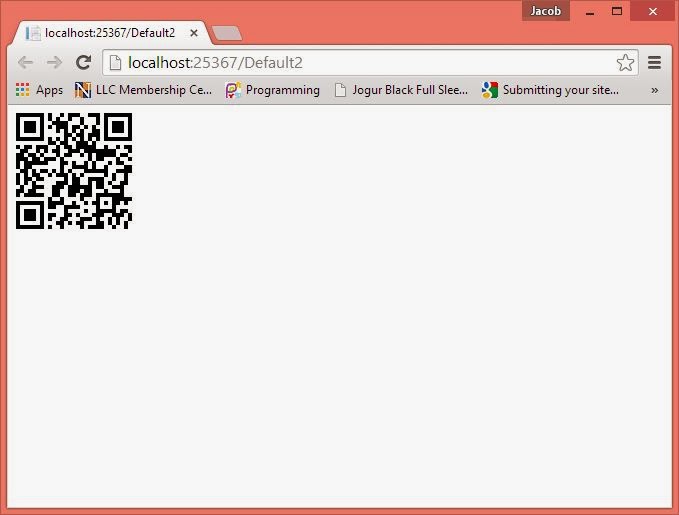
Code Generate the following output

Generate QRCODE in ASP.NET

Download Full Source code

II-Method

To generate QR Code image. First to Download QRcode library from the codeplex site.

Webform Source page:
<form id="form1" runat="server">
    <div>
    <asp:Image ID="img" runat="server" Height="142px" Width="124px" />
    </div>
    </form>

CodeBehind file

protected void Page_Load(object sender, EventArgs e)
    {

        QrEncoder encode = new QrEncoder();
        QrCode code = encode.Encode("hello world");
        Bitmap hi = new Bitmap(code.Matrix.Width, code.Matrix.Height);
        for (int i = 0; i<=code.Matrix.Width-1; i++)
        {
            for (int j = 0; j < code.Matrix.Height-1; j++)
{
if(code.Matrix.InternalArray[i,j])
             {
                 hi.SetPixel(i, j, System.Drawing.Color.LightBlue);

             }
             else
             {
                 hi.SetPixel(i, j, System.Drawing.Color.DarkBlue);
             }
}
        }
        hi.Save(Server.MapPath("~/imjk/ji.jpg"),ImageFormat.Jpeg);
        img.ImageUrl = "~/imjk/ji.jpg";


    }
© Copyright 2013 Computer Programming | All Right Reserved