-->

Sunday, February 1, 2015

Addition and Subtraction operation in Data Structures through C Language

Addition and Subtraction operation:

After assigning some value (address) to the pointer, such pointer can be used in arithmetic operation only involving addition and subtraction. Be cautious, the addition and subtraction. After assignment whenever a number is added to pointer then a normal addition. The concept will be clear when you see an example.
Consider the following declaration: int A[10], *p: ‘A’ is an array of size 10 of the type integer. ‘p’ is a pointer variable also of the type integer. Name of the array ‘A’ give the base address of array. Now, p=A;    pointer variable p is assigned with base address of array
A[0]    first element of the array
P[0]    also gives first element of array
A[3]    fourth element of the array
P[3]     also gives fourth element of the array

Suppose that base address allocated to array is 3200. Then the value of pointer ‘p’ is 3200. As the array is of the type integer, each element of array consumes 2 bytes of memory and the computer memory is allocated to the array statically (at the time of compilation) and the memory is ‘contiguous’ i.e. continuous. So, the first element address is 3202. Similarly each element of the array differs by size of the data type i.e. 2. Now let us see the concept of pointer addition. Pointer ‘p’ contains address of first element i.e. 3200. If 1 is added to ‘p’ then the resulting value will be 3202 not 3201. It means the address is updated by the size of the element rather then the just 1 .Similarly whenever a number ‘n’ is added to the pointer the result will be the concept. When 0 is added to pointer then it gives the address of ‘0’ number element i.e. first element of the array. When 2 is added to pointer then it gives the address of ‘2’ number element i.e. third element of the array.

 The following looping statement will print the array elements through pointer variable:
                for(I=0;I<10;I++)
                    Printf(“%d”,*(p+I));
The above loop is similar to the following normal looping statements to print the array:
                      for(I=0;I<10;I++)
                        Printf(“%d”,A[I]);
OR
                       for(I=0;I<10;I++)
                          Printf(“%d”,p[I]);

The subtraction operation is similar to the addition operation. If a number is subtracted from the pointer, then the result obtained gives the address of the previous element. Again the result depends on the size of the element. The following loop prints the array in reverse order with the help of pointer subtraction;
      p=&A[9];   /*last element’s address is stored in ‘p’*/
        for(I=0;I<10;I++)
           printf(“%d”,*(p-I));

The array can be printed in reverse order using the following normal looping statements:
  For(I=9;I>=0;I--)                              OR                  for(I=9;I>0;I--)
   Printf(“%p”,A[I]);                                                       printf(“%d”,p[I]);

In the similar way the value stored in a pointer changes by:
          1 if the element is of the type ‘char’
          4 if the element is of the type of ‘float’ or ‘long integer’
          8 if the element is of the type ‘double’
During pointer arithmetic involving ‘addition’ and ‘subtraction’. In addition operation the pointer points to the next element’s address where as in subtraction the pointer points to the previous element’s address.  

About and Uses of String Data Types in C language

String is a data type and is often used as an array of bytes that stores a sequence of elements i.e. characters, in computer programming. C language supports string in every calculation of programming, the article describes the use with examples.

No program generally exists without the manipulation of the strings. In all our previous articles, we have used several times the statements:
pritnf("Enter the number of n");

Here, the sequence of characters enclosed within a pair of double quotes is a string. Strings are generally used to store and manipulate data in text form like words or sentences.

Definition: An array (or sequence) of characters is called as string. A string is most conveniently represented using continuous storage locations in memory. The storage representations of strings are classified as shown below:

Fixed length Format:

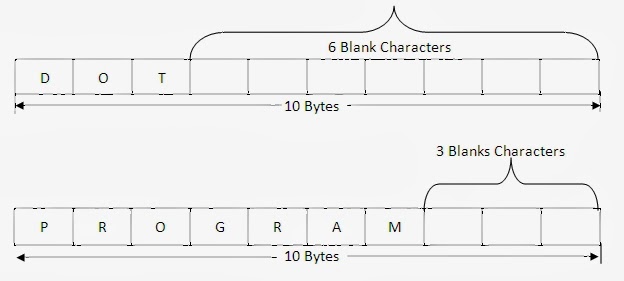
A fixed length string is a string whose storage requirement is "known when the string is created". In this string, irrespective number of characters the string has, the length of the string is always fixed. Once the string is defined, the length of a string cannot be changed. It is ‘fixed’ for the duration of program execution. In this format, the non-data characters such as space are added at the end of the data.

For example, the string "DOT" and "PROGRAM" are stored in fixed format where size is fixed for 10 bytes as shown below:


Note: The string "DOT" is 10 bytes string ending with 7 blanks characters.
Note: The string "PROGRAM" is 10 bytes string ending with 3 blanks characters.
Note: The blank characters cannot be used as data since it acts as end of the string.

Disadvantages
  • If the length reserved for string is too small, it is not possible to store the large string.
  • If the length reserved for string is too large, too much memory is wasted.
  • Once the string is defined, the length of a string cannot be changed. It id ‘fixed’ for the duration of program execution.
  • There is the problem of distinguishing data character from non-data characters. Normally non-data character such as spaces are added at the end of the data.
The above disadvantages can be overcome using variable length format, will be discussed in later article.

String literals and constants

Add New Elements or Content in jQuery

JQuery provides some standard functions through which developer can easily add element/content to an existing element. User can add an element after or before an existing element by using jQuery functions. These element can also be added using callback functions. Just check some value and according to condition, we can add element easily.

Following are jQuery methods that are used to add new content:

Append method

This function insert content or new element at the end of selected html element. For example

$("#lblComment").append("last comments");

This function will add specified text after the existing text of selected label.

prepend()

This function insert content or new element at the beginning of selected html element. For example

$("#lblComment").prepend("start comments");

This function will add specified text before the existing text of selected label. We can use both these methods to add multiple content by using multiple parameters. These functions can easily get multiple parameters as shown below:

$("#lblComment").prepend("one", "two", "three");
$("#lblComment").append("eight", "nine", "ten");

After() and before()

After method inserts content after the selected html element and before method inserts content before the selected html element. More can be explained by following jQuery code fragment:

$("#lblComment").after("after adding text");
$("#lblComment").before("before adding text");

Both these functions will add the specified text after and before the selected label element respectively. Same as append and prepend, these functions can also be used for adding multiple elements to an existing.

In above examples, we have added only texts only but we can add any other element in place of that text. Just write the element’s html code and place as parameter of these functions, that element will add easily. In further article we will remove the added element/content and how to use/append css classes through jQuery code fragment.

Data Definition Language (DDL) Triggers in SQL

A DDL trigger is fired in response to DDL statements, such as CREATE TABLE or ALTER TABLE. DDL triggers can be used to perform administrative tasks, such as database auditing.

Database auditing helps in monitoring the DDL operations on a database. DDL operation can include operations such as creation of a table or view, or modifications of a table or procedure. Consider an example, where you want the database administrator to be notified whenever a table is created in the Master Database. For this purpose, you can create a DDL trigger.

Depending on the way in which triggers are fired, they are categorized as:

After Triggers

The after trigger can be created on any table for the insert, update or delete operation just like other triggers. The main difference in the functionality of an after trigger is that it is fired after the execution of the DML operation for which it has been defined. The after trigger is executed when all the constraints and triggers defined on the table are successfully executed.

By default, if more than one after trigger is created on a table is for a DML operation such as insert, update, or delete, then the sequence of execution is the order in which they were created.
For example, the EmpSalary table stores the salary and tax details for all the employees in an organization. You need to ensure that after the salary details of an employee are updated in the EmpSalary table, the tax details are also recalculated and updated. In such a scenario, you can implement an after trigger to update the tax details when the salary details are updated.

Instead of Triggers

The instead of triggers can be primarily used to perform an action, such as a DML operation on another table or view. This type of trigger can be created on both a table as well as a view.

An instead of trigger can be used for the following actions:

  • Ignoring parts of a batch.
  • Not processing a part of a batch and logging the problem rows.
  • Taking an alternative action when an error condition is encountered.

For example, if a view is created with multiple columns from two or more tables, then an insert operation on the view is only possible if the primary key fields from all the base tables are used in the query. Alternatively, if you use an instead of trigger, you can insert data in the base tables individually. This makes the view logically updateable.

You can even create an Instead of trigger to restrict deletion in a master table. For example, you can display a message “Master record cannot be deleted” if a delete statement is executed on the Employee table of the AdventureWorks database.

Unlike after triggers, you cannot, create more than one Instead of trigger for a DML operation on the same table or view.

Nested Triggers

Nested triggers are fired due to actions of other triggers. For example, you delete a row from TableA. A trigger on TableA deletes rows from TableB. Because you are deleting rows from TableB, a trigger is executed on TableB to record the deleted rows.

Recursive Triggers

Recursive triggers are a special case of nested triggers. Unlike nested triggers, support for recursive triggers is at the database level. As the name implies, a recursive trigger eventually calls itself. There are two types of recursive triggers, Direct and Indirect.

Direct Recursive Trigger

A direct trigger is a trigger that performs the same operation (insert, update, or delete) on the same table causing the trigger to fire itself again.

Indirect Recursive Trigger

An indirect trigger is a trigger that fires a trigger on another table and eventually the nested trigger ends up firing the first trigger again. For instance, an UPDATE on TableA fires a trigger that in turn fires an update on TableB. The update on TableB fires another trigger that performs an update on TableC. TableC has a trigger that causes an update on TableA again. The update trigger of TableA is fired again.

Saturday, January 31, 2015

Implementing Callback Functions in JQuery

Callback function reference will execute after the current effect/function/event finished completely. This type of function can be used after any event completion like to set an element’s value after execution of some function finished.

In earlier article we have discussed about callback function execution after finishing effect. These functions executes after current effect have been finished. As the effect completed, the function reference specified as callback will be executed.

Following code block will change the text field of element having id "testComment" as mentioned in the code. This whole process will take place after button (btnComment) click event done.

$("#btnChange").click(function(){
  $("#testComment").text(function(i,origText){
    return "Old text: " + origText + " New text: Changed! on index: " + i;
  });
});

A callback function is one which is passed as an argument in another function and which is invoked after some kind of event. The call back nature of the argument is that, once its parent method completes, the function which this argument represents is then called; that is to say that the parent method calls back and executes the method provided as an argument.

So we can perform anything after any event or any ajax request also e.g. we want to change the html of a div element after clicking on a button, the following code fragment helps us:

$("#btnChange").click(function(){
  $("#testDiv").html(function(i,origText){
    return "Old html: " + origText + " New html: This is new HTML for this div element";
  });
});

Callbacks are so-called due to their usage with pointer languages. If you don't use one of those, just understand that it is just a name to describe a method that's supplied as an argument to other method, such that when the first method is called and its method body completes, the callback method is then invoked, or in other words "called at the back" of the other function.

Friday, January 30, 2015

Implementation of pointer variable in Data Structures through C Language

            Implementation of pointer variable with example

Pointer Operations

One can do only possible two operations on pointers One is assignment and another one is simple addition or subtraction of values with pointer variables. No other operation is permitted to perform on the pointer variables because they simply contain the memory addresses or locations not the variables.

Assignment operation:

      The assignment operation is nothing but assigning a pointer variable with the memory address. The memory address must be known (static or dynamic). A pointer can be assigned with the address stored in another pointer variable. To perform assignment operation the two “pointer variables” must be of the same type. The pointer must point to memory locations that contain the similar type values like integers, floating-point number, characters etc. If ‘a’ is an integer variable then the address of ‘a’ can be assigned to any pointer variable of the type integer.

Example:
Void main()
{
Int*p, a=120;
 /* p is a pointer variable, a is a simple variable*/
Printf(“Address = %Id, Value = %d\n”,&a,a);
P = &a;
/*p is assigned with address of a */
Printf(“Address = %Id, Value = %d”,p*p);
/*Both of the above printf statements Display the same values*/

In the above example, the pointer variable is assigned with the memory address that is already allocated by the system to other variable. In this type of simple assignment  the address of variable ‘a’ is stored in pointer p. You can also note that the data type of both the variables, ‘a’ and ‘b’ is similar i.e. ‘int’.

       If the pointer variable is used to change the value at the memory location, then it automatically changes the value of the non-pointer variable ‘a’. This is the concept that comes into picture when ‘call-by-reference’ is used (i.e. when the formal parameters are pointer types)
Example:
Main()
{
Int *p,a=10;
Printf(“Value of a, before pointer operation: %d”,a);
/*10*/
P=&a;
*p=26;
Printf(“Value of a, after pointer operation: %d”,a);
/*26*/
}
In the example the address of a variable (a) is assigned to a pointer variable (p). When the content of memory is changed by the pointer variable it affects the original variable. It is mainly because both the variables refer the same memory location or address.
Example to show the effect of ‘call-by-reference’:
Void fun (int a, int *b)
/*a is a value parameter, b is a reference parameter*/.
{
a++;
/*’a’ local variable of fun() incremented by 1*/
*b = *b + a; /* pointer ‘b’ points to the memory location of variable ‘b’ of main()*/
}
main()
{
Int a=10, b=12;
Printf(“a=%d, b=%d\n”,a,b);
fun(a,&b);
printf(“a=%d,b=%d”,a,b);

}


The parameter ‘b’ of function fun() is a pointer. So, it changes the value of variable ‘b’ of main(). Both refer to same memory.
Example:
Main()
{
Int *p1, *p2, a=10;
Printf(“a=%d\n”,a);          /*a=10 is displayed*/
p1=&a;    /*pointer p1 is assigned with address of variable ‘a’*/
p2=p1;    /*pointer p2 is assigned with value of p1 (address of a). another way of assignement */
printf(“Value at p1=%d\n”,*p1);     /* 10 is displayed */
printf(“Value at p2=%d\n”,*p2);      /* 10 is displayed */
}
The above example is self-explaining via comments. You can mainly note that the non-pointer variable ‘a’, pointer p1 and p2 are of same type (int). Now let us see an example of dynamic memory allocation:
Main()
{
Int*p;
p=(int*) malloc(sizeof(int)); *p=10; printf(“%d”,*p);
}
In this example the pointer variable p is assigned with the address that is returned from the malloc(). An example of assigning dynamically allocated memory. The dynamically allocated memory  stores integer and the pointer is also of the type integer.

Pointer and Dynamic memory Allocation in data structure through C Language

                                                            When the variables are declared in a program, usually the memory is allocated during the compilation that is statically. The memory referred by such variables is used to store the value (data) directly. Instead of data directly if another memory location is to be stored in the variables, then it should be a pointer variable. As we are already familiar with the dynamic memory allocation, and if it is to be implemented then without pointer variables it is not possible. During the execution of program dynamic memory is allocated, so there must be a variable that stores addresses of memory at that time. That is the reason why pointer variable is used. When pointer variables are declared no memory is allocated to store the data. The memory is allocated to them only to store the memory address not the data. Taking this as an advantage the pointer variable can be made to point dynamically allocated memory location.

For example if “p” is a pointer variable declared of the type “int” then for p memory is allocated to store the address of a memory is location that stores an “int” (integer data). Here the memory address that is to be stored in pointer variable may be static or dynamic. Usually it is to be dynamic memory allocation. It can be pictured as follows:
int *p, a;           ‘p’ is a pointer variable, ‘a’ is a simple integer variable. For ‘a’
                           memory is allocated statically to store integer data. Of course for                  
                           ‘p’ also memory is allocated but to store an address not data.
a=10;                 at memory location is reserved by ‘a’, an integer 10 is stored.
P=&a;                ‘p’ as it is pointer variable used to store address of statically
                           allocated memory.
With the help of pointer ‘p’ is possible to refer integer value stored at variable ‘a’ indirectly through pointer ’p’.

If ‘a’ is user to print, it prints the value 10, if &a (&a is called address operator) is used, it prints 1000 as per the examples. If p is used it also prints 1000 the content of p the address of memory is allocated to a. If *p (de-referencing of pointer) is used it prints the value of memory location pointed by the pointer variable. Here it prints the value of ‘a’ that is 10.
We can take the advantage of storing the memory address by a pointer variable during the execution of program. So instead of storing the already allocated static memory, a dynamic memory maybe requested during the execution of program and the dynamically allocated memory address may be stored in a pointer variable and it is used as it is normal variable.
Dynamically the memory is allocated using the standard functions calls depending on the high level languages used. Like in Pascal new used, in C++ new operator is used and in C language the functions like malloc(), calloc() and realloc() are used.
So, in C language if memory is requested by the user during the execution of the program to store data one of the following functions may be used. The functions are different as per the purpose and the numbers of arguments passed to the functions. All these functions return an address called the base address of dynamically allocated memory and is store in a pointer variable.


For example (int *) malloc (20) – allocates 20 bytes of consecutive memory dynamically on success, (or return a NULL address if not successfully allocates) and returns the base address. The returned address may be stored in a pointer variable of the type int and 10 integers can be referred with the help of that pointer variable. It is nothing but an array of size 10 for which the memory is allocated during the execution of program. The initial values stored in the memory location allocated are garbage values.


So, the memory allocated by the ‘calloc’ function is the product of number_of_elements and size_of_each_element. For example (int *) calloc (10, 2) allocates 20 bytes of dynamic memory. So, 10 integers can be stored in those memory locations. The initial values of these memory locations will be zero. Similar to malloc (), the returned address may be stored in a pointer variable and treated as an array of 10 integers.


If the dynamic memory allocated using either calloc or malloc is to be changed during the execution of program then realloc is used. It allocates completely a new memory block and copies the contents of already allocated block and returns the new base address. That address may be stored in the same pointer variable. Otherwise it expands the existing block and returns the same base address. The change may even reduce the size of already allocated block.
The dynamic memory is allocated from the heap area of main memory. If the requested memory is not available the dynamic memory is allocation functions return NULL address or invalid address, it is also treated as a 0 (zero) value. The dynamically allocated memory may be freed from the programmer after his/her usage using free () function. The prototype of void free (void *block) is available in alloc.h. If the user does not free the dynamically allocated memory, it is the function of operating system to collect the dynamic memory periodically and give it back to heap. This function of operating system called as “garbage collection”. It is better practice for the programmers to free the dynamically allocated memory after the use of such memory. If you write the statements for dynamic memory allocation then remember that the free statement is also used in the program before the end of program to ensure to free the dynamically allocated memory. 
© Copyright 2013 Computer Programming | All Right Reserved