-->

Sunday, February 1, 2015

Example programs showing pointer assignment, addition and subtractions in Data Structures through 'C'

Example programs showing pointer assignment, addition and subtractions:


1.’C’ program to read and print a dynamic array of the user required size:
   #include<stdio.h>
  #include<conio.h>
  #include<stdlib.h>
main(),
{
 int *arr, size, i;
 /* arr is a pointer to store address of dynamically allocated memory*/
 clrscr();
 printf(“Enter the size of array :”);
 scanf(“%d”,&size);
  arr=(int*)malloc(size*sizeof(int));
   /* dynamic memory allocation, pointer assignment operation */

  If(arr= = NULL)
 {
   printf(“Memory allocation error!”);
   exit(0);        /*to terminate program execution */
 }    /*end of if*/
 printf(“\n Enter array elements:”);
 for(i=0;i<size;i++)
    scanf(“%d”,arr+i);                                 /*pointer
addition */
  printf(“\nThe array is:\n”);
  for(i=0;i<size;i++)
  printf(“%d”,*(arr+i));                                  /*pointer
 addition */

}             /* end of main() */


NOTE: The array elements can also be referred as arr[i],
Where ’i’ is the index of the respective element.
The same program 1 for reading and displaying dynamic array can also be written with pointer subtraction as follows:

To read the array and display the array using pointer subtraction operation, the address of the last element is stored in a pointer variable and it is update accordingly by subtracting the respective index of the element to be read or displayed.
   #include<stdio.h>
  #include<conio.h>
  #include<stdlib.h>
main(),
{
  int *arr, size, i,*p;
  /* arr is a pointer to store address of dynamically allocated memory*/
  clrscr();
  printf(“Enter the size of array :”);
  scanf(“%d”,&size);

   arr=(int*)malloc(size*sizeof(int));
   /* dynamic memory allocation, pointer assignment operation */

   if(arr= = NULL)
   {
     printf(“Memory allocation error!”);
     exit(0);        /*to terminate program execution */
     }    /*end of if*/

  p=&a[size-1];/*address of the last element */
  printf(“\n Enter array elements:”);
  for(i=size-1;i>=0;i--)
   scanf(“%d”,p-i);                   /*pointer subtraction*/

  p=&a[size-1]; /*pointer assignment */
  printf(“\nThe array is:\n”);
  for(i=0;i<size;i++)
   printf(“%d”,*(p-i));      /*pointer subtraction*/

}             /* end of main() */

2.’C’ program to implement to searching using dynamic array:


   #include<stdio.h>
  #include<conio.h>
  #include<stdlib.h>
main(),
{
 float *arr, num;  /*array of real numbers */
 int size, i;
 clrscr();
 printf(“Enter the size of array :”);
 scanf(“%d”,&size);
 arr=(float*)malloc(size*sizeof(float));
 if(arr = = NULL)
 {
  printf(Memory allocation error!);
  exit(0);    /*to terminate program execution */
 }        /* end of it*/
 printf(“\nEnter  array elements:”);
 for(i=0;i<size;i++)
 scanf(“%f”,arr+i);                                      /*pointer addition */
 printf(“Enter the real number to search in array:”);
 scanf(“%f”,&num);
 for(i=0;i<size;i++)
   if(num==*(arr+i))
   break;                /*to terminate for loop */
 if(i==size)            /*if i=size then ‘break’ is not executed.
                               Element comparison is over */
 printf(“Search unsuccessful…”);
 else
 printf(“Search successful…”);
} /*end of main() */

3.’C’ program to count the frequency of a number in a dynamic array.

#include<stdio.h>
#include<conio.h>
#include<stdlib.h>
main(),
{
  float *arr, num;  /*array of real numbers */
  int size, i, count=0;
  printf(“Enter the size of array :”);
  scanf(“%d”,&size);
  arr=(float*)malloc(size*sizeof(float));
  if(arr == NULL)
 {
   printf(Memory allocation error!);
   exit(0);    /*to terminate program execution */
 }        /* end of it*/
  printf(“\nEnter  array elements:”);
  for(i=0;i<size;i++)
  scanf(“%f”,arr+i);                                      /*pointer addition */
  printf(“Enter the number, the freq. of which is freq.:”);
  scanf(“%f”,&num);
   /*finding the frequency */
  for(i=0;i<size;i++)
   if(num==*(arr=i))
     count++;        /*count incremented by 1, whenever the num is equal to
                              the array element */                                
  printf(“\n Frequency of number %f is %d”,num,count);
} /*end of main() */

4.’C’ program to find the number of prime numbers stored in a dynamic array.

  #include<stdio.h>
 #include<conio.h>
 #include<stdlib.h>
 int prime(int num)
{
  int i;
  for(i=2;i<=num/2;i++)
  if(num%i == 0)               /*Non-prime */
     return 0;
  return 1;               /*prime */
 }
main()
{
  int  *arr, size, i, count=0;

  printf(“Enter the size of array :”);
  scanf(“%d”,&size);

  arr=(int*)malloc(size*sizeof(int));
  if(arr == NULL)
 {
   printf(“Memory allocation error!”);
   exit(0);                                /*to terminate program execution */
}                         /* end of it*/
 printf(“\nEnter  array elements:”);
 for(i=0;I<size;i++)
 scanf(“%d”,arr+i);                                      /*pointer addition */
 for(i=0;i<size;i++)
 if(prime(*(arr+i)) ==1)
 count++;                                    
 printf(“\nNumber of primes = %d”,count);
} /*end of main() *

How to Perform Initialization of Two Dimensional Arrays in C language

Assigning required value to a variable before processing is called initialization. As we initialize a variable to the required value (for example, a=10), we can also initialize the individual elements of a two dimensional array. The initialization can be done at the time of declaration with the following syntax:

data_type array_name [exp1][exp2]={
                                 {a1, a2, a3, ……, an},
                                 {b1, b2, b3, ……, bn},
                                  {c1, c2, c3, ……, cn},
                                           .…………………………
                       };
Where

  • data_type can be int, float, char, etc.
  • array_name is the name of the array
  • exp1 and exp2 are enclosed within square brackets
  • a-1 to a-n are the values assigned to 1st row, b1 to bn are the values signed to 2nd row and so on.

Initializing all specified memory locations

Consider the initialization statement shown below:

int  arr[3][3] = {{1, 2, 3},
           {4, 5, 6},
           {7, 8, 9}};

The declaration indicates that array arr has 3 rows and 3 columns. The pictorial representation of the two dimensional array is shown below:

How to Perform Initialization of Two Dimensional Arrays in C: Computer Programming

Note that a[0][0] = 1 and so on with increment the value of square brackets.

Partial array initialization

If the numbers of values to be initialized are less than the size of the array, then the elements are initialized from left to right one after other. The remaining locations will be initialized to zero automatically.

Example:     int arr[3][3] = {(1,2),(3,4),(5,6),(7,8)};

The declaration indicates that the array arr has 3 rows and 3 columns in which only first column of each row are initialized. The 3rd column of each row bill be initialized with zeros automatically as shown in the following figure:

How to Perform Initialization of Two Dimensional Arrays in C: Computer Programming

i.e., all arr[0][2], arr[1][2], arr[2][2] are initialized to zeros.

Example: Consider the partial initialization shown below:

int arr[3][3] = {{1,2,3,4},{5,6},{7,8}};

In this array each row should have three columns. But, in this example, we have initialized row 0 with 4 elements. This results in syntax error.

Memory Map: To represent the memory map of two dimensional array, consider the following two dimensional array declaration:
int arr[3][3] = {
            {1,2,3},
            {4,5,6},
            {7,8,9}
};

Even though we represent a matrix pictorially as a two dimensional array, in memory they are stored contiguously one after the other. Assume that address of first byte of arr (known as base address) is 12000 and size of integer is 2 byte. The memory map for the two dimensional array arr is shown in below figure:

How to Perform Initialization of Two Dimensional Arrays in C: Computer Programming

How to Perform Initialization of Two Dimensional Arrays in C language

Assigning required value to a variable before processing is called initialization. As we initialize a variable to the required value (for example, a=10), we can also initialize the individual elements of a two dimensional array. The initialization can be done at the time of declaration with the following syntax:

data_type array_name [exp1][exp2]={
                                 {a1, a2, a3, ……, an},
                                 {b1, b2, b3, ……, bn},
                                  {c1, c2, c3, ……, cn},
                                           .…………………………
                       };
Where

  • data_type can be int, float, char, etc.
  • array_name is the name of the array
  • exp1 and exp2 are enclosed within square brackets
  • a-1 to a-n are the values assigned to 1st row, b1 to bn are the values signed to 2nd row and so on.

Initializing all specified memory locations

Consider the initialization statement shown below:

int  arr[3][3] = {{1, 2, 3},
           {4, 5, 6},
           {7, 8, 9}};

The declaration indicates that array arr has 3 rows and 3 columns. The pictorial representation of the two dimensional array is shown below:

How to Perform Initialization of Two Dimensional Arrays in C: Computer Programming

Note that a[0][0] = 1 and so on with increment the value of square brackets.

Partial array initialization

If the numbers of values to be initialized are less than the size of the array, then the elements are initialized from left to right one after other. The remaining locations will be initialized to zero automatically.

Example:     int arr[3][3] = {(1,2),(3,4),(5,6),(7,8)};

The declaration indicates that the array arr has 3 rows and 3 columns in which only first column of each row are initialized. The 3rd column of each row bill be initialized with zeros automatically as shown in the following figure:

How to Perform Initialization of Two Dimensional Arrays in C: Computer Programming

i.e., all arr[0][2], arr[1][2], arr[2][2] are initialized to zeros.

Example: Consider the partial initialization shown below:

int arr[3][3] = {{1,2,3,4},{5,6},{7,8}};

In this array each row should have three columns. But, in this example, we have initialized row 0 with 4 elements. This results in syntax error.

Memory Map: To represent the memory map of two dimensional array, consider the following two dimensional array declaration:
int arr[3][3] = {
            {1,2,3},
            {4,5,6},
            {7,8,9}
};

Even though we represent a matrix pictorially as a two dimensional array, in memory they are stored contiguously one after the other. Assume that address of first byte of arr (known as base address) is 12000 and size of integer is 2 byte. The memory map for the two dimensional array arr is shown in below figure:

How to Perform Initialization of Two Dimensional Arrays in C: Computer Programming

Addition and Subtraction operation in Data Structures through C Language

Addition and Subtraction operation:

After assigning some value (address) to the pointer, such pointer can be used in arithmetic operation only involving addition and subtraction. Be cautious, the addition and subtraction. After assignment whenever a number is added to pointer then a normal addition. The concept will be clear when you see an example.
Consider the following declaration: int A[10], *p: ‘A’ is an array of size 10 of the type integer. ‘p’ is a pointer variable also of the type integer. Name of the array ‘A’ give the base address of array. Now, p=A;    pointer variable p is assigned with base address of array
A[0]    first element of the array
P[0]    also gives first element of array
A[3]    fourth element of the array
P[3]     also gives fourth element of the array

Suppose that base address allocated to array is 3200. Then the value of pointer ‘p’ is 3200. As the array is of the type integer, each element of array consumes 2 bytes of memory and the computer memory is allocated to the array statically (at the time of compilation) and the memory is ‘contiguous’ i.e. continuous. So, the first element address is 3202. Similarly each element of the array differs by size of the data type i.e. 2. Now let us see the concept of pointer addition. Pointer ‘p’ contains address of first element i.e. 3200. If 1 is added to ‘p’ then the resulting value will be 3202 not 3201. It means the address is updated by the size of the element rather then the just 1 .Similarly whenever a number ‘n’ is added to the pointer the result will be the concept. When 0 is added to pointer then it gives the address of ‘0’ number element i.e. first element of the array. When 2 is added to pointer then it gives the address of ‘2’ number element i.e. third element of the array.

 The following looping statement will print the array elements through pointer variable:
                for(I=0;I<10;I++)
                    Printf(“%d”,*(p+I));
The above loop is similar to the following normal looping statements to print the array:
                      for(I=0;I<10;I++)
                        Printf(“%d”,A[I]);
OR
                       for(I=0;I<10;I++)
                          Printf(“%d”,p[I]);

The subtraction operation is similar to the addition operation. If a number is subtracted from the pointer, then the result obtained gives the address of the previous element. Again the result depends on the size of the element. The following loop prints the array in reverse order with the help of pointer subtraction;
      p=&A[9];   /*last element’s address is stored in ‘p’*/
        for(I=0;I<10;I++)
           printf(“%d”,*(p-I));

The array can be printed in reverse order using the following normal looping statements:
  For(I=9;I>=0;I--)                              OR                  for(I=9;I>0;I--)
   Printf(“%p”,A[I]);                                                       printf(“%d”,p[I]);

In the similar way the value stored in a pointer changes by:
          1 if the element is of the type ‘char’
          4 if the element is of the type of ‘float’ or ‘long integer’
          8 if the element is of the type ‘double’
During pointer arithmetic involving ‘addition’ and ‘subtraction’. In addition operation the pointer points to the next element’s address where as in subtraction the pointer points to the previous element’s address.  

About and Uses of String Data Types in C language

String is a data type and is often used as an array of bytes that stores a sequence of elements i.e. characters, in computer programming. C language supports string in every calculation of programming, the article describes the use with examples.

No program generally exists without the manipulation of the strings. In all our previous articles, we have used several times the statements:
pritnf("Enter the number of n");

Here, the sequence of characters enclosed within a pair of double quotes is a string. Strings are generally used to store and manipulate data in text form like words or sentences.

Definition: An array (or sequence) of characters is called as string. A string is most conveniently represented using continuous storage locations in memory. The storage representations of strings are classified as shown below:

Fixed length Format:

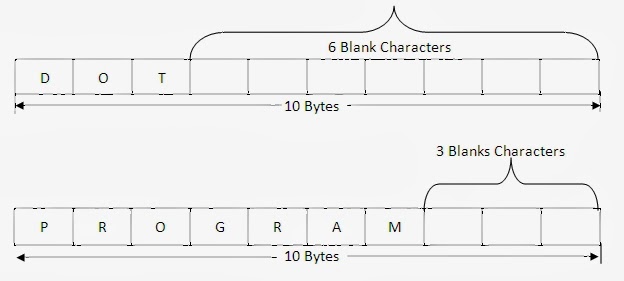
A fixed length string is a string whose storage requirement is "known when the string is created". In this string, irrespective number of characters the string has, the length of the string is always fixed. Once the string is defined, the length of a string cannot be changed. It is ‘fixed’ for the duration of program execution. In this format, the non-data characters such as space are added at the end of the data.

For example, the string "DOT" and "PROGRAM" are stored in fixed format where size is fixed for 10 bytes as shown below:


Note: The string "DOT" is 10 bytes string ending with 7 blanks characters.
Note: The string "PROGRAM" is 10 bytes string ending with 3 blanks characters.
Note: The blank characters cannot be used as data since it acts as end of the string.

Disadvantages
  • If the length reserved for string is too small, it is not possible to store the large string.
  • If the length reserved for string is too large, too much memory is wasted.
  • Once the string is defined, the length of a string cannot be changed. It id ‘fixed’ for the duration of program execution.
  • There is the problem of distinguishing data character from non-data characters. Normally non-data character such as spaces are added at the end of the data.
The above disadvantages can be overcome using variable length format, will be discussed in later article.

String literals and constants

Add New Elements or Content in jQuery

JQuery provides some standard functions through which developer can easily add element/content to an existing element. User can add an element after or before an existing element by using jQuery functions. These element can also be added using callback functions. Just check some value and according to condition, we can add element easily.

Following are jQuery methods that are used to add new content:

Append method

This function insert content or new element at the end of selected html element. For example

$("#lblComment").append("last comments");

This function will add specified text after the existing text of selected label.

prepend()

This function insert content or new element at the beginning of selected html element. For example

$("#lblComment").prepend("start comments");

This function will add specified text before the existing text of selected label. We can use both these methods to add multiple content by using multiple parameters. These functions can easily get multiple parameters as shown below:

$("#lblComment").prepend("one", "two", "three");
$("#lblComment").append("eight", "nine", "ten");

After() and before()

After method inserts content after the selected html element and before method inserts content before the selected html element. More can be explained by following jQuery code fragment:

$("#lblComment").after("after adding text");
$("#lblComment").before("before adding text");

Both these functions will add the specified text after and before the selected label element respectively. Same as append and prepend, these functions can also be used for adding multiple elements to an existing.

In above examples, we have added only texts only but we can add any other element in place of that text. Just write the element’s html code and place as parameter of these functions, that element will add easily. In further article we will remove the added element/content and how to use/append css classes through jQuery code fragment.

Data Definition Language (DDL) Triggers in SQL

A DDL trigger is fired in response to DDL statements, such as CREATE TABLE or ALTER TABLE. DDL triggers can be used to perform administrative tasks, such as database auditing.

Database auditing helps in monitoring the DDL operations on a database. DDL operation can include operations such as creation of a table or view, or modifications of a table or procedure. Consider an example, where you want the database administrator to be notified whenever a table is created in the Master Database. For this purpose, you can create a DDL trigger.

Depending on the way in which triggers are fired, they are categorized as:

After Triggers

The after trigger can be created on any table for the insert, update or delete operation just like other triggers. The main difference in the functionality of an after trigger is that it is fired after the execution of the DML operation for which it has been defined. The after trigger is executed when all the constraints and triggers defined on the table are successfully executed.

By default, if more than one after trigger is created on a table is for a DML operation such as insert, update, or delete, then the sequence of execution is the order in which they were created.
For example, the EmpSalary table stores the salary and tax details for all the employees in an organization. You need to ensure that after the salary details of an employee are updated in the EmpSalary table, the tax details are also recalculated and updated. In such a scenario, you can implement an after trigger to update the tax details when the salary details are updated.

Instead of Triggers

The instead of triggers can be primarily used to perform an action, such as a DML operation on another table or view. This type of trigger can be created on both a table as well as a view.

An instead of trigger can be used for the following actions:

  • Ignoring parts of a batch.
  • Not processing a part of a batch and logging the problem rows.
  • Taking an alternative action when an error condition is encountered.

For example, if a view is created with multiple columns from two or more tables, then an insert operation on the view is only possible if the primary key fields from all the base tables are used in the query. Alternatively, if you use an instead of trigger, you can insert data in the base tables individually. This makes the view logically updateable.

You can even create an Instead of trigger to restrict deletion in a master table. For example, you can display a message “Master record cannot be deleted” if a delete statement is executed on the Employee table of the AdventureWorks database.

Unlike after triggers, you cannot, create more than one Instead of trigger for a DML operation on the same table or view.

Nested Triggers

Nested triggers are fired due to actions of other triggers. For example, you delete a row from TableA. A trigger on TableA deletes rows from TableB. Because you are deleting rows from TableB, a trigger is executed on TableB to record the deleted rows.

Recursive Triggers

Recursive triggers are a special case of nested triggers. Unlike nested triggers, support for recursive triggers is at the database level. As the name implies, a recursive trigger eventually calls itself. There are two types of recursive triggers, Direct and Indirect.

Direct Recursive Trigger

A direct trigger is a trigger that performs the same operation (insert, update, or delete) on the same table causing the trigger to fire itself again.

Indirect Recursive Trigger

An indirect trigger is a trigger that fires a trigger on another table and eventually the nested trigger ends up firing the first trigger again. For instance, an UPDATE on TableA fires a trigger that in turn fires an update on TableB. The update on TableB fires another trigger that performs an update on TableC. TableC has a trigger that causes an update on TableA again. The update trigger of TableA is fired again.

© Copyright 2013 Computer Programming | All Right Reserved