-->

Tuesday, February 3, 2015

How to bind Gridview from two Merged Data Table

Introduction

It is a combination of DataColumns and DataRow. Generally, we use it for data binding purpose. In this article we will learn how to design the DataTable , merge two DataTable and Bind the gridview control with merged DataTable. First of all, create the object of it then add some column in it. After define the columns you will enter data in the columns. We have already dicussed on this topic earlier. Today, we will focus on merge( ) method.

Add columns and rows in the DataTable (Copy and Paste)


DataTable datatable1 = new DataTable();

        datatable1.Columns.Add("id", typeof(Int32));
        datatable1.Columns.Add("Name", typeof(string));
        datatable1.Rows.Add(1, "A");
        datatable1.Rows.Add(2, "B");

Above code define, we have two column that is, id with integer DataType and Name with string DataType. Similarly, we can design code for second DataTable. Like

  DataTable datatable2 = new DataTable();
        datatable2.Columns.Add("id", typeof(Int32));
        datatable2.Columns.Add("Name", typeof(string));
        datatable2.Rows.Add(3, "C");
        datatable2.Rows.Add(4, "D");

How to merge  DataTable:

After preparing the DataTable, you should use Merge( ) method. Like

datatable1.Merge(datatable2);

Now, you have to bind the GridView with Merged DataTable.

   GridView1.DataSource = datatable1;
        GridView1.DataBind();

Now code Generate the following output:

How to bind Gridview from two Merged Data Table

Sunday, February 1, 2015

How to find controls from usercontrols in ASP.NET

Introduction

Today, when we was design a program with the help of  web usercontrol. I was take two web usercontrols in the single web form (learn how to add web usercontrol in the aspx page) with a single button control. My code look like in the ASPX page:

    <uc1:Register ID="Register1" runat="server" /> 
        <uc2:login ID="login1" runat="server" />
        <asp:Button ID="Button1" runat="server" Text="Find control" Width="483px" />

I want to access controls which is inside in user controls such as Button, TextBox, Label, Dropdownlist and etc. So, For this type of problem, i have a solution. Actually user control is a collection of controls or text and each control have a id property; also control have a runat attribute. So, easily we can access or find controls in the code file as well as in the <script> block. In this article i will explain you how to find the controls such as Button, Label, TextBox and etc from the user control

Find controls from user controls in the code file I-Method:

The Web User Control:

<%@ Control Language="C#" AutoEventWireup="true" CodeFile="Register.ascx.cs" Inherits="MyControl_Register" %>

<asp:TextBox ID="usertxt" runat="server" Width="209px"></asp:TextBox>

The Page

The following HTML Markup of the ASPX Page contains the UserControl and a Button.
The button has an OnClick event handler which executes a click function which validates the TextBox usertxt present inside the UserControl Register.

<%@ Page Language="C#" AutoEventWireup="true" CodeFile="Default5.aspx.cs" Inherits="Default5" %>
<%@ Register src="MyControl/Register.ascx" tagname="Register" tagprefix="uc1" %>

<!DOCTYPE html>
<html xmlns="http://www.w3.org/1999/xhtml">
<head runat="server">
    <title></title>
</head>
<body>
    <form id="form1" runat="server">
    <div>
    
        <uc1:Register ID="Register1" runat="server" />
    
    </div>
        <asp:Button ID="Button1" runat="server" OnClick="Button1_Click" Text="Find control from user control" Width="483px" />
    </form>
</body>
</html>

Code Behind file

protected void Button1_Click(object sender, EventArgs e)
    {
        TextBox t1 = Register1.FindControl("usertxt") as TextBox;
        if(t1.Text == "")
        {
            Response.Write("<script>alert('please fill the username')</script>");
        }
    }

Find controls from user controls using java script II-Method:

Also we can find the controls such as Label, ListBox, etc., which is inside in user controls. But a little problem you and i face that is:
When i place an toolBox controls inside usercontrols then the HTML ID of the control which is inside in usercontrol changes. And hence Java Script is not determine the control so, it is unable to find the control. Suppose, you have a TextBox with ID usertxt in a web user control, render web form in the browser and see the html source view :

 <input name="Register1$usertxt" type="text" id="Register1_usertxt" style="width:209px;" /> 

  Solution of the problem

Use Embedded code block with ClientID property in the document.getElementById menthod.
Now, Your whole code look like

<%@ Page Language="C#" AutoEventWireup="true" CodeFile="Default6.aspx.cs" Inherits="Default6" %>

<%@ Register src="MyControl/Register.ascx" tagname="Register" tagprefix="uc1" %>

<!DOCTYPE html>

<html xmlns="http://www.w3.org/1999/xhtml">
<head runat="server">
    <title></title>
    <script>
        function validate()
        {
            var t1 = document.getElementById('<%= Register1.FindControl("usertxt").ClientID %>');
            if (t1.value=="") {
                alert("Please fill username");
            }
        }


    </script>
</head>
<body>
    <form id="form1" runat="server">
    <div>
    
        <uc1:Register ID="Register1" runat="server" />
    
    </div>
        <asp:Button ID="Button1" runat="server" Text="Find control using java script" Width="451px" OnClientClick="validate()" />
    </form>
</body>
</html>

If you want to see the full implementation and output, see this video:


Example programs showing pointer assignment, addition and subtractions in Data Structures through 'C'

Example programs showing pointer assignment, addition and subtractions:


1.’C’ program to read and print a dynamic array of the user required size:
   #include<stdio.h>
  #include<conio.h>
  #include<stdlib.h>
main(),
{
 int *arr, size, i;
 /* arr is a pointer to store address of dynamically allocated memory*/
 clrscr();
 printf(“Enter the size of array :”);
 scanf(“%d”,&size);
  arr=(int*)malloc(size*sizeof(int));
   /* dynamic memory allocation, pointer assignment operation */

  If(arr= = NULL)
 {
   printf(“Memory allocation error!”);
   exit(0);        /*to terminate program execution */
 }    /*end of if*/
 printf(“\n Enter array elements:”);
 for(i=0;i<size;i++)
    scanf(“%d”,arr+i);                                 /*pointer
addition */
  printf(“\nThe array is:\n”);
  for(i=0;i<size;i++)
  printf(“%d”,*(arr+i));                                  /*pointer
 addition */

}             /* end of main() */


NOTE: The array elements can also be referred as arr[i],
Where ’i’ is the index of the respective element.
The same program 1 for reading and displaying dynamic array can also be written with pointer subtraction as follows:

To read the array and display the array using pointer subtraction operation, the address of the last element is stored in a pointer variable and it is update accordingly by subtracting the respective index of the element to be read or displayed.
   #include<stdio.h>
  #include<conio.h>
  #include<stdlib.h>
main(),
{
  int *arr, size, i,*p;
  /* arr is a pointer to store address of dynamically allocated memory*/
  clrscr();
  printf(“Enter the size of array :”);
  scanf(“%d”,&size);

   arr=(int*)malloc(size*sizeof(int));
   /* dynamic memory allocation, pointer assignment operation */

   if(arr= = NULL)
   {
     printf(“Memory allocation error!”);
     exit(0);        /*to terminate program execution */
     }    /*end of if*/

  p=&a[size-1];/*address of the last element */
  printf(“\n Enter array elements:”);
  for(i=size-1;i>=0;i--)
   scanf(“%d”,p-i);                   /*pointer subtraction*/

  p=&a[size-1]; /*pointer assignment */
  printf(“\nThe array is:\n”);
  for(i=0;i<size;i++)
   printf(“%d”,*(p-i));      /*pointer subtraction*/

}             /* end of main() */

2.’C’ program to implement to searching using dynamic array:


   #include<stdio.h>
  #include<conio.h>
  #include<stdlib.h>
main(),
{
 float *arr, num;  /*array of real numbers */
 int size, i;
 clrscr();
 printf(“Enter the size of array :”);
 scanf(“%d”,&size);
 arr=(float*)malloc(size*sizeof(float));
 if(arr = = NULL)
 {
  printf(Memory allocation error!);
  exit(0);    /*to terminate program execution */
 }        /* end of it*/
 printf(“\nEnter  array elements:”);
 for(i=0;i<size;i++)
 scanf(“%f”,arr+i);                                      /*pointer addition */
 printf(“Enter the real number to search in array:”);
 scanf(“%f”,&num);
 for(i=0;i<size;i++)
   if(num==*(arr+i))
   break;                /*to terminate for loop */
 if(i==size)            /*if i=size then ‘break’ is not executed.
                               Element comparison is over */
 printf(“Search unsuccessful…”);
 else
 printf(“Search successful…”);
} /*end of main() */

3.’C’ program to count the frequency of a number in a dynamic array.

#include<stdio.h>
#include<conio.h>
#include<stdlib.h>
main(),
{
  float *arr, num;  /*array of real numbers */
  int size, i, count=0;
  printf(“Enter the size of array :”);
  scanf(“%d”,&size);
  arr=(float*)malloc(size*sizeof(float));
  if(arr == NULL)
 {
   printf(Memory allocation error!);
   exit(0);    /*to terminate program execution */
 }        /* end of it*/
  printf(“\nEnter  array elements:”);
  for(i=0;i<size;i++)
  scanf(“%f”,arr+i);                                      /*pointer addition */
  printf(“Enter the number, the freq. of which is freq.:”);
  scanf(“%f”,&num);
   /*finding the frequency */
  for(i=0;i<size;i++)
   if(num==*(arr=i))
     count++;        /*count incremented by 1, whenever the num is equal to
                              the array element */                                
  printf(“\n Frequency of number %f is %d”,num,count);
} /*end of main() */

4.’C’ program to find the number of prime numbers stored in a dynamic array.

  #include<stdio.h>
 #include<conio.h>
 #include<stdlib.h>
 int prime(int num)
{
  int i;
  for(i=2;i<=num/2;i++)
  if(num%i == 0)               /*Non-prime */
     return 0;
  return 1;               /*prime */
 }
main()
{
  int  *arr, size, i, count=0;

  printf(“Enter the size of array :”);
  scanf(“%d”,&size);

  arr=(int*)malloc(size*sizeof(int));
  if(arr == NULL)
 {
   printf(“Memory allocation error!”);
   exit(0);                                /*to terminate program execution */
}                         /* end of it*/
 printf(“\nEnter  array elements:”);
 for(i=0;I<size;i++)
 scanf(“%d”,arr+i);                                      /*pointer addition */
 for(i=0;i<size;i++)
 if(prime(*(arr+i)) ==1)
 count++;                                    
 printf(“\nNumber of primes = %d”,count);
} /*end of main() *

How to Perform Initialization of Two Dimensional Arrays in C language

Assigning required value to a variable before processing is called initialization. As we initialize a variable to the required value (for example, a=10), we can also initialize the individual elements of a two dimensional array. The initialization can be done at the time of declaration with the following syntax:

data_type array_name [exp1][exp2]={
                                 {a1, a2, a3, ……, an},
                                 {b1, b2, b3, ……, bn},
                                  {c1, c2, c3, ……, cn},
                                           .…………………………
                       };
Where

  • data_type can be int, float, char, etc.
  • array_name is the name of the array
  • exp1 and exp2 are enclosed within square brackets
  • a-1 to a-n are the values assigned to 1st row, b1 to bn are the values signed to 2nd row and so on.

Initializing all specified memory locations

Consider the initialization statement shown below:

int  arr[3][3] = {{1, 2, 3},
           {4, 5, 6},
           {7, 8, 9}};

The declaration indicates that array arr has 3 rows and 3 columns. The pictorial representation of the two dimensional array is shown below:

How to Perform Initialization of Two Dimensional Arrays in C: Computer Programming

Note that a[0][0] = 1 and so on with increment the value of square brackets.

Partial array initialization

If the numbers of values to be initialized are less than the size of the array, then the elements are initialized from left to right one after other. The remaining locations will be initialized to zero automatically.

Example:     int arr[3][3] = {(1,2),(3,4),(5,6),(7,8)};

The declaration indicates that the array arr has 3 rows and 3 columns in which only first column of each row are initialized. The 3rd column of each row bill be initialized with zeros automatically as shown in the following figure:

How to Perform Initialization of Two Dimensional Arrays in C: Computer Programming

i.e., all arr[0][2], arr[1][2], arr[2][2] are initialized to zeros.

Example: Consider the partial initialization shown below:

int arr[3][3] = {{1,2,3,4},{5,6},{7,8}};

In this array each row should have three columns. But, in this example, we have initialized row 0 with 4 elements. This results in syntax error.

Memory Map: To represent the memory map of two dimensional array, consider the following two dimensional array declaration:
int arr[3][3] = {
            {1,2,3},
            {4,5,6},
            {7,8,9}
};

Even though we represent a matrix pictorially as a two dimensional array, in memory they are stored contiguously one after the other. Assume that address of first byte of arr (known as base address) is 12000 and size of integer is 2 byte. The memory map for the two dimensional array arr is shown in below figure:

How to Perform Initialization of Two Dimensional Arrays in C: Computer Programming

How to Perform Initialization of Two Dimensional Arrays in C language

Assigning required value to a variable before processing is called initialization. As we initialize a variable to the required value (for example, a=10), we can also initialize the individual elements of a two dimensional array. The initialization can be done at the time of declaration with the following syntax:

data_type array_name [exp1][exp2]={
                                 {a1, a2, a3, ……, an},
                                 {b1, b2, b3, ……, bn},
                                  {c1, c2, c3, ……, cn},
                                           .…………………………
                       };
Where

  • data_type can be int, float, char, etc.
  • array_name is the name of the array
  • exp1 and exp2 are enclosed within square brackets
  • a-1 to a-n are the values assigned to 1st row, b1 to bn are the values signed to 2nd row and so on.

Initializing all specified memory locations

Consider the initialization statement shown below:

int  arr[3][3] = {{1, 2, 3},
           {4, 5, 6},
           {7, 8, 9}};

The declaration indicates that array arr has 3 rows and 3 columns. The pictorial representation of the two dimensional array is shown below:

How to Perform Initialization of Two Dimensional Arrays in C: Computer Programming

Note that a[0][0] = 1 and so on with increment the value of square brackets.

Partial array initialization

If the numbers of values to be initialized are less than the size of the array, then the elements are initialized from left to right one after other. The remaining locations will be initialized to zero automatically.

Example:     int arr[3][3] = {(1,2),(3,4),(5,6),(7,8)};

The declaration indicates that the array arr has 3 rows and 3 columns in which only first column of each row are initialized. The 3rd column of each row bill be initialized with zeros automatically as shown in the following figure:

How to Perform Initialization of Two Dimensional Arrays in C: Computer Programming

i.e., all arr[0][2], arr[1][2], arr[2][2] are initialized to zeros.

Example: Consider the partial initialization shown below:

int arr[3][3] = {{1,2,3,4},{5,6},{7,8}};

In this array each row should have three columns. But, in this example, we have initialized row 0 with 4 elements. This results in syntax error.

Memory Map: To represent the memory map of two dimensional array, consider the following two dimensional array declaration:
int arr[3][3] = {
            {1,2,3},
            {4,5,6},
            {7,8,9}
};

Even though we represent a matrix pictorially as a two dimensional array, in memory they are stored contiguously one after the other. Assume that address of first byte of arr (known as base address) is 12000 and size of integer is 2 byte. The memory map for the two dimensional array arr is shown in below figure:

How to Perform Initialization of Two Dimensional Arrays in C: Computer Programming

Addition and Subtraction operation in Data Structures through C Language

Addition and Subtraction operation:

After assigning some value (address) to the pointer, such pointer can be used in arithmetic operation only involving addition and subtraction. Be cautious, the addition and subtraction. After assignment whenever a number is added to pointer then a normal addition. The concept will be clear when you see an example.
Consider the following declaration: int A[10], *p: ‘A’ is an array of size 10 of the type integer. ‘p’ is a pointer variable also of the type integer. Name of the array ‘A’ give the base address of array. Now, p=A;    pointer variable p is assigned with base address of array
A[0]    first element of the array
P[0]    also gives first element of array
A[3]    fourth element of the array
P[3]     also gives fourth element of the array

Suppose that base address allocated to array is 3200. Then the value of pointer ‘p’ is 3200. As the array is of the type integer, each element of array consumes 2 bytes of memory and the computer memory is allocated to the array statically (at the time of compilation) and the memory is ‘contiguous’ i.e. continuous. So, the first element address is 3202. Similarly each element of the array differs by size of the data type i.e. 2. Now let us see the concept of pointer addition. Pointer ‘p’ contains address of first element i.e. 3200. If 1 is added to ‘p’ then the resulting value will be 3202 not 3201. It means the address is updated by the size of the element rather then the just 1 .Similarly whenever a number ‘n’ is added to the pointer the result will be the concept. When 0 is added to pointer then it gives the address of ‘0’ number element i.e. first element of the array. When 2 is added to pointer then it gives the address of ‘2’ number element i.e. third element of the array.

 The following looping statement will print the array elements through pointer variable:
                for(I=0;I<10;I++)
                    Printf(“%d”,*(p+I));
The above loop is similar to the following normal looping statements to print the array:
                      for(I=0;I<10;I++)
                        Printf(“%d”,A[I]);
OR
                       for(I=0;I<10;I++)
                          Printf(“%d”,p[I]);

The subtraction operation is similar to the addition operation. If a number is subtracted from the pointer, then the result obtained gives the address of the previous element. Again the result depends on the size of the element. The following loop prints the array in reverse order with the help of pointer subtraction;
      p=&A[9];   /*last element’s address is stored in ‘p’*/
        for(I=0;I<10;I++)
           printf(“%d”,*(p-I));

The array can be printed in reverse order using the following normal looping statements:
  For(I=9;I>=0;I--)                              OR                  for(I=9;I>0;I--)
   Printf(“%p”,A[I]);                                                       printf(“%d”,p[I]);

In the similar way the value stored in a pointer changes by:
          1 if the element is of the type ‘char’
          4 if the element is of the type of ‘float’ or ‘long integer’
          8 if the element is of the type ‘double’
During pointer arithmetic involving ‘addition’ and ‘subtraction’. In addition operation the pointer points to the next element’s address where as in subtraction the pointer points to the previous element’s address.  

About and Uses of String Data Types in C language

String is a data type and is often used as an array of bytes that stores a sequence of elements i.e. characters, in computer programming. C language supports string in every calculation of programming, the article describes the use with examples.

No program generally exists without the manipulation of the strings. In all our previous articles, we have used several times the statements:
pritnf("Enter the number of n");

Here, the sequence of characters enclosed within a pair of double quotes is a string. Strings are generally used to store and manipulate data in text form like words or sentences.

Definition: An array (or sequence) of characters is called as string. A string is most conveniently represented using continuous storage locations in memory. The storage representations of strings are classified as shown below:

Fixed length Format:

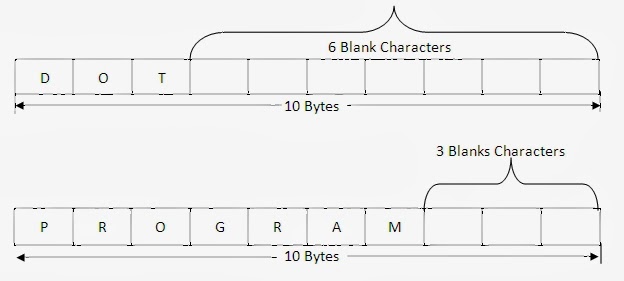
A fixed length string is a string whose storage requirement is "known when the string is created". In this string, irrespective number of characters the string has, the length of the string is always fixed. Once the string is defined, the length of a string cannot be changed. It is ‘fixed’ for the duration of program execution. In this format, the non-data characters such as space are added at the end of the data.

For example, the string "DOT" and "PROGRAM" are stored in fixed format where size is fixed for 10 bytes as shown below:


Note: The string "DOT" is 10 bytes string ending with 7 blanks characters.
Note: The string "PROGRAM" is 10 bytes string ending with 3 blanks characters.
Note: The blank characters cannot be used as data since it acts as end of the string.

Disadvantages
  • If the length reserved for string is too small, it is not possible to store the large string.
  • If the length reserved for string is too large, too much memory is wasted.
  • Once the string is defined, the length of a string cannot be changed. It id ‘fixed’ for the duration of program execution.
  • There is the problem of distinguishing data character from non-data characters. Normally non-data character such as spaces are added at the end of the data.
The above disadvantages can be overcome using variable length format, will be discussed in later article.

String literals and constants
© Copyright 2013 Computer Programming | All Right Reserved