-->

Tuesday, February 10, 2015

Range ASP.NET validator control in asp.net c#

Introduction

The Range ASP.NET validator control checks whether or not the value of an input control is inside a specified range of values . It has the following four three properties:
  • ControlToValidate - Property- Contains the Input control to validate
  • MinimumValue - Property- Holds the minimum value of the valid range
  • MaximumValue - Property - Holds the maximum value of the valid range
If one of these properties is set, then the other property must also be set . Do not forget to set the Type property to the data type of the values .  The following data types can be used for the values:

String - A string data type
Integer - An integer data type
Double - A double data type
Date - A date data type
Currency- A currency data type

Application of Range ASP.NET validator control are:


  • Specify age range between the two numbers in register form
  • Use in Date of Birth selection. 
Let see the range asp.net validator control video for implementation:


Public Properties of the Range ASP.NET validator Class
MaximumValue : Obtains or sets the maximum value of the validation range for the RangeValidator control.

MinimumValue : Obtains or set the minimum value of the validation range for the RangeValidator control.

Example
<%@ Page Language="C#" AutoEventWireup="true" CodeFile="rangevalidator.aspx.cs" Inherits="rangevalidator" %>

<!DOCTYPE html>

<html xmlns="http://www.w3.org/1999/xhtml">
<head runat="server">
<title></title>
</head>
<body>
<form id="form1" runat="server">
<div>


Enter Your Age ( 18 - 30)<br />
<asp:TextBox ID="agetxt" runat="server"></asp:TextBox>
<asp:RangeValidator ID="RangeValidator1" runat="server" ControlToValidate="agetxt" ForeColor="Maroon" MaximumValue="30" MinimumValue="18" Type="Integer">Enter your age between 18 to 30</asp:RangeValidator>
<br />
<asp:Button ID="Button1" runat="server" Text="submit" />
<br />
   </div>
</form>
</body>
</html>
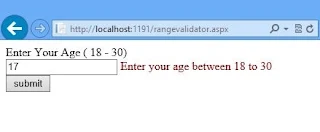
Output
range

Related Article

Looping Statements in Computer Programming, C Language

Introduction

We have learnt about branching statements that transfer the control from one point to another point in the computer programming. In this article, we concentrate on another important constructs like loop statements, which executes a set of statements repeatedly. Sometimes, it is required to execute a set of statements repeatedly in c programming. In such cases, the looping statements are used.

The statements that enables the programmer to execute a set of statements repeatedly till the required activity is completed, called looping statements or simply loop statements. These statements are also called repetitive or iterative statements. The statements within a loop may be executed for a fixed number of times or until a certain condition is reached. The various types of loop statements that are supported by the C language are as follows:

For Loop

A set of statements may have to be repeatedly executed for a specified number of times. In such situations, we use for loop statement. This type of loop is defined as an iterative statement that causes a set of statements to be executed repeatedly for a fixed number of times. If we know well in advance as how many times a set of statements have to be executed repeatedly, then for loop is the best choice.

The syntax of for loop as follows:
for (initialization; condition; increment/decrement)
{
    statement1;
    statement2;
    statement3;
}

Where

  • for: is the reserve word or keyword
  • Initialization: used to provide starting value to the variable. It should end with semicolon (;).
  • Condition: used to determine whether value of variable has reached the number of repetitions desired. It should end with semicolon (;).
  • Increment/Decrements: It is used to update the variable value by increment or decrements.

Note: Initialization, condition and updating statement can be multiple statements separated by comma (,).

In for loop some points have to keep in mind by c programmer, which are:

  • The initialization statement executes first and only once when the execution begins.
  • After this, condition is executed. If the condition is evaluated as the True then the body of for loop is executed. After executing the body of the loop the increment/decrements statement is executed. It is normally update the variable value by the specified step size. Then termination condition statement is executed and the process is repeated.
  • If the condition is evaluated to False, then the control comes out of the loop without executing the body of the loop. Later, the rest of the code is executed.

As long as condition is evaluated to True, the body of for loop and the updating statement are executed.
For example

for(i=1; i<=5;i++)
{
  printf(“%d”,i);
}
printf(“\nOut of the loop”);

In the above example,

  • For loop is executed for the first time and initialize the value of i =1.
  • Then, condition is checked and it is true since i = 1.
  • So, control enters into body of the loop and displays 1 on the screen using printf statement.
  • Then i is incremented by 1 and condition is checked again. The loop is repeatedly executed for i=1, 2, 3, 4 and 5, all these values are displayed one after other.
  • Finally, when i will be 6, the condition fails and control comes out of the loop and the message "Out of the loop" is displayed on the screen.

Here's an example to find sum of N natural numbers using For loop.

Algorithm:
Step1:    [Read the number of terms]
Read: N
Step2:    [Initialization]
    Sum = 0
Step3:    for i = 1 to N in steps of 1 do
    Sum = Sum + i
    [End of for]
Step4:    Write: Sum
Step5:    Exit

Looping Statements in Computer Programming, C Language


C program to find sum of natural number

main()
{
  int i,n,sum=0;
  printf("Enter the number of terms here:\n");
  scanf("%d",&n);
  for(i=1; i<=n; i++)
   {
     sum=sum+i;
   }
printf("The sun of n %d term = %d",n,sum);
getch();
}

Looping Statements in Computer Programming, C Language

Branching Statements in C

Do-While Loop with Example in C language

In Computer programming, do-while loop is similar to while loop and used when a set of statements may have to be repeatedly executed until a certain condition is reached. When we do not know exactly how many times a set of statements have to be repeated, do-while can be used. The syntax of the do-while loop is shown below in C:

do
{
 statement1;
 statement2;
 statement3;
   .
   .
statementn;
} while (exp);

Where
  • do and while – are reserve words or keywords
  • exp – is the expression which is evaluated to TRUE or FALSE. The semicolon indicates the termination of the loop.
Working of do-while loop:
The following sequences of the operations are carried out during the execution of the do-while loop statement:
  • The body of the do-while loop consisting of statements statement-1, statement-2,….statement-n are executed.
  • Then, the exp is evaluated. If the expression exp is evaluated to TRUE, the body of the loop is executed again and the process is repeated.
  • If the exp is evaluated to FALSE, control comes out of the do-while loop and the statements after (outside) the do-while loop are executed.

Since the expression exp is evaluated to TRUE or FALSE at the bottom of the do-while loop, so, the do-while loop is called bottom testing loop or exit controlled loop. Here, the body of the loop is executed at least once.

Difference between while & do-while loop

Do-While Loop with Example in C: Computer Programming

Here's an example to get sum of 1 to given no.s
Algorithm:

Step1:    [Input the number of terms]
    Read: n
Step2:    [Initialization]
    sum=0
    i=0
Step3:    do
    sum = sum+i
    i = i+1
    while (i<=n)
Step4:    Write: sum
Step5:    Exit

Do-While Loop with Example in C: Computer Programming

C program
main()
{
int n,i,sum;
clrscr();
printf("Enter the value of n here: \n");
scanf("%d",&n);
sum=i=0;
do
{
sum=sum+i;
i++;
}while(i<=n);

printf("Sum of the series is %d",sum);
getch();
}

Do-While Loop with Example in C: Computer Programming, output

Read Also: Jump statements in C

Jump Statement used in Computer Programming, C Language

After discussing about looping statements in computer programming, programmer should know about jump statements. These statements are used to jump forward/backward, on a given condition. This article will give you a brief overview in c language.

Sometimes, during the execution of a loop it may be desirable to skip execution of some statements or leave the loop when a certain condition occur. For example, during searching process, if the desired item found then there is no need to search further. In such cases, we have to terminate the loop using jump. The various jumps in loops are as follows:


Jump Statement used in Computer Programming, C Language

goto statement

goto statement is a jump statement that transfers the control of the specified statement in a program. This is an unconditional branch statement. The specified statement is identified by a symbolic name (any identifier) ending with colon ':'.
Syntax:
    goto label:
Where
  • goto – is a reserve word or keyword
  • label – is an identifier ending with colon ‘:’
Disadvantages:
  • Using goto statement in a program is an unstructured programming style.
  • The unstructured program written using goto statement are very difficult to read and understand.
  • It is also very difficult to debug the program.
Example: A C program to add all the natural numbers using goto statement.
main()
{
  int n,i,sum;
  clrscr();
  printf(“Enter the number od terms:”);
  scanf(“%d”,&n);
  sum=i=0;
  top:    sum=sum+i;
    i=i+1;
    if(i<=n) goto top;
    printf(“Sum of series = %d”,sum);
  getch();
}


Jump Statement used in Computer Programming, C Language output

Break Statement

The break statement is another jump statement which is frequently used in switch statement and loops. The break statement works as follows:
  • The 'break' statement is part of switch statement causes control to exit the switch statement. Usually, in any case, the break statement will be the last statement.
  • If break is executed in any type of loop like for, while or do-while, the control comes out of the loop and the statement following the loop will be executed. The break statement is used mainly to terminate the loop when a specific condition is reached.
Note: If ‘break’ appears in the inner loop of a nested loop, control only comes out of the inner loop.
Consider the following program segment:
    i = 1;
    for(; ; )
    {
      if(i==5) break;
      printf(“%d”,i++);
    }
In the given for loop, there is no initialization, condition and re-initialization part. Such loop is called as infinite loop. Even though it appears as an infinite loop, as the value of i reaches to 5, the control immediately comes out of the loop. When the value of i is compared with 5, the break statement is executed and the control immediately comes out of the loop.

Continue statement:

The continue statement is used only in the loops to terminate the current iteration. During execution of a loop, it may be necessary to skip a part of the loop based on some condition e.g. during processing of student records, it may be necessary to exclude student names whose marks are less than or equal to 35. In such case, a test is made to see whether the marks scored are less than or equal to 35. If so, the part of the program that processes the student details can be skipped using continue. 

But, the execution continues with next iteration of the loop. In the while statement and do-while statement, whenever a continue statement is executed, the rest of the statements within the body of the loop are skipped and the conditional expression (conditional statement) is executed. But, in for loop, the updating statement will be executed. For example, consider the statements shown below:
    for(i=1;i<=5;i++)
    {
      if(i==2) continue;
      printf(“%d”,i);
    }
Note that when i takes the value 2, the continue statement is executed and the statements following continue are skipped. The control is transferred to updating i.e. i++ statement and the execution continues from that point. The output of this program is 1 3 4 5.

Difference between break and continue statement


Difference between jump statements in computer programming

Array in Computer Programming

How to use ASP.NET validator control with example

INTRODUCTION
ASP.NET validator are controls used for validating the data entered in an input control , such as the textbox of a Web page.When a user enters invalid data in an associated control, the ASP.NET validator  control displays an error message on the screen. The error message is defined as a property value of the validation control . The data being entered is validated each time it is entered by the user , and the error message disappears only when the data is valid. Validation controls help save time and enhance the efficiency of the application by validating the data before a request is sent to the server.
The BaseValidator class
The System.Web.UI.WebControls.BaseValidator class provides basic implementation required for all validation controls.


Public Properties of the BaseValidator Class

ControlToValidate : Handles an input control, such as the TextBox Control , which needs to be validated.

Display : Handles the behavior of the error message in a validation control.

EnableClientScript : Handles a value indicating whether or not client-side validation is enabled

Enabled : Handles a value that indicates whether or not the validation control is enabled or not.

ErrorMessage : Handles the text for the error message displayed in a ValidationSummary control when validation fails.

ForeColor : Handles the color of the messgage displayed when validation fails.

IsValid : Handles a value that indicates if the focus is set on the control or not , specified by the ControlToValidate property when validation fails.

Text : Handles the text displayed in the validation control when the validation fails.

ValidationGroup : Handles the name of the validation group to which this validation control belongs.

Note: ValidationGroup property , when set, validates only the validation controls within the specified group when the control is posted back to the server.

Public Methods of the BaseValidator Class

validate() : Helps in performing validation on the associated input control and update the IsValid property

GetValidationProperty : Help in determining the validation property of a control , if it exists.

The following ASP.NET validator controls are

Sunday, February 8, 2015

C Language: How to Store Multiple values in Array

One data item can only be stored in one variable, in the context of computer programming. If programmer want to store more information in the memory, he/she should have more variables. Programmer can choose another option that is an Array.

Suppose that a student has scored 90 marks. These marks can be stored in a variable in c programming language as shown below:
int marks=90;

After executing this statement, the value 90 will be stored in the variable marks. Suppose there programmer needs to store marks of 10 students. In such case, we have to use 10 variables like marks1, marks2, marks3, …, marks10. But, if it is required to store the marks of 100 students, definitely it is not feasible to use 100 variables marks1, marks2, marks3, …, marks100. In mathematics, we use sets to group the items of similar kind. For example, consider the set shown below:

Marks = {75, 76, 78, 79, 86, 56, 98, 89, 56, 89}

This is a set of 10 students. Note that every item can be accessed by prefixing marks along with the position of marks in the sheet. The first item 75 corresponds to the marks of first student, 76 corresponds to the marks of second student and so on i.e., marks1=75, marks2=76, marks3=78, ….., marks10=89. In C language, this is where; the concept of arrays is used. Since all the marks are of the same type, we can group and refer all the marks with a common name using arrays.

An array is defined as an ordered set of similar data items. All the data items of an array are stored in consecutive memory locations in main memory. The elements of an array are of same data type and each item can be accessed using the same name. e.g., consider an array of marks of 5 students as shown below:

How to Store Multiple values in Computer Programming: Array

To refer an item in the array, we specify the name of the array along with position of the item. The position of the item must be written within square brackets '[ ]'. The position of the item enclosed within square brackets is called 'subscript' or 'index'. For example, the above figure represents an integer array called marks where marks of 5 students are stored. The marks of each student can be accessed as shown below:

  • Marks[0] i.e. 75 – represents marks of first student
  • Marks[0] i.e. 76 – represents marks of second student
  • Marks[0] i.e. 78 – represents marks of third student
  • Marks[0] i.e. 79 – represents marks of fourth student
  • Marks[0] i.e. 86 – represents marks of fifth student

Note: Using Marks[0] through Marks[n-1] we can access the marks of n students in general.

In an array it is not possible to have a group of items with different data types. For example,

How to Store Multiple values in Computer Programming: Array

This is an invalid way of storing the elements in an array. This is because, it is a collection of multiple datatypes, so we have to classify the array. The classification will be done in next article.

Implementation of STACK using Linked List in C language

Implementation of STACK using Linked List

             To implement the STACK using Linked List, the Linked List itself is created in different manner. In this case instead of ROOT in normal Linked List, an external pointer TOP is used to point all the time to the just added node.
      Initially when the STACK is empty TOP points to a NULL address.

When the PUSH operation is to be done, a NEW node is created and TOP is made point to it. Suppose for the first time one PUSH operation is done. The linked list is shown below:

When again another ITEM is PUSHed, a NEW node is created and the address of the node pointer by TOP, is copied in the LINK field of NEW node the TOP is made point to the NEW node. The Linked List is as below:
When again another item is to be PUSHed it is done similarly. After the PUSH of one more ITEM the Linked List is as shown below:
So, the Linked List created as STACK can be graphically shown as below:
While deletion, POPping is to be done from the STACK, TOP is checked. If it is NULL then the STACK is empty and ‘underflow’ occurs otherwise the ITEM of the node pointed by TOP can be copied in a variable and TOP is updated by link of TOP. Then ITEM is returned.
                      In the above-created STACK, if the POP operation is done once, the Linked List can be shown as below:


© Copyright 2013 Computer Programming | All Right Reserved