-->

Thursday, January 30, 2014

How to Querying Data using Joins in Sql Programming: Part 2

In comparison to an inner join, an outer join displays the result set containing all the rows from one table and the matching rows from another table. For example, if you create an outer join on Table A and Table B, it will show you all the records of Table A and only those records from Table B for which the condition on the common column holds true.

An outer join displays NULL for the columns of the related table where it does not find matching records. The syntax of applying an outer join is:

SELECT column_name, column_name [, column_name]
FROM table1_name [LEFT | RIGHT| FULL] OUTER JOIN table2_name
ON table_name.ref_column_name

An outer join is of three types:

Left Outer Join

A left outer join returns all rows from the table specified on the left side of the LEFT OUTER JOIN keyword and the matching rows from the table specified on the right side. The rows in the table specified on the left side for which matching rows are not found in the table specified on the right side, NULL values are displayed in the column that get data from the table specified on the right side.

Consider an example. The SpecialOfferProduct table contains a list of products that are on special offer. The SalesOrderDetail table stores the details of all the sales transactions. The users at AdventureWorks need to view the transaction details of these products. In addition, they want to view the ProductID of the special offer products for which no transaction has been done.

To perform this task, you can use the LEFT OUTER JOIN keyword, as shown in the following query:

Select p.ProductID, q.SalesOrderID, q.UnitPrice
From Sales.SpecialOfferProduct p
Left outer join Sales.SalesOrderDetail q on p.ProductID= q.ProductID
where SalesOrderID is NULL

The following figure displays the output of the preceding query.

How to Querying Data using Joins in Sql Programming: Part 2

Right Outer Join

A right outer join returns all the rows form the table specified on the right side of the RIGHT OUTER JOIN keyword and the matching rows from the table specified on the left side.

Consider the example of Adventure Works. Inc. The JobCandidate table stores the details of all the job candidates. You need to retrieve a list of all the job candidates. In addition, you need to find which candidate has been employed in Adventure Works, Inc. To perform this task, you can apply a right outer join between the Employee and JobCandidate tables, as shown in the following query:

SELECT e.JobTitle, d.JobCandidateID
FROM HumanResources.Employee e
RIGHT OUTER JOIN HumanResources.JobCandidate d
ON e.BusinessEntityID=d.BusinessEntityID

The result set displays the JobCandidateID column from the JobCandidate table and the BusinessEntityID column from the matching rows of the Employee table.

How to Querying Data using Joins in Sql Programming: Part 2

Full Outer Join

A full outer join is a combination of left outer join and right outer join. This join returns all the matching and non-matching rows from both the tables. However, the matching records are displayed only once. In case of non-matching rows, a NULL value is displayed for the columns for which data is not available.

SELECT e.BusinessEntityID, e.EmployeeName,ed.EmployeeEducationCode,
ed. Education
FROM Employee e FULL OUTER JOIN Education ed
ON e.EmployeeEducationCode = ed.EmployeeEducationCode

According to this query, the employee details and their highest educational qualification is displayed. For non-matching values, NULL is displayed.

Reference Data Types in Java Programming

Any type of storage that stores an address or we can say reference of object in memory, called Reference data type. Java like other language have also some reference data types discussed in the article.

Broadly a reference in Java is a data element whose value is an address of a memory location. Arrays (a group of similar data items), classes (a blue print of some entity e.g. a student) and interfaces are reference type. The value of reference type variable, in contrast to that of primitive type, is a reference to (an address of) the value or set of values represented by variables.

Reference Data Types in Java Programming

A reference is called a pointer, or memory address in other language. The java programming language does not support the explicit use of addresses like other languages do. You use variable’s name instead.

An importance reference type that you use in Java is String type. The String type lets you create variables that can hold textual data e.g. “Mohan”, TZ194”, “194ZB”, “234” etc. Anything that you enclose in double quotes is treated as text in Java.

Create PHP Array in PHP Programming

Create PHP array :-
                               We have following methods to create an array in PHP.
To assign index and key manually to the variable: - In this method we have to provide a specific index value as well as key value to the variable. This can be understood with the help of example.
Let we want an array named “record” to store different information of students such as name, age , id, and marks. Here the variable “record” act as an array and store all these information in following way.

In this example we use an array variable $record to store different elements. Now we have following properties this PHP array.
Index range for this array is 0-3.where minimum index is 0 and maximum index is 3;
Maximum item that this array can store is 4.
A PHP array can store different type of elements like integer or string or double etc. because php takes the type of data automatically corresponding to that.
In above program we use the function print_r() which is used to print values store in array variable.


In this example we used a key in stand of index. PHP provide this facility to make the array calculation much easy and user-friendly. The array which uses keys to hold the value is called associative array. 
To use range() function:- If we want to create an array  with a specific range like for integer such as 100-500 or for float 4.6-90.6 or for string like b-k then we can create an array by using range function. Syntax of this method is following
Range (string value, ending value, difference);
This could be understood with the help of example.


To use array () function: - This functions is used to make an array in php. The syntax of this fictional is follows.
Array array ([ mixed $... ] )
This array function takes mixed type of variables and prepares an array for us.
This can be understand with the help of following codes.
$name=array(“jack”, “jon”,”weilems”);
Or this can be use for associative array such as:-
$record=array(name->”jack” ,roll->5, marks->45.9, address->”new york”);

How to use TextChanged event of TextBox with AutoPostBack in ASP.NET


ASP.NET application works on AutoPostBack model, i mean, if we want to run code behind event like TextChanged event then we must set AutoPostBack property is true.
  <%@ Page Language="C#" AutoEventWireup="true" CodeFile="Default3.aspx.cs" Inherits="Default3" %>

<!DOCTYPE html PUBLIC "-//W3C//DTD XHTML 1.0 Transitional//EN" "http://www.w3.org/TR/xhtml1/DTD/xhtml1-transitional.dtd">

<html xmlns="http://www.w3.org/1999/xhtml">
<head runat="server">
    <title></title>
</head>
<body>
    <form id="form1" runat="server">
    <div>
        Search Item<asp:TextBox ID="TextBox1" runat="server" 
            AutoPostBack="True" Width="174px" ontextchanged="TextBox1_TextChanged"></asp:TextBox>
        <br />
        <br />
    </div>
    <asp:Label ID="Label1" runat="server"></asp:Label>
    </form>
</body>
</html>
Code Behind Code

using System;
using System.Collections.Generic;
using System.Linq;
using System.Web;
using System.Web.UI;
using System.Web.UI.WebControls;

public partial class Default3 : System.Web.UI.Page
{
    protected void Page_Load(object sender, EventArgs e)
    {

    }
    protected void TextBox1_TextChanged(object sender, EventArgs e)
    {
        string[] arr = { "jacob", "lefore", "martin" };

        foreach (string item in arr)
{
if (item==TextBox1 .Text)
        {
            Label1.Text = item;

        } 
}
        
    }
}

Output

This example shows that TextChanged event occurs when user focus out from the TextBox. You can search item on TextChanged event.

Algorithmic Notation in DataStructure, C Programming

Algorithm is a sequential, finite non-complex step-by-step solution, written in English like statements, to solve a problem. Here we can consider some points about the algorithmic notation, which are helpful in writing algorithms to understand the basic data structure operations clearly. Algorithm writing is first step in implementing the data structure.

1.Name of the algorithm and parameters: Name of the algorithm may be written in capital letters and the name is chosen according to the problem or operation specification. The name may depict the work done by algorithm is called can be given as parameter names immediately followed by name of the algorithm in a pair of parenthesis.
           e.g.     TRAVERSELIST (LIST, SIZE)
                       LINEARSEARCH (LIST, SIZE, ITEM)

The name of algorithm serves the purpose of start for algorithm and it is the heading of algorithm, and further statements of algorithm are written after the heading.
s using any of the programming languages.

 2.Comments: The comments that are necessary to explain the purpose of algorithm or the things used in an algorithm in detail as non-executable statements of a program are written in a pair of square brackets.
            e.g.       LINEARSEARCH (LIST, SIZE, ITEM)
                         [Algorithm to search an ITEM in the LIST of size SIZE].

3.Variable names: The variable names are written in capital letters without any blank spaces within it. Underscore (_) may be used in case of multi-word names to separate the words. The name should start with an alphabet and may have any number of further alphabets or numbers.
            e.g.       LIST, SIZE, ITEM, NUM1, FIRST_NUM etc.
                         Single letter names like I, J, K can be used for index numbers.

4.Assignment operator:  To set the values of a variable an assignment operator—may be used or = sign along with SET and value may be used. In this book—is used.
           e.g. SET COUNT=0, COUNT+1 etc.
           The second type is most commonly used.

5.Input and Output: To input the value of a variable Read: and to output the values of variable Write: are used. The message to be outputted may be placed between single quotes ‘ ‘.
             e.g.   Read:  NUM
                       Write: The Value is’, SUM
                       Write: NUM etc.


6.Sequential statements are written one after the other, usually in separate lines. If two statements are to be written on the same line they may be separated by means of comma,. Arithmetic operators +,-, *, /, % can be used for addition, subtraction, multiplication, division, mod operation respectively, to write arithmetic expressions.
               e.g.   SUM—0; NUM—15
                         SUM—SUM+NUM
                         Write: ‘Sum is’, SUM

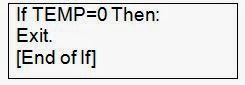
7.Selective statements or conditional statements can be written using If-Then:,  If-Then:   Else:. The relational operators >,>=<,<=,<>,= can be used for greater than, greater than or equal, less than, less than or equal, not equal, equal respectively. For logical connection of two conditions AND, OR can be used. NOT can be used to negate the condition.


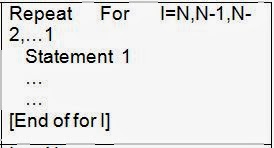
8.Repetitive or Iterative statements can be written between Repeat For … [Endo For] or Repeat While …[End of While]. Repeat For is used for the purpose of repeating the statements for fixed number of times    where as Repeat while is used to repeat the statements till a condition is true.


9.Exit is used terminate the Algorithm and Return may be used to return a value from the algorithm.

Or   


10.The array elements can be referred by means of the Name of the array and subscript in a pair of square brackets. The fields of a static struct can be referred by means of placing the name of the struct variable, a. (dot) and field name. The fields of a dynamic struct can be referred by means of placing the name of struct variable,        (arrow) and field name. The arrow operator is framed as a combination of – (minus) and > (greater than operators).
           e.g. LIST[1], LIST[I], LIST[J] etc.
                  NODE--->LINK, NODE--->INFO etc.
                  EMP.ENO, EMP.SALARY etc.      

Wednesday, January 29, 2014

Character and Boolean Data Types used in Java Programming

Java programming have some more data types for storage of single character and even true/false values. These data types are called Character and Boolean in programming language.

Character Type

The character data type (char) data type of Java is used to store characters. A character in Java can represent all ASCII (American standard Code for Information Interchange) as well as Unicode characters.

The Unicode character representation code can represent nearly all languages of world such as Hindi, English, German, French, Chinese, and Japanese etc. And because of Unicode character, size of char data type of Java is 16 bits i.e., 2 bytes in contrast to 1 byte characters of other programming languages that support ASCII.

  • Type: Char (Single Character)
  • Size:   16bits (2 bytes)
  • Range: 0 to 65536

Boolean Type

Another type of the primitive data type is Boolean. A Boolean value can have one of two values: true or false. So this data type is used to store such type of values.

In a Java program, the words true and false always mean these Boolean values. The data type Boolean is named after a nineteenth century mathematics- George Boole, who discovered that a great many things can be done with true/false value. A special branch of algebra Boolean algebra, is based on Boolean values.

  • Type: Boolean (Logical values)
  • Size:   reserve 8 bits uses 1 bit
  • Range: true or false

Following tables lists examples of various data items of different data types. Here are some examples of literal values of various primitive types:

Character and Boolean Data Types used in Java Programming


Draw graphics in ASP.NET

You can draw graphics on browser window using Graphics class. This class exists in System.Drawing namespace. It provide different types of graphics methods, such as DrawArc, DrawImage, DrawIcon, DrawLine and many more. Graphics class hold pen instance for creating graphics onto the screen.

Algorithm Behind the drawing

Step-1 : First define the graphics area on browser window using Bitmap class.
Step-2 : Create instance of Graphics class and initialize with Bitmap class instance.
Step-3 : Create Pen class object with specified color and width.
Step-4 : Create starting point and ending point using Point class.
Step-5 : Draw graphics and save into Bitmap instance.

Lets take an simple example of drawing Line , Rectangle in asp.net

 <%@ Page Language="C#" AutoEventWireup="true" CodeFile="Default3.aspx.cs" Inherits="Default3" %>

<!DOCTYPE html PUBLIC "-//W3C//DTD XHTML 1.0 Transitional//EN" "http://www.w3.org/TR/xhtml1/DTD/xhtml1-transitional.dtd">

<html xmlns="http://www.w3.org/1999/xhtml">
<head runat="server">
    <title></title>
</head>
<body>
    <form id="form1" runat="server">
    <div>
    
    </div>
    <asp:Image ID="Image1" runat="server" Height="83px" Width="95px" />
    </form>
</body>
</html>

CodeBehind Code Draw Rectangle

using System;
using System.Collections.Generic;
using System.Linq;
using System.Web;
using System.Web.UI;
using System.Web.UI.WebControls;
using System.Drawing;
using System.Drawing.Imaging;

public partial class Default3 : System.Web.UI.Page
{
    
    protected void Page_Load(object sender, EventArgs e)
    {
         Bitmap bmp = new Bitmap(500,200);  
        Graphics g = Graphics.FromImage(bmp);  
        g.Clear(Color.Green);
        Pen p1 = new Pen(Color.Orange, 3);

        g.DrawRectangle(p1, 20, 20, 80, 40);

        string path = Server.MapPath("~/Image/rect.jpeg");
        bmp.Save(path, ImageFormat.Jpeg);

        Image1.ImageUrl = "~/Image/rect.jpeg";


        g.Dispose();
        bmp.Dispose();

    }
}

Code Generating the following output

Draw Rectangle in asp.net

CodeBehind Code for Draw Line

using System;
using System.Collections.Generic;
using System.Linq;
using System.Web;
using System.Web.UI;
using System.Web.UI.WebControls;
using System.Drawing;
using System.Drawing.Imaging;

public partial class Default3 : System.Web.UI.Page
{
    
    protected void Page_Load(object sender, EventArgs e)
    {
         Bitmap bmp = new Bitmap(500,200);  
        Graphics g = Graphics.FromImage(bmp);  
        g.Clear(Color.Green);
        Pen p1 = new Pen(Color.Orange, 3);
        
        g.DrawLine(p1, 20, 20, 100, 100);
        string path = Server.MapPath("~/Image/line.jpeg");
        bmp.Save(path, ImageFormat.Jpeg);

        Image1.ImageUrl = "~/Image/line.jpeg";


        g.Dispose();
        bmp.Dispose();

    }
}

Code Generating the following output

Draw line in asp.net

© Copyright 2013 Computer Programming | All Right Reserved