-->

Tuesday, September 23, 2014

Adjacency matrix representation in Graph

Pictorially it is very the graph can be represented very easily and analysis can be done quite normally. But there is no direct pictorial data structure available to represent the graph. The basic data structure serve the purpose to store the graph in the memory. The data structures two-dimensional array and linked list most commonly used to represent the graphs. If the graph is represented using two dimensional array then the representational is called as "adjacency matrix representation" and if the linked list is used to represent the graph then the representation is called as "adjacency list representation".

Adjacency Matrix Representation:

A two dimensional array of size nxn can be used to represent the graph where 'n' is the number of vertices of the graph. 'n' number of rows are used to represent the vertices and 'n' number of columns are used for each vertex. The matrix entries depend on the type of graph. If the graph is undirected or directed then each row for the respective vertex contains the number of direct paths to each vertex is entered in the matrix. If the graph is weighted graph then the matrix entries for each row will be the weight of the edge to other vertices is entered as matrix entry. Consider the following undirected graph:

Adjacency matrix representation in Graph


In the given graph, the node 2, 4 and 6 are adjacent to 1(there exist a direct path). So, in the adjacency matrix the row entry for vertex 1 contains '1' for each column representing vertices 2, 4 and 6 and rest of the entries will be 0 for that row. Similarly the row for vertex 2 contains entry '1' for column 1 and 5, '0' for 2, 4 and 6. You can note that 1 and 5 are adjacent nodes of vertex 2. In our all discussions node and vertex are synonyms. The complete adjacency matrix is:

Adjacency matrix representation in Graph


In the above adjacency matrix each row is used for each node and each column is used for each node. Adj ij entry will be 1 if node 'i' is adjacent to 'j' otherwise it is 0 where 'Adj' is adjacency matrix, 'i' represents rows for nodes 1,2,3,4,5,6 and 'j' represents columns for nodes 1,2,4,5,6.

Consider the following digraph:

directed graph with adjacency

Nodes 2 and 6 are adjacent nodes of 1. Node 5 is the only adjacent node of 2. Nodes 1 and 5 are adjacent node 4. Node 6 is the adjacent node of 5. There are no adjacent nodes of node 6 it means it is not possible to move from node 6 to any other nodes of the graph (no direct path). So, the adjacency matrix is:

Adjacency matrix representation in Graph


The adjacency matrix of a directed graph is not always symmetric whereas the adjacency matrix of an undirected graph is always symmetric. So, determination of only upper triangle of the adjacency matrix is more than enough for an undirected graph.

Consider the following weighted graph:

Consider the following weighted graph

In the adjacency matrix of the above weighted graph the entries are the respective weight of the edges of the adjacent nodes if any exists otherwise it will be '∞' (unknown weight). So, the adjacency matrix is:
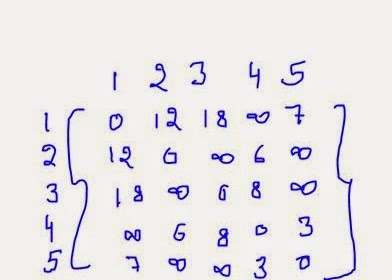
Adjacency matrix representation in Graph

Monday, September 22, 2014

How to use Case and While statement in Batches: SQL

Database developer can use the CASE as well as While statement in situation where several conditions need to be evaluated.

Using CASE statement

The CASE statement evaluates a list of conditions and returns one of the possible results. You can use the IF statement to do the same task. However, you can use a CASE statement when there are more than two conditions that check a common variable for different values. The syntax of the CASE statement is:

CASE
WHEN Boolean_expression THEN expression
[ [WHEN Boolean_expression THEN expression] […..] ]
[ELSE expression]
END
Where,
  • Boolean_expression specifies a bollean expression that is evaluated when using the CASE construct.
  • Expression is the resultant expression that is executed when the Boolean expression evaluates to TRUE. This can be a constant, a column name, a function, a query, or any combination of arithmetic, bit-wise, and string operators.

In a simple CASE construct, a variable or an expression is compared with the Boolean expression in each WHEN clause. If any of these expressions evaluate to TRUE, then the expression specified with the THEN clause is executed. If the expression does not evaluate to TRUE, the expression with the ELSE statement is executed.

Consider the following example where a case construct is included in the SELECT statement to display the marital status as ‘Married’ or Single’:

SELECT EmployeeID, ‘Marital status’ =
CASE MaritalStatus
WHEN ‘M’ THEN ‘Married’
WHEN ‘S’ THEN ‘Single’
ELSE ‘Not specified’
END
FROM HumanResources.Employee
GO

Using the While Statement

You can use the WHILE statement in a batch to allow a set of T-SQL statement to execute repeatedly as long as the given condition holds true. The syntax of the WHILE statement is:

WHILE Boolean_expression
{sql_statement | statement_block}
[BREAK]
{sql_statement | statement_block}
[CONTINUE]
Where,

  • Boolean_expression is an expression that evaluates to TRUE or FALSE.
  • Sql_statement is any SQL statement.
  • Statement_block is a group of SQL statements.
  • BREAK causes the control to exit from the WHILE loop.
  • CONTINUE causes the WHILE loop to restart, skipping all the statements after the CONTINUE keyword.

The SQL Server provides the BREAK and CONTINUE statements to control the statement within the WHILE loop. The BREAK statement causes an exit from the WHILE loop. Any statements that appear after the END keyword, which marks the end of the loop, are executed after the BREAK statement is executed. The CONTINUE statement causes the WHILE loop to restart, skipping any statements after this statement inside the loop.

Consider the following example where the HR department of AdventureWorks, Inc. has decided to review the salary of all the employees. As per the current HR policy, the average hourly salary rate of all the employees should be approximately $20. You need to increase the hourly salary of all the employees until the average hourly salary reaches near $20. In addition, you need to ensure that the maximum hourly salary should not exceed $127.

WHILE (SELECT AVG(Rate) +1 FROM HumanResources.EmployeePayHistory) <20
BEGIN
UPDATE HumanResources.EmployeePayHIstory
SET Rate = Rate +1
FROM HumanResources.EmployeePayHistory
IF (SELECT max (Rate) +1 FROM
HumanResources.EmployeePayHistory)>127
BREAK
ELSE
CONTINUE
END

How to use Constructs in Batches for Conditional Execution: SQL

SQL Server allows you to use programming constructs in the batches for conditional execution of statements. For example, you need to retrieve data based on a condition. If the condition is not satisfied, a message should be displayed.

The SQL Server allows you to use the following constructs to control the flow of statements:

  • IF…..ELSE statement
  • CASE statement
  • WHILE statement

Using the IF….ELSE Statement

You can use the IF…..ELSE statement for conditional execution of SQL statements. A particular action is performed when the given condition on evaluates to TRUE and another action is performed when the given condition evaluates to FALSE.
The syntax of IF….ELSE statement is:

IF Boolean_expression
{sql_statement | statement_block}
ELSE
{sql_statement | statement_block}]
Where,

  • Boolean_expression specifies the condition that evaluates to either TRUE or FALSE. Sql_statement specifies a T-SQL statement.
  • Statement_block is a collection of T-SQL statements.

The following example retrieves the pay rate of an employee from the EmployeePayHistory table to a variable, @Rate. The value of the @Rate variable is compared with the value 15 by using the <(less than) comparison operator. Based on the condition, different messages are displayed.

DECLARE @Rate money
SELECT @Rate = Rate FROM HumanResources.EmployeeHistory
WHERE EmployeeID = 23
IF @Rate < 15
PRINT ‘Review of the rate is required’
ELSE
BEGIN
PRINT ‘Review of the rate is not required’
PRINT ‘Rate =’
PRINT @Rate
END
GO

In the preceding example, the IF statement checks if the rate variable is storing a value less than 15. If the result is true, the PRINT statement displays “Review of the rate is required” else it displays “Review of the rate is not required”. Further, the next PRN statement displays the value of the rate.

Consider another example, where a check is performed to see the existence of the sales department. If the Sales department exists, all the details are displayed otherwise, a user-defined message is displayed.

IF EXISTS (SELECT * FROM HumanResources.Department WHERE Name = ‘Sales’)
BEGIN
SELECT * FROM HumanResources.Department WHERE Name = ‘Sales’
END
ELSE
PRINT ‘Department details not available’
GO

How to Change Default Behaviour of element in jQuery

Earlier article was about installing and embedding jQuery on our web-pages, and then using jQuery selectors to perform some events. These events can be easily written on the same page or may be in another javascript file having extension (js).

jQuery provides simple function to prevent the default behavior of any event on the web page. I have an anchor tag on the page and on the click on that tag I am redirecting the user on the jQuery.com website.

Now to cancel this redirection programmer can use:

$( document ).ready(function() {
    $( "a" ).click(function( event ) {
               event.preventDefault();
    });
});

The above code will can cancel all the redirection of all the anchor tag on the page. If you want to prevent the behavior for some specific element then use their id or may be class selector. Selectors have discussed in earlier article, you can get more help out there.

Let’s suppose we have a form filling out all the details by the user and at the last there is a submit button to post the form data to controller. Now we don’t want to post data then we can use this simple jQuery code:

$( document ).ready(function() {
    $( "#btnSubmit" ).click(function( event ) {
               event.preventDefault();
    });
});

Now we have some more buttons or may be anchor tag to be used on the form but don’t want their click event or redirection on their click. Add any class for each of the anchor element whichever click event you want to cancel and write the following code:

$( document ).ready(function() {
    $( ".className" ).click(function( event ) {
               event.preventDefault();
    });
});

Saturday, September 20, 2014

Implementing Batches in SQL Server and Guidelines

As a database developer, you might need to execute more than one SQL statement to perform a task. For example, when a new employee joins AdventureWorks, Inc., you need to insert the employee details in the database. The details of the employees are stored in more than one table. Therefore, you need to execute an insert statement into store the details in each table. In such a case, you can send all the SQL statements together to the SQL Server to be executed as a unit. This helps in reducing the network traffic.

Creating Batches

A batch is a group of SQL statements submitted together to the SQL Server for execution. While executing batches, the SQL Server compiles the statements of a batch into a single executable unit called an execution plan. This helps in saving execution time.

Consider an example. You have to execute 10 statements and you are executing them one by one by sending 10 requests. This process takes time if your queries are in queue. All statements together in a batch, then the execution process becomes faster as all the statements are sent to the server together.

To create a batch, you can write multiple SQL statements followed by the keyword GO at the end, as shown in the following listing:
<T-SQL Statement1>
<T-SQL Statement2>
<T-SQL Statement3>
…. . .
GO

GO is a command that specifies the end of the batch and sends the SQL statements to an instance of the SQL Server.

Consider an example. If you want to store the details of new employees in the Adventure Works database, you can create the following batch:

INSERT INTO [AdventureWorks]. [Person]. [Contact]
VALUES (0, null, ‘Robert’, ‘J’ ‘Langdon’, NULL
,’rbl@adventure-works.com’, 0, ‘1 (11) 500 555-0172’
,’9E685955-ACD0-4218-AD7F-60DDF224C452’, ‘2a31OEw=’ , NULL
, newid( ), GETDATE ( ) )
INSERT INTO [AdventureWorks]. [HumanResources] . [Employee]
VALUES (‘AS01AS25R2E365W’, 19978, ‘robert1’, 16, ‘Tool Designer’,
‘1972-05-15’, ‘S’, ‘M’, ‘1996-07-31’, 0, 16, 20, 1, newid ( ) ,

When a batch is submitted to the SQL Server, it is compiled to create an execution plan. If any compilation error occurs, such as a syntax error, the execution plan is not created. Therefore, none of the statements in the batch is executed. However, after the execution plan is created, if a run-time error occurs, the execution of the batch stops. In such a case, the statements executed before the statement that encountered the run-time error are not affected.

Using Variables

While creating batches, you might need to save some values temporarily during the execution time. For example, you might need to store some intermediate values of calculations. To store the intermediate values, you can declare variables and assign values to them. You can declare a variable by using the DECLARE statement. The syntax of the DECLARE statement is:

DECLARE @variable_name data_type

Variables that are declare in a batch and can be used in any statement inside the batch are called local variables.
The following code declares a variable, @Rate, and assigns the maximum value of the Rate column from the EmployeePayHistory table to the variable:

DECLARE @Rate int
SELECT @Rate = max (Rate)
FROM HumanResources.EmployeePayHistory
GO
In the preceding example, the @Rate variable is declardd and used to store the maximum value of the Rate column. The max aggregate function is used to retrieve the maximum pay rate from the EmployeePayHistory table. The GO keyword is used to send all the statements together to the SQL Server.

Displaying User-Defined Messages

At times, you need to display user-defined messages or values of variables when the batch is executed. For this, you can use the PRINT statement, as shown in the following batch.
The following code displays the value of the rate variable by using the PRINT statement.

DECLARE @Rate int
SELECT @Rate = max (Rate)
FROM HumanResources.EmployeePayHistory
PRINT @Rate
GO
You can also use comment entries in batches to write a description of the code. This will help understand the purpose of the code. A comment entry can be written in two ways:

  • Multiple line comment entries enclosed within /* and */
  • Single line comment entry starting with – (double hyphens).

Guidelines to Create Batches

While crating batches, you need to consider the following guidelines:

  • You cannot combine statements, such as CREATE DEFAULT, CRATE FUNCTION, CREATE PROCEDURE, CREATE RULE, CREATE TRIGGER, and CREATE VIEW with other statements while creating a batch. Any statement that follows the create statement is interpreted as part of the definition.
  • You can use the EXECUTE statement in a batch when it is not the first statement of the batch, otherwise the EXECUTE statement works implicitly.
In addition, you need to consider the following restrictions:
  • You cannot bind rules and defaults to columns and use them in the same batch.
  • You cannot define and use the CHECK constraint in the same batch.
  • You cannot drop objects and recreate them in the same batch.
  • You cannot alter a table by adding a column and then refer to the new columns in the batch created earlier.


How to add jQuery to Web Pages: MVC

Programmer must include jQuery library on the web pages (views in case of MVC) to be execute all the functions/event/triggers written for that page in jQuery.  This article will lists all the options may be used to use jQuery on the pages.

To include jQuery there are two options which are basically used:
  • Include jQuery from google
  • Download and then add a reference on your page. (www.jQuery.com)

All the js files have two versions and can be downloaded through the website given above:
  • Development version:  uncompressed and readable, used for testing purpose
  • Production version: compressed and not readable, used on live sites.

@Scripts.Render(“http://ajax.googleapis.com/ajax/libs/jquery/1.11.1/jquery.min.js”)

In earlier article, we have studied about layout files and a simple view file that is used to render styles/scripts on the pages in MVC. So to include jQuery or any other file on the page we have two ways i.e.
  • Add reference on view: adding a reference on the view individually will only enable jQuery for that page. If you want to use it on another page then you have to add it on that page also.
  • Add reference on layout: as we all know, layout file is the basic structure for all the pages including that layout. So adding a reference on layout can be used for all the pages following that layout.

Earlier article was about to use selectors on the page but without adding this reference, you can’t use those. In next article we will discuss about jQuery syntaxes.

Graph Introduction

Graph is a non-linear data structure which is a collection of nodes also called as vertices and edges also called as arcs. So, if 'G' is a Graph mathematically it is represented as, G=(V,E) where 'V' is the non empty set of vertices 'E' is the set of edges. The edge if it exists in the graph connects any two nodes only. There may be more than one edge connecting the same nodes. If the edges in a graph show direction then such edges are called as directed edges and the graphs containing such directed edges are called as directed graphs or simply digraphs. If the graph contains undirected edges (represented by straight lines) then it is called as undirected graph or simply graph.

 undirected graph

Set of vertices, V={A,B,C,D,E,F,G}
Set of edges, E={AB,AD,AF,BC, CE, DE, EG, FG}

In undirected graph the edge AB is similar to BA. Only one representation is considered. But in a directed graph the edge AB means, the edge starts from A and ends in B.
Directed Graph or digraph:
Directed Graph or digraph

Set of vertices, V={A,B,C,D,E,F,G}
Set of edges, E={AB,AD,CB,DE,EC,EG,FG,FA}
Scenario: A person moves from pilani to Jaipur by road. From Jaipur he reaches Delhi via Bharatpur. The person comes back to pilani via chandigrah.
How many places the person has visited? How much distance he has covered? How much time he takes to make a tip?
To answer all these questions it is necessary to go through the scenario many a times. If the same scenario is represented pictorially then answering the questions will be very easy. That is what the major benefit of graph is. See the following representation.

The above representation is a graph from which we can instantly say the person visited 4 places from pilani. If we mark the edges by means of either distance or time required to reach then the graph becomes weighted graph. See the following graph where the edges are marked with distances in kilometers.
weighted digraph

 From the above weighted graph we can easily say that the person has traveled 710 kilometers. If the edges are labeled with time as weight we can easily calculate the time required to cover the places. In the above graph there exists route from Pilani to Jaipur then vice-versa is also true. So, in undirected graph an edge is a two-way edge. But in case of digraph the edge if exists represents one-way.
Consider the following undirected graph:

Set of vertices, V={1,2,3,4,5,6}
Set of edges, E={12,14,16,23,35,45,56}, Number of edges=7
Degree of any vertex is total number of incident edges. So, in the graph degree of vertex 1 is 3, 2 is 2, 3 is 2, 4 is 2, 5 is 3 and vertex 6 is 2. Sum of degree of all vertices of graph is 14. The sum is always even. Number of edges in the graph is equal to 7. Therefore we can derive a relation between number of edges in a graph and sum of degree of vertices of graph. The relation is:
Number of edges in graph = 1/2 (Sum of degree of vertices)

      
Number of edges in graph


where m is number of edges of a graph, d(V)The same relation holds true for digraph also. In a digraph degree of a vertex is equal to sum of in degree and out degree.
In degree of a vertex is equal total number of edges entering into the vertex and out degree is equal to total number of edges going out of the vertex.
In the above graph there exists an edge from vertex 1 to 2. There is no direct edge existing from 1 to 3. But it is possible to move to 3 from 1 via 2. It is called as path. In a directed graph if the path terminates in a start node then it is cycle. There are 3 paths from node 1 to node 5. They are 1-2-3-5, 1-4-5 and 1-6-5. The path 1-2-3-5 is a collection of paths 1-2, 2-3 and 3-5. In a graph if two nodes are directly connected then there exists a direct path. If there exists an edge from one vertex 'i' to other vertex 'j' then node 'i' and 'j' are called as adjacent nodes. From the above graph we can list the adjacent nodes of each vertex as:
Graph Introduction

© Copyright 2013 Computer Programming | All Right Reserved