-->

Thursday, February 19, 2015

Pointer Declaration and Definition in c language

In C language, we know that all the variables should be declared before they are used. Pointer variable should also be declared before their use. The syntax to declare a pointer variable is shown below.

type *  identifier;

Type : type can be any datatype such as int, float , char etc. It may be derived or user defined data type also.
*       : The asterisk (*) in between type and identifier tells that the identifier is a pointer variable.
Identifier : Name given to the pointer variable. 

Example -1 : Consider the following declaration:
int * p;
The above declaration can be read as "p is pointer to integer variable" and this declaration informs the following points:


  • The variable p is a pointer variable. So, it should contain the address of variable during execution.
  • The type int refer to the type of the variable stored in pointer variable p i.e. the pointer variable p should contain address of an integer variable.

Example-2 : Consider the following declaration:
double *pd;
This declaration informs the compiler that pd is a pointer variable and can hold the address of a variable of type double.


Example-3 : In the declaration, the position of * is immaterial. For example, all the following declaration are same:
int *pa;
int * pa;
int*  pa;
Any of the above declaration informs that the variable pa is a pointer variable and it should contain address of integer variable.


Example-4 : Consider the multiple declaration as shown below:

int* pa,pb,pc;

Note : Here, we may wrongly assume that the variables pa, pb amd pc are pointer variables. This is because * is attached to int. This assumption is wrong. Only pa is a pointer variable, whereas the variables pb and pc are ordinary integer variables. For better readability, the above declaration can be written as shown below:

int *pa, pb, pc;

Now, we can easily say that pa is a pointer variable because of * operator, whereas pb and pc are integer variables and are not pointer variables. It is still better if the variable are declared in separated lines as shown below:
int *pa;
int pb;
int pc;


Initializing a pointer variable in C Language

Initializing a pointer variable

Initialization of a pointer variable is the process of assigning the address of a variable or memory to a pointer variable. The initialization of a pointer variable can be done using following three steps :
Step-1 : Declare a data variable.
Step-2 : Declare a pointer variable.
Step-3: Assign address of a data variable to pointer variable using & operator and assignment operator.
Note that the Step1 and 2 can be interchanged i.e. we can first declare a pointer variable, then declare a data variable and then initialize the pointer variable.

Example : Consider the following three statements:
int x; /* Step-1 : x is declared as a data variable */
int *px ; /* Step-2: px is declared as a pointer variable */
px= &x; /* Step-3 : copy address of data variable to pointer variable */
....
.....
Here , the variable x is declared as integer data variable. Since px is pointer variable of type integer, it should contain address of integer variable. So, using the statement : px = & x;
the valid address is stored in the pointer variable and hence the pointer variable px is initialized.

Example: Consider the following three statements:
int x ;  int *px; px=&x;
The above three statements can also be written as shown below:
int x;    int *px=&x;
Note : It is also possible to combine the declaration of data variable, pointer variable and initialization of pointer variable in one step as: int x, *px=&x;
Here, x is declared as a data variable, px is declared as pointer variable and px is initialized to address of data variable x.

Example : Consider the following statements:
int p, *ip;
float d,f;
ip=&p;  /* Valid Initialization */
..............
ip=&d;   /* Invalid initialization */
Note: First initialization is valid. In the second initialization , ip is a pointer to integer. So , it should contain address of integer variable. But , address of floating point variable d is stored in ip and hence it is invalid.

Example : Pointers are flexible i.e. a pointer can point to different data variables by storing the address of approximate variables. Consider the following declaration:
int x=10, y=20,z=30;
int *p;

p= &x;

.........
p=&y;
.........
p=&z;
..........

Note : It is observed from above example that the pointer variable p points to different memory location by storing the addresses of different variables. Thus, same pointer can be pointed to different data variables.


Initializing a pointer variable in C Language


NULL Pointer in C language

Introduction

Definition : A NULL pointer is defined as the special pointer value that points to nowhere in the memory. If it is too early in the code to assign a value to the pointer, then it is better to assign NULL (i.e., \0 or 0) to the pointer.


For example , consider the following code:

#include<stdio.h>
int *p=NULL;
Here, the pointer variable p is a NULL pointer, this indicates that the pointer variable p does not point to any part of the memory. The value for NULL is defined in the header file "stdio.h". Instead of using NULL, we can also use '\0' or 0. The programmer can access the data using the pointer variable p if and only if it does not contain NULL. The error condition can be checked using the following statement:
if(p==NULL)
printf("p does not point to any memory\n");
else
{
printf("Access the value of p\n");
......................
}
Note : A pointer variable must be initialized. If it is too early to initialize a pointer variable, then it is better to initialize all pointer variables to NULL in the beginning of the code. This avoids unintentional use of an un-initialized pointer variable.

Example :  Consider the following statements:
int *x;
int y;
x=y;   /* Error*/
Note :  The value of data variable can not be assigned to a pointer variable. So, the statement x=y; result in an error . The correct statement is x=&y;

Pointer to Pointer in C language

Introduction

Definition : It is possible to make a pointer to point to another pointer variable. A variable which contains address of a pointer variable is called pointer to a pointer. For example, consider the following declarations:

int a;
int *p1;
int *p2;

  • The first declaration instructs the compiler to allocate the memory for the variable a in which integer data can be stored.
  • The second declaration tells the compiler to allocate a memory for the variable p1 in which address of an integer variable can be stored.
  • The third declaration tells the compiler to allocate a memory for the variable p2 in which address of a pointer variable which points to an integer can be stored. The memory organization for the above three declaration is shown below:
Pointer to Pointer in C programming


Example: Memory organization after executing following assignment statement:
a=10;
p1=&a;
p2=&p1;

The memory organization after executing the statement a=10 is shown below:


The memory organization after executing the statement a=10


The memory organization after executing the statement p1=&a is shown below:

The memory organization after executing the statement p1=&a

The memory organization after executing the statement p2=&p1 is shown below:


The memory organization after executing the statement p2=&p1

The data item 10 can be accessed using three variables a, p1 and p2 as shown below:
a    refers to the data item 10
*p1 Also refers to the data item 10. Here, using p1 and only one indirection operator, the data item 10 can be accessed.
**p2  Also refers to the data item 10. Here, using p2 and two indirection operators the data item 10 can be accessed (i.e., *p2 refers to p1 and **p2 refers to a)


Floating point constant in C language

Floating point constant

Definition: The numeric values having fractional part are called floating point constants. All  negative Numbers should have prefix ‘- ’. A positive number may have a ‘+’ sign that is optional. Other
Character  are not allowed . The floating point constant can be represented using two forms as:

1. Fractional form
2. Exponent notation(Scientific notation)

Fractional from: Now, let us see  ‘‘how to represent floating point numbers using fractional form?  Explain giving examples.’’ A floating point number represented using fractional form has an integer part followed by a decimal point and a fractional part. We can omit the digits before the decimal point or after the decimal point. For example, 0.5, -0.99, -6, -9,+.9 etc all are valid floating point numbers.

Exponent notation (Scientific notation): Now , the question is ‘‘How to represent floating point numbers in scientific notation? Give examples.’’ The floating point number represented using Scientific notation (also called exponential notation) has three parts namely:
                          (part1)             (part2)                 (Part 3)
                         mantissa             e or E                  exponent


  • The mantissa can be an integer or a floating point number represented using fractional Notation.The letter e or should follow mantissa.
  • The exponent should follow e or E. The exponent has to be an integer ‘‘with optional ‘+’
  • Sign’’ or ‘- ’ sign.


The following table shows invalid floating point numbers. The reasons for invalidity are also shown:


Floating point/ Real Constant
Valid / invalid
Reasons for invalidity
22.0/7
Invalid
/ is not allowed.
120
Invalid
There is no decimal point.
6.5e 8
Invalid
White space is not allowed between e and 8.
1.2.3
Invalid
More than one decimal point is not allowed.
2.123,4
Invalid
Comma is not allowed
10.5e-6.9
invalid
Fractional part 6.9 is not allowed in exponent part.

Primitive data types in C language

Introduction

Definition : “Basic data types are those that are not composed of other data types.

Primitive Data types are:

  • int
  • char
  • float
  • double
  • void
Note: The primitive data types are also called basic data types or simple data types or
fundamental data types.

int

It is a keyword which is used to define integer numbers. Normally they are associated with the
Variables to store singed integer values in memory  locations. That is, using this data type both
Positive and negative numbers can be stored in the memory . To represent only unsigned numbers
it is normally associated with a qualifier unsigned.
For example, unsigned int is used to define only positive numbers. Negative numbers cannot be
Stored if a variable is associated with unsigned int. the size and the range of integer vary from
Machine to machine as shown below:


n- bit machine
Size of int
Range of unsigned int
0 to 2n -1
Range of signed int
-2n-1 to 2n-1 -1
16-bit machine
2 bytes
0 to 216-1
Or
0 to 65532
-215 to 215-1
Or
-32768 to 32767
32-bit machine
4 bytes
0 to 232-1
Or
0 to 4294967295
-231 to 231 -1
Or
-2147483648 to 2147483647


Float

 It is a keyword which is used to define floating point numbers. The floating point numbers are Also called real numbers. Normally they are associated with the variables (also called identifiers) To store floating point numbers in memory locations. That is , using this data type both positive And  negative floating point numbers can be stored in the memory.

 Double

It is a keyword which is used to define  high precision floating point numbers Normally they are       Associated with the variables to store large floating point numbers in memory locations. That is, Using this data type both positive and negative large floating point numbers can be stored in the Memory.

Char

 It is a keyword which is used to define single character or a sequence of character called string.
Normally , They are associated with the variables to store a character or a string  in  memory
Locations. Each character stored in the memory is associated with a unique value called an ASCII
(American standard Code For Information Interchange) value.

Void

It is an empty data type. It is normally used in functions to indicate that the function does not
Return any value. Since no value is associated with this data type, it does not occupy any space
in the memory. Normally, it is not associated any variable (except pointers).

Table- Size and Range of Data types on a 10-bit machine.

Type
Size (bits)
Range
Format
Char of signed char
Unsigned char
Short signed int
Shot unsigned int
Signed int
unsigned int
long signed int or long int
long unsigned int
Float
double
long double
8
8
16
16
16
16
32
32
32
64
80
-128 to 127
0 to 255
-32768 to +32767
0 to65535
-32768 to +32767
0 to 65535
-2147483648 to +2147483647
   0 to 429467295
-3.4e38 to +3.4e38
-1.7e308 to +1.7e308
-1.7e4932 to +1.7e4932
%c
%c
%d
%u
%d
%u
%ld
%lu
%f
%lf
% lf

Tuesday, February 17, 2015

Structure in C language

Introduction to structures


We know that an array is a collection of similar data items such as int, float, char etc. If more number of Data items of same data type are grouped, we normally use arrays. For example, the marks of 6 students can be stored using array as shown below:

Int marks[6]={86,99,95,93,87,91};

The ordinary variables and arrays can handle variety of situations. But, in real world, we often deal with entities that are collection of dissimilar data types. For example, suppose we want to have the data related to a student. We may be interested in:
  • Name of the student            (char array, string type)
  • Roll number                        (int type)
  • Average marks                    (float type)
Note that the above data is a collection of various items of dissimilar data types(heterogeneous). So, arrays cannot be used (because, array is a collection of similar data types, homogeneous in nature). This is where, the structure are used.

Structure and its definition


Now, we shall see “ what is a structure? What is the syntax of a structure?”
Definition : A structure is defined as a collection of logically related (generally heterogenous) Variables under a single name. All these variables may contain data items of similar or dissimilar
Data types. Using these variables each item of a structure can be selected. Each variable in the
Structure represents an item and is called member or field or element of the structure. Each field
Has a type.


The general format or syntax of a structure is shown below:

Structure in C Programming


Where
  • Struct is keyword which tells the compiler that a structure is being defined.
  • Member1, member2,… are called members of the structure. They are also called fields or Elements of the structure.
  • The members are declared within curly braces. It is called body of the structure. The Members can be any of data types such as int, char, float etc.
  • There should be semicolon at the end of closing brace.
Example: Structure definition for storing student data.
Assume the student data consists of the following:
  •    Name of the student: Name is made up of sequence of characters. Ex: “Jecob Lefore”
  •    Roll number: It is of type integer Ex:1101
  •    Average marks: It is of type float Ex: 93.45
Since the above information is related to student and all the above information is logically related to
A student, we can use the structure. The structure definition to hold the information of student is
Shown below:
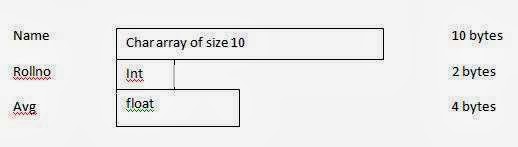
                               Struct student
                               {
                                          Char name [10];
                                          Int    rollno;
                                          Float   avg;
                             };
In the above example, observe the following points:

  • Struct is the keyword.
  • Student is called the name of the structure. The name of the structure is also called structure tag.
  • Name, rollno and avg are called fields of the structure. They are also called members of Structure and are associated with data types char, int and float.

The structure definition does not reserve any space  in memory for the members. So, it is called a  structure template and memory will  not be allocated for the template. This is pictorially represented as shown below:

structure template and memory will  not be allocated for the template

                                                          
Note : the various items in a structure can be same or different data types. But, all the items should be logically related. Do not combine un-related data.

For example, for the above structure definition, let us have filed number_of_wheels. The field number_of_wheels is in no way related to student data and hence has to  be avoided.
© Copyright 2013 Computer Programming | All Right Reserved