-->

Tuesday, March 3, 2015

How to bind label and text box control using edmx file in windows form c#

In previous article we have already learn about bind label or text box using ado.net. Today, i will discuss about edmx file. If you want to bind label or text box in windows form, edmx file is the best solution for this type of problem. There are following steps to bind the label or text box:

I am giving you a whole code video for user friendly: 

  1. First to add some label and text boxes in the form Like:
How to bind label and text box control using edmx file in windows form c#

  1.  Now, add edmx file in the solution
  2. Now, copy this code and paste in the button click event handler block.

 private void button1_Click(object sender, EventArgs e)
        {
            int id = Convert.ToInt32(idtxt.Text);
            Student_DBEntities dc = new Student_DBEntities();
            var getrecord = dc.Student_record.Where(a => a.Id == id).SingleOrDefault();

            Studentidtxt.Text = getrecord.Student_Id;
            studentnametxt.Text = getrecord.Student_Name;
            fathernametxt.Text = getrecord.Father_Name;
            MotherNametxt.Text = getrecord.Mother_Name;
            Addresstxt.Text = getrecord.Address;

        }
Here,
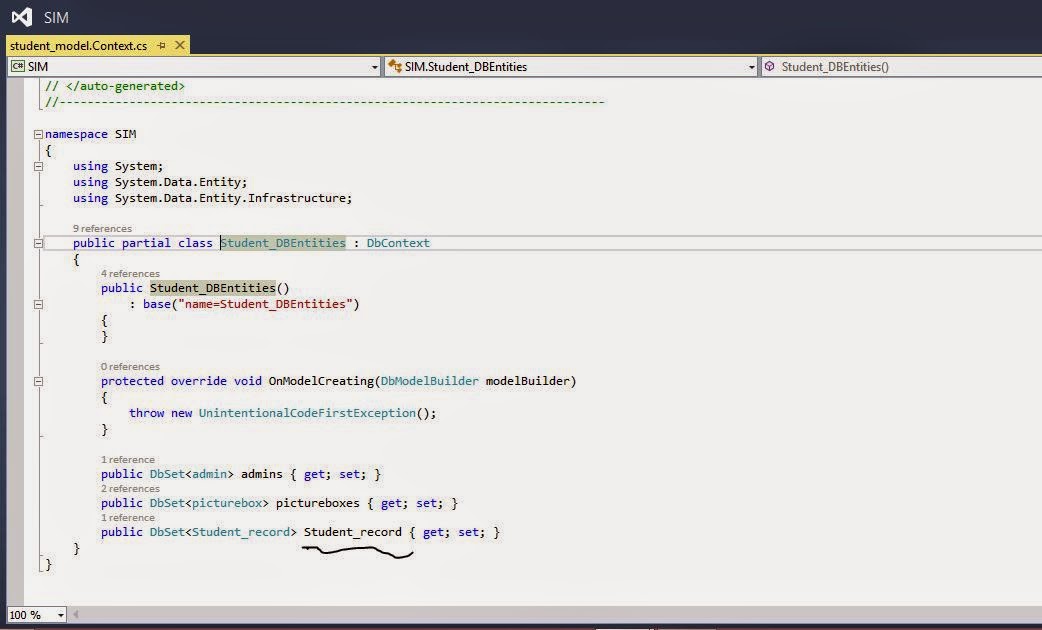
  1. Student_DBEntities is a data context name, Create a object of that class, Access public property(Student_record -Screen Shot mentioned in the link) by using instance name.
  2. Access single record with the help of where clause with lambda expression also use SingleOrDefault( ) method.
  3. By using getrecord variable you can access table fields or you can say model class fields. 
  4. Get each fields which is required by you, returning result assign in Text boxes.

Monday, March 2, 2015

How to bind ComboBox using edmx in windows form c#

Introduction

In my previous article i have already explained about bind combo box with entity framework using code first approach. also bind combo box with ado.net. Now, today i am discussing about edmx file. Before bind the combo box with edmx file , first to add edmx file in the solution or you can say project. Now, add a combo box in the form.

Copy the following code and paste in class constructor after  InitializeComponent(); method.

 Student_DBEntities dc = new Student_DBEntities();
            var item = dc.Student_record;
            comboBox1.DataSource = item.ToList();
            comboBox1.DisplayMember = "Student_Name";

Now, Code generate the following output:

How to bind ComboBox using edmx in windows form c#

The following video cover all such types of things which is mentioned in the article, i am giving you this video for better understanding:

Here,
  1. Student_DBEntities is a context class through which we can access or manipulate database record. (Check the context file in your solution).
Context class in edmx folder
  1. Student_record is a public property through which we can communicate database table.
How to bind ComboBox using edmx in windows form c#

Sunday, March 1, 2015

Difference between malloc( ) and calloc() in C language

In c language article we will see the difference between malloc() and calloc(). Both are the functions in c language. See the table which is mentioned below:


Malloc()
Calloc()
The Syntax of malloc() is :
Ptr = (data_type *) malloc(size);

The required number of bytes to be allocated is specified as argument i.e. size un bytes.
The Syntax of calloc() is :
Ptr = (data_type*)calloc(n,size);
Takes two arguments: n is number of blocks to be allocated, size is number of bytes to be allocated for each block.
Allocates a block of memory of size bytes.
Allocates multiple blocks of memory, each block with the same size.
Allocated space will not be initialized
Each byte of allocated space is initialized to zero.
Since no initialization takes place, time efficiency is higher than calloc()
Calloc() is slightly more computationally expensive because of zero filling but, occasionally, more convenient than malloc().
This function can allocate the required size of memory even if the memory is not available contiguously but available at different locations
This function can allocate the required number of blocks contiguously. If required memory cannot be allocated contiguously, it returns NULL.

Advantages and Disadvantages of pointers in C language

By this time, you might have understood the concepts of  C pointers and if any problem is given, you should be in a position to solve. After understanding the full concepts of pointers, we should be in a position to answer the question " What are the advantages and disadvantages of pointers?"

Advantages

  1. More than one value can be returned using pointer concept (pass by reference).
  2. Very compact code can be written using pointers.
  3. Data accessing is much faster when compared to arrays.
  4. Using pointers, we can access byte or word locations and the CPU register directly. The pointers in C are mainly useful in processing of non-primitive data structures such as arrays, linked list etc.


Disadvantages

  1. Un-initialized pointers or pointers containing invalid addresses can cause system crash.
  2. They are likely to be used incorrectly causing bugs that are very difficult to identify and rectify.
  3. They are confusing and difficult to understand in the beginning and if they are misused the result is unpredictable.

Saturday, February 28, 2015

Insert data into database table using edmx file in windows form c#

Introduction

In my previous article i have already explained about login control, in which i was add edmx file. Now, today we will learn about register control or you can say how to insert data into database.
Steps

  1. First to prepare database table with some fields.
  2. Create a new project in the windows form.
  3. Add edmx file in the solution.
  4. If you want to add data using input control in the database table then take some text boxes and other control in the form. Otherwise you can do this without input field--see the example, which is explained below.


Now, the model class in the entity framework is: (check your solution explorer after add edmx file in the project)


namespace WindowsFormsApplication4
{
    using System;
    using System.Collections.Generic;
    
    public partial class Student_record
    {
        public int Id { get; set; }
        public string Student_Id { get; set; }
        public string Student_Name { get; set; }
        public string Address { get; set; }
        public string Father_Name { get; set; }
        public string Mobile { get; set; }
        public string Mother_Name { get; set; }
        public string Picture { get; set; }
    }
}

Similarly you have to check the Context class which is also add with the model class in the entity data model.

Student_DBEntities sd = new Student_DBEntities();
             Student_record student_recod = new Student_record();
             student_recod.Student_Name = "jacob";
             student_recod.Mobile = "+123 123654 89";
             student_recod.Father_Name = "Bill Smith";
             student_recod.Address = "USA";
             student_recod.Mother_Name = "Ammey";
             sd.Student_record.Add(student_recod);
             sd.SaveChanges();

Here,


  1. Student_DBEntitties is a context class, through which we can access all the record from the database table.
  2. Student_record is the model class which is defined above already.
  3. Add record by the object of the class.
  4. sd.Student_record is a public property.
  5. Update record by the SaveChanges() method.

Thursday, February 26, 2015

Custom login control using edmx file in windows forms application C#

Introduction

Login contol provide some privilege to the project or you can say its a entry point of the project. Though this form we can move to the next form. If your input text is valid then move to the next but if your input is wrong then move failed. So, the main function of the project is check each entry of the table with the TextBox.

Design login control in windows form


  1. Add Two TextBox with the label control.
  2. Add one button control with click event , Look like
login control in windows form

Add EDMX file with the help of following steps:

  1. Add ADO.NET Entity Data Model by the add new item component.
  2. Add ADO.NET Entity Data Model
  3. Now, select EF designer from database in the entity data model wizard.
  4. select EF designer from database
  5. Now create the connection by pressing the 'new connection' button , also select the check box where your connection string save into your application configuration file. Now, press to next button.
  6. Now create the connection by pressing the 'new connection' button
  7. Select entity framework version , i select 5.0 in the project.
  8. Select entity framework version , i select 5.0 in the project.
  9. Select table, views , stored procedure in the appeared window.
  10. Select table, views , stored procedure in the appeared window.
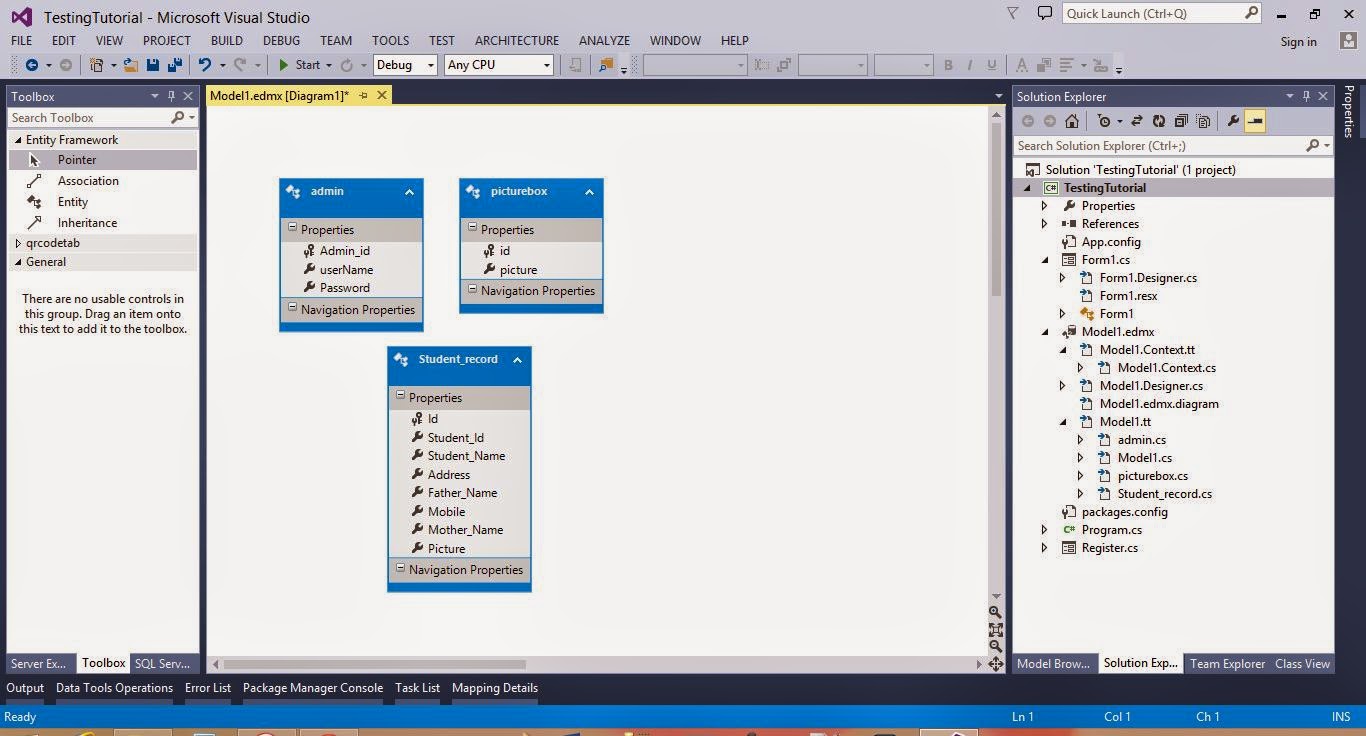
  11.  Now, your model look likeentity data model

Copy and paste the below code inside the button click event.


private void button1_Click(object sender, EventArgs e)
        {
            Student_DBEntities dc = new Student_DBEntities();
            if (usrBox.Text != string.Empty && pwdBox.Text != string.Empty)

            {
                var existuser = dc.admins.FirstOrDefault(a => a.userName.Equals(usrBox.Text));
                if(existuser!=null)
                {
                    if (existuser.Password.Equals(pwdBox.Text))
                        MessageBox.Show("Login Sucess");
                    else
                        MessageBox.Show("try again later");
                }

            }
        }

Here,
  1. Student_DBEntities is a DataContext , which is take connection string in the constructor. Also take public property of the model class, through this we can access all the data from database table.
  2. admins is the public property of data context class.
Code generate the following output - please see the video:

Sunday, February 22, 2015

C language: Searching in graph

Similar to traversal of graph two searching techniques of the graph are used which are Breadth First Search and Depth First Search. Both the techniques are same as respective traversal techniques. In case of breadth first search the traversal algorithm for breadth first is used. The algorithm is terminated with a message search successful whenever the deleted item from QUEUE is the node to be searched otherwise the algorithm is terminated with a message search unsuccessful when the QUEUE is empty. The formal algorithm for BFS is:

GRAPHBFS
[goal node is the node to be searched]
Mark the start node and insert it in the QUEUE
If the start node is the goal node Then:
Write: 'Search Successful' ; Exit
[End of If]
Repeat While QUEUE is not empty
Delete QUEUE
If deleted node is the goal node Then:
Write: ' Search successful;; Exit.
Else
Mark the unmarked adjacent nodes of the deleted node.
Insert the marked nodes(if any) of the deleted node in the QUEUE.
[End of If]
[End of While]
Write: 'Search unsuccessful'
Exit.

In case of depth first search the traversal algorithm for depth first is used. The algorithm is terminated with a message search successful whenever the popped item from STACK  is the node to be searched otherwise the algorithm is terminated with a message search unsuccessful when the STACK is empty. The formal algorithm for DFS is:

GRAPHDFT
[goal node is the node to be searched]
Mark the start node and push it on to the STACK
If the start node is the goal node Then:
Write: 'Search Successful'; Exit
[End of If]
Repeat While STACK is not empty
POP STACK.
If popped node is the goal node Then:
Write: ' Search successful'; Exit.
Else
Mark the unmarked adjacent nodes of the popped node. 
Push the marked nodes of the deleted node(if any) on to the STACK.
[End of While]
Write: 'Search unsuccessful'
Exit. 
© Copyright 2013 Computer Programming | All Right Reserved