Introduction
In this article i will show you how to open new window when we click on button using JQuery. I will give an example of it. Also do some thing like when we click on other button then opened new window will closed also mentioned in the example.
Introduction
In this article i will show you how to determine which web browser is selected for your application or you can say that how many user open your website in which web browser. Through this article i will show you Browser type, Browser version etc. Lets check the example of getting browser details using JQuery.
If you want to run your windows phone 8.1 application to your physical device or you can say phone that you can follow these instruction which is mentioned below:
1. Search windows phone developer registration 8.1 from your window start screen.
2. Register your windows phone now.
3. After successfully registration, set platform of windows phone by build menu in visual studio like:
4. Select Platform as "ARM" from Dropdown option.
5. Now, connect your phone with your computer from USB cable.
6. Run your application.
In this article i will show you how to bind dataList from database table. Also i will give an example of it. In this example i will set the orientation property of items also set columns which is appear on the web page.
The DataList Control
The DataList control is a Data bound control that display data by using templates. These templates define controls and HTML elements that should be displayed for an item. The DataList control exists within the System.Web.UI.WebControl namespace.
Now , lets take an example.
How to bind DataList Control using the SqlDataSource
Follow some steps for binding Datalist to SqlDataSource . Steps same as Previous post. Basically SqlDataSource is used to connect front-end to back-end using connection string . Connection string saved in configuration file.
Now , After establishing connection you have to use property builder through ShowSmart tag.
Select Property Builder link , Now after selected a new window will open
Introduction
In this article i will show you how to show total of all rows of GridView column. I will give you an example of this problem.Suppose you have a one numeric type columnn in your data table and you want to add all column values.Also display sum of column in footerRow of the GridView. If we think about algorithm for this type of problem. Algorithm say that first we take a Gridview with Two template field , One template field have one item template and one footer template such as
In codebehind model first we would bind GridView on page Load method. After that handle RowDataBound event . In RowDataBound event first check Row type is DataRow.
After that find income label in Gridview using findcontrol method.
if (e.Row.RowType ==DataControlRowType .DataRow)
{
var incomsal = e.Row.FindControl("incomelbl") as Label;
if (incomsal != null)
{
total += int.Parse(incomsal.Text);
}
}
Here Total is a integer variable.
Now Show Total income to footer label then you must find control from the footer row on Page_Load method
In this article i will show you , how to generate tooltip on controls using c# code. By using tooltip we can put some hints about task. I will give you an example of ToolTip in windows form c#. In this article we will use ToolTip class with their SetToolTip method.
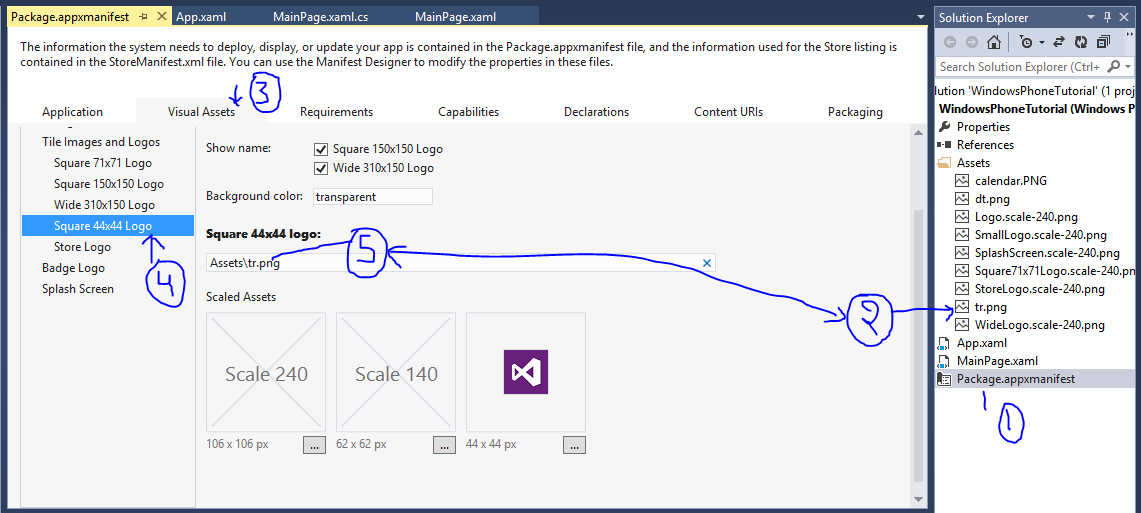
In this article i will show you how to change windows phone 8.1 app icon using manifest file. You can set your image file in place of default icon file. The default app icon file looking like cross square. I will provide you step by step guide to change the icon file or you can say image file.
Double click on Package.appxmanifest file.
Select Visual Assets tab.
Add new image in Assets folder with 44x44 resolution.