-->

Saturday, October 19, 2013

Integer Constant in C language

Integer constant 

‘‘What is an integer? Explain giving example.”

Definition: An integer constant is a whole number without any decimal point. No extra characters are allowed other than + and –sign. If + and – are present, they should precede the  number. An integer constant can be classified into three types as shown below.

Integer Constants are

Decimal : e.g: 120,14,-1, etc
Octal   : e.g : 070,012,-040, etc.
Hexadecimal : e.g. 0xBA, 0x3B etc


Now, let us explain decimal integer with example.
Definition: A decimal integer can be any combination of digits from ‘0’ to ‘9’. No extra characters are allowed other than ‘+’ and ‘–’ sign. If ‘+’ and ‘–’are present. Then they should precede the integer. For example, 100,-7,+989 etc.The following are invalid:


Decimal Integers
Validity
Reasons for Invalidity
10,000
invalid
Comma is not allowed.
0.5
invalid
Decimal point is not allowed.
10 20
invalid
Space is not allowed.
085
invalid
Should not start with the digit 0.
32768
invalid
Out of range for 16 bit machine.
-32769
invalid
Out of range for 16 bit machine.

Now let us see ‘‘What is an octal number? Explain giving example.’’

Definition: An octal integer constant can be any combination of digits from ‘0’ to ‘7’ with a Prefix 0(digit zero).No extra characters are allowed other than preceding ‘+’ and ‘- ’ sign. For Example, 01612, 034567, -0765 etc. are valid. The following are invalid:

Octal Integers
Validity
Reasons for invalidity
7,000
Invalid
Comma is not allowed.
0.075
Invalid
Decimal point is not allowed.
10 20
Invalid
Space is not allowed.
085
Invalid
8 is invalid in octal.
275
Invalid
Should have a prefix 0.


Now, let us see ‘‘What is a hexadecimal number? Explain giving example.’’

Definition: An hexadecimal integer constant can be any combination of digits from ‘0’ to ‘9’ along with the letters ‘A’ to ‘F’ or ‘a’ to ‘f’. This constant has be preceded OX or OX. For example, 0x18A, OXB, OXFFF etc. are valid. The following are invalid hexadecimal constant:

Hexadecimal Integers
Validity
Reasons for invalidity
10,000
invalid
Comma is not allowed.
0xIJ
invalid
I and J are invalid characters.
Ox123
invalid
Should be preceded with 0(zero) not O(Oh.)
O1234
invalid
Should be preceded with 0x or OX.


Note: usually decimal integers are used in programming. Octal and hexadecimal  are rarely used.
Floating point constant

Friday, October 18, 2013

How to use SqlDataAdapter Class in ASP.NET

Introduction

Represents a set of data commands and a database connection that are used to fill the DataSet and update a SQL Server database(according to msdn library). You can say that retrieved table load into DataSet.

Represents a set of data commands and a database connection that are used to fill the DataSet

SqlDataAdapter class contains different parameter or non parameter constructor such as 

SqlDataAdapter( ) // you can initiate a new instance of SqlDataAdapter class.
SqlDataAdapter(SqlCommand instance) //you can specify SqlCommand instance into the SqlDataAdapter.

Lets take a simple example to take a SqlCommand instance for retrieving data from the database and these object pass to SqlDataAdapter object.

Algorithm

Step-1 : Create a SqlConnection class object  for connecting database server.

SqlConnection con = new SqlConnection();
        con.ConnectionString =ConfigurationManager.ConnectionStrings["ConnectionString"].ToString ();

        con.Open ();


Step-2 : Create a SqlCommand Object for retrieving data columns and data rows.

SqlCommand cmd = new SqlCommand();
        cmd.CommandText = "select * from deltable";

        
Step-3 : Connect SqlCommand to SqlConnection.

cmd.Connection = con;

Step-4 : Create SqlDataAdapter Object.
Step-5 : Pass SqlCommand instance to SqlDataAdapter object.

SqlDataAdapter da = new SqlDataAdapter(cmd);

Step-6 : Create DataSet Object.

DataSet ds = new DataSet();

Step-7 : Fill DataSet by SqlDataAdapter using fill( ) method.

da.Fill(ds, "deltable");

Step-8 : Bind GridView or any other datacontrol from DataSet.

  GridView1.DataSource = ds;

        GridView1.DataBind();

Complete code

<%@ Page Language="C#" AutoEventWireup="true" CodeFile="binding.aspx.cs" Inherits="binding" %>

<!DOCTYPE html PUBLIC "-//W3C//DTD XHTML 1.0 Transitional//EN" "http://www.w3.org/TR/xhtml1/DTD/xhtml1-transitional.dtd">

<html xmlns="http://www.w3.org/1999/xhtml">
<head runat="server">
    <title></title>
</head>
<body>
    <form id="form1" runat="server">
    <asp:Button ID="Button1" runat="server" onclick="Button1_Click" Text="GetData"
        Width="123px" />
    <br />
    <div>
   
        <asp:GridView ID="GridView1" runat="server">
        </asp:GridView>
   
    </div>
    </form>
</body>

</html>
Codebehind

using System;
using System.Collections.Generic;
using System.Linq;
using System.Web;
using System.Web.UI;
using System.Web.UI.WebControls;
using System.Data.SqlClient;
using System.Configuration;
using System.Data;

public partial class binding : System.Web.UI.Page
{
    protected void Page_Load(object sender, EventArgs e)
    {

    }
    protected void Button1_Click(object sender, EventArgs e)
    {
        SqlConnection con = new SqlConnection();
        con.ConnectionString =ConfigurationManager.ConnectionStrings ["ConnectionString"].ToString ();
        con.Open ();

        SqlCommand cmd = new SqlCommand();
        cmd.CommandText = "select * from deltable";
        cmd.Connection = con;
        SqlDataAdapter da = new SqlDataAdapter(cmd);
        DataSet ds = new DataSet();
        da.Fill(ds, "deltable");
        GridView1.DataSource = ds;
        GridView1.DataBind();


    }
}
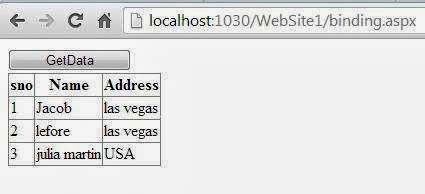
Output
How to use SqlDataAdapter Class in ASP.NET

Thursday, October 17, 2013

How to Copy File from One Location to Another: Windows Forms

Sometimes, some files are mostly used in our programming field, and we can’t use OpenFileDialog only after a minute and so on. That’s why we have to copy these files in our desired location, so that we can use them as per our requirement.

To copy a file from an existing location, we should have source path and destination path. For source path, we can use open file dialog and for destination path, we can use folder browsing path or even a path in form of string.

Generally System.IO.File namespace is used for handling file functions and events. In our previous post we have create, delete, read or write a text file. Now to copy a file from source to destination, we are just using following function:

System.IO.File.Copy("Source Path", "Destination Path", Boolean value);

This function is as simple as written above. Source and destination path is known to everyone, now the focus is on Boolean value. This Boolean parameter is deciding, whether the file should be overwriten or not. If the value of this Boolean value be
  • True: if the file exist on destination, it will overwrite that. If not exist copy that file.
  • False: if the file exist on destination, it will not copy. If not exist copy that file.
Now look out the following code, it will open an open file dialog, and then copy the selected file to our debug folder of the project.
OpenFileDialog ofd = new OpenFileDialog();
ofd.ShowDialog();
System.IO.File.Copy(ofd.FileName, Environment.CurrentDirectory + "\\"+ ofd.SafeFileName, true);

I have used the true value for Boolean parameter, means it will overwrite the file if exists. So the file has been successfully copied and we can check that using File.Exist(“Path”) function.

Sunday, October 13, 2013

Pointer constants in C language

Definition  

As we store any data (information) in our memory, the computer also stores data in its memory. The computer memory is divided into a number of location called storage cells. Each location can hold one bye of data and each location is associated with address. Let us assume size of memory is 64K where 1K=1024bytes. So , total number of memory locations =64K = 64X 1K

= 64 X 1024 bytes

=65536 locations

Logically, all 65535 locations in computer memory are numbered sequentially from 0 to 65535 but, physically they are divided into even bank and odd bank. Even bank is set of memory locations with even address and odd bank is set of memory locations with odd addresses as shown as below:

Pointer constants in C


These memory addresses are called pointer constants. We cannot change them ; but, we can only use them to store data values.
for example, in the above memory organization, the address ranging from 0 to 65535 are pointer constants.

How to Split String in Equal Parts: C#

String is a text of Unicode characters in any programming language, it can be changeable as the user want. Splitting a string means to divide a string in an array after performing some operations on it. These operation may be to remove desired character, blank spaces or find out a substring of a particular length.

A string can be split into chunks of equal size, given by the user. Create two string variable, first will contains the original string that is to be split, second string is empty and will contain the split string.

Write the following code in which for loop is used to get our desired chunk size. I am dividing the string in chunks of 4.
string stringToDivide = "abcdefghijklmnopqrstuvwxyz";
string stringAfterDivide = string.Empty;
int part = 4;
int stringLength = stringToDivide.Length;
for (int i = 0; i < stringLength; i += part)
{
if (i + part > stringLength) part = stringLength - i;
stringAfterDivide += stringToDivide.Substring(i, part) + " ";
}
MessageBox.Show(stringAfterDivide);

I am using alphabets as original string, and at the last the string will be divide in chunk of four as shown in below message box.

How to split string in equal parts in windows forms C#


The string can be changed according to the user’s requirements, or may be input by the user through the textbox. The chunk size can also be changed, or may also be input by the user. 

Saturday, October 12, 2013

Binary Search in c Language

Binary Search

To overcome the disadvantage of linear search, we generally use binary search when the elements are sorted. Now, let us see " What is binary search? What is the concept used in binary search?"

Definition : Binary search is a simple searching technique which can be applied if the items to be compared are either in ascending order or descending order.

The general idea used in binary search is similar to the way we search for the meaning of a word in dictionary. Obviously , we do do not use linear search. Instead , we open the dictionary in the middle and the word is compared with the element at the middle of the dictionary. If the word is found, the corresponding meaning is retrieved and the searching is finished. Otherwise , we search either the left part of the dictionary or the right part of the dictionary. If the word to be searched is less than the middle element, search towards left otherwise , search towards right. The procedure is repeated till key(word) is found or the key item (word) is not found.

Once we know the concept of binary search, the next question is "How to search for key in a list of elements?"

Now, let use see how to search for an item. The procedure is shown below:

Procedure: The program can be designed as follows. Here, low is considered as the position of the first element and high as the position of the last element. The position of the middle element can be obtained using the statement: mid=(low+high)/2;
the key to be achieved using the statement:
if(key==a[mid])
{
printf("Sucessful search");
exit(0);
}
After executing the statement , if(key==a[mid]), if it is true, the message "successful search" is displayed. If this condition is false, key may be in the left part of the array or in the right part of the array . If the key is less than the middle element, the array in the left part has to be compared from low to mid-1. Otherwise, the right part of the array has to be compared from mid-1 to high.
This can be achieved by using the following statement:
if(key<a[mid])
high=mid-1;
else
low=mid+1;
Note that, as all the above statement are executed repeatedly, the gap between low and high will be reduced. Finally, the value of low may exceed the value of high, in that case we say that key is not found.
Now, the C program takes the following form:

low=0;
high=n-1;
while(low<=high)
{
mid=(low+high)/2;
if(item==a[mid])
{
printf("Sucessful search");
exit(0);
}
if(item<a[mid])
high=mid-1;
else
low=mid+1;
}
printf("UN-Successful search");

You are already familiar with the algorithm and flowchart of binary search. Now the complete C program is shown below:

#include<stdio.h>
#include<conio.h>
void main()
{
int i,n,key,a[10],low,mid,high;
printf("Enter the value of n:\n");
scanf("%d",&n);
printf("Enter n values\n");
for(i=0;i<n;i++)
scanf("%d",,&a[i]);
printf("Enter Key to search");
scanf("%d",&key);
/* Initialization*/
low=0;
high=n-1;
while(low<=high)
{
/* Find the mid point */
mid=(low+high)/2;
/* Key found */
if(key==a[mid])
{
       printf("Sucessful");
       exit(0);
}
if(key<a[mid])
       high=mid-1;
else
       low=mid+1;
}
printf("UN-Sucessful");

}


Binary Search in c Language


Note: The necessary condition for binary search is that the list of elements should be sorted. Otherwise, binary search should not be used. If elements are not sorted and are very less, normally we go for linear search. But, if the elements are more and not sorted, it is better to sort them and use binary search.

Advantages of binary search
  • Simple Technique 
  • Very efficient searching technique.
Disadvantage:
  • The list of elements where searching takes place should be sorted.
  • It is necessary to obtained the middle element which is possible only if the elements are sorted in the array. If the elements are sorted in linked list , this method can not be used.

Check If File Exist or Not at Specified Location: C#

We can specify the extension of files, to be opened using OpenFileDIalog as I have explained in Use Filters in Open File Dialog. Let suppose user have been copied a file at a specified location and save that location for future reference. After some time, when user want to use that file with that location and, the file is not there, then it will throw an exception.


To avoid that exception, we have to check that file’s existence at the given location. The existence of file can be check through File.Exist() method, which resided in System.IO.File class in Visual Studio.

The following c# code will check the file named “ab.jpg” in our current directory which is Debug folder of the solution.
if (File.Exists(Environment.CurrentDirectory + "\\ab.jpg"))
{
//Write your code to execute
}
else
MessageBox.Show("File Not Exist");

If the file exist at the debug folder, it will execute our line of code, and if file not exist, it will show a message containing “File Not Exist”.

How to check file's existence in windows forms C#


See Also: Use Filters to Open Desired Files
© Copyright 2013 Computer Programming | All Right Reserved