-->

Saturday, February 7, 2015

How to Read and Write Single Dimensional Array in C Language

In Computer Programming, it is very easy to read or write variables by following some of the syntaxex listed in the rules. While programming in C, as discussed in earlier article, single dimensional array have such a simple declaration, initialization and now read and write syntax.

Consider the declaration shown below:

int arr[5];

Here, 5 memory locations are reserved and each item in the memory location can be accessed by specifying the index as: arr[0] through arr[4], we can access 5 data items. What, if there are n no. of items to be stored in the array.
Note: In general, using arr[0] through arr[n-1] we can access n data items of an array.

The n data items are read from the keyboard using the scanf() function as shown below:

scanf("%d", &arr[0]);
scanf("%d", &arr[1]);
scanf("%d", &arr[2]);

……………………………
……………………………
scanf("%d", &arr[n-1]);

In general syntax of scanf("%d", &arr[i]) i may be valued as 0, 1, 2, 3, ……., n-1. So, in C language, if we want to read n data items from the keyboard, the following looping statement can be used:

for(i=0; i<n; i++)
{
   scanf(“%d”,&arr[i]);
}

Similarly, to display n data items stored in the array, replace scanf() by printf() statement as shown below:

for(i=0; i<n; i++)
{
   printf(“%d”,arr[i]);
}

Now, write a small C program to read n elements from the keyboard and to display those same n elements on to the screen.

main()
{
  int n, i, arr[10];
  clrscr();
  printf("Enter the value of n:");
  scanf("%d",&n);
  printf("Enter n elements here:\n");
  for(i=0; i<n; i++)
    {
       scanf("%d",&arr[i]);
    }
 for(i=0;i<n;i++)
   {
       printf("The entered elements are :%d\n", arr[i]);
   }
getch();
}

The above program, when run, will show the following output screen:

How to Read and Write Single Dimensional Array in C: Computer Programming

Linear Linked List for Data Structure in C language

  Linear Linked List

Creation:

           External pointer ROOT is used to store  the address of the first node of the Linked List. So initially when the list is empty the ROOT contains a NULL (0) address.

  
When the first node is created dynamically memory is allocated to it. The address of that first node is store in ROOT. Another pointer variable TEMP is also used to store the address of first node. The pointer variable TEMP is used to point every time to the current node created so that to store the address of first node all the
time.


            When next node is created, the LINK of the FIRST node is stored with its address. As TEMP points to FIRST node TEMP’s LINK field is copied with new node’s address and TEMP is updated to point to new node.


Similarly all the node are added to the linked list.

Algorithm to create a linear linked list.

      CREATELL
      ROOT<--  NULL
      CHOICE<--‘Y’
      Repeat While CHOICE=’Y’
        If AVAIL=NULL Then:
          Write:’Memory Allocation Error’; Exit.
        Else:
         NEW<-- AVAIL
         NEW--> LINK<-- NULL
         NEW--> INFO<-- Information
         [Information is the data to be stored in linked list]
         AVAIL<-- AVAIL--> LINK
       [End of it]
       If ROOT=NULL Then:
         ROOT<-- NEW
         TEMP<-- NEW
      Else:
        TEMP--> LINK<-- NEW
        TEMP<--  NEW
      [End of it]
      Write: ‘Do you want to add another node?(Y/N)’
      Read: CHOICE
  [End of while]
Exit.

C Program to create unordered Singly Linked List:
#include<stdio.h>
#include<stdlib.h>
#include<conio.h>
struct node
{
int info;
struct node *link;
};typedef struct node sn;
main()
{
 sn *root, *temp, *new; char choice=’y’;
 root=NULL;
 while(choice==’y’)
 {
 new=(sn*)malloc(sizeof(sn));
 if(new==NULL)
 {
 printf(“Memory allocation error…”); exir(0);
 }
 new->link=NULL;
 printf(“\nEnter node information :”);
 scanf(“%d”,&new->info);
 if(root==NULL)
 {
  root=new;      temp=root;
  }
else
 {
  temp->link=new;  temp=new;
 }
  printf(“Do you want to continue…(y/n)”);
  choice=getche();
 }
 printf(“\nThe Singly linked list is:\n\n”);
 temp=root;                /*temp pointer is reused */
 while(temp!=NULL)
 {
 printf(“%d”,temp->info);   temp=temp->link;
 }
}

Introduction of Free Pool Data Structure in C Language

Free Pool

         Dynamically the memory is allocated to the requesting data structure from an area of the main memory called Free Pool. If no cell is free, then no memory is allocated, results in memory allocation error. The dynamically created memory, when it is deleted, is periodically collected by the Operating System and added to the Free Pool. This process of adding deleted, unwanted, memory is called as “Garbage Collection”.

        The free pool in the main memory is treated as an empty linked list and it is called as AVAIL linked list. AVAIL is an external pointer similar to ROOT of a linked list, contains the address of the first free node of the AVAIL linked list. AVAIL address is allocated to NEW node when a new node is created means when memory for a new node is allocated i.e. when memory is requested. After the allocation of AVAIL address to NEW node, AVAIL is updated to point to the next free node of the AVAIL linked list. It can be shown by means of the below algorithmic notation’s statements.
                                       NEW <--- AVAIL
                                      AVAIL<--- AVAIL---> LINK
                AVAIL--->  LINK mean the LINK part of AVAIL node(---> is an arrow operator to access field of a struct pointer). INFO, the information part of node to be created or added to the list is copied to the INFO part of NEW node, NEW     INFO. Then the NEW node can be used for the purpose.


If a node is to be allocated with a new address, NEW is allocated with the address 402 pointed by AVAIL. So NEW points to 402 and INFO part of it is copied with the information to be stored in the node. The LINK part of it is initially copied with 0, an invalid address. In the mean time the AVAIL is updated to point to the next free node i.e. AVAIL  is incremented to point to the location (address)505.


How to Use and Declare Two Dimensional Array in C Language

Introduction

The elements of the arrays that explain or represent two characteristics are called two dimensional arrays in context of computer programming. Arrays with one set of square brackets '[]' are single dimensional arrays. Arrays with two sets of square brackets '[][]' are called two dimensional arrays and so on. Arrays with two or more dimensions are called multi-dimensional arrays. It is responsibility of the programmer to specify the number of elements to be processed within square brackets. For example,

int arr[5];       
int arr1[5][5];
int arr2[5][5][5];

In the above declaration the array named with arr is declared as one dimensional array, the array named with arr1 is declared as two dimensional arrays and the array named with arr2 is declared as three dimensional arrays.

A two dimensional array is used when data items are arranged row-wise and column-wise in a tabular form. Here, to identify a particular item or element, we have to specify two indices (also called subscripts). The first index identifies the row number and second index identifies the column number of the item or element.

Declaration of two dimensional arrays

A two dimensional array must be declared before it is use along with row-size and column-size of the array. The size used during declaration of the array, is useful to reserve the specified memory locations. A two dimensional array in C can be declared using the following syntax:

data_type array_name[exp1][exp2];

Where
  • data_type – can be a basic data type such as int, float, char etc.
  • array_name – is the name of the array
  • exp1 and exp2 – are constant or ordinal expression. The expression should be enclosed within square brackets ‘[]’. No variables are allowed inside the brackets. Should be evaluated to a positive integer only. It can also be an integer constant.
Note: exp1 specifies rows to be accessed using first index or subscript and exp2 specifies columns to be accessed using second index or subscript.

Consider the following declaration:
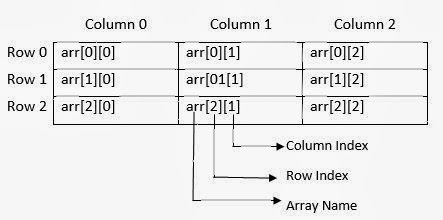
int arr[3][3];

The array arr has two sets of square brackets '[][]' and hence it is a two dimensional array with 3 rows and 3 columns. This declaration informs the compiler to reserve 9 locations (3 x 3 = 9) contiguously one after the other. Total memory reserved is 9 x 2 = 18 bytes. The pictorial representation of this arr array is shown below:

How to Use and Declare Two Dimensional Array in C: Computer Programming

Initialization of Two Dimensional Array

Linked List in Data Structures through C language

Linked List

Linked List is linear and dynamic data structure. The list is a collection of elements called nodes and each node is created dynamically. Linked List comes into picture to overcome the disadvantages of Array. In array it is not possible to vary the size. The size is fixed and the memory is allocated statically when it is declared. During the compilation time the memory is allocated to array. In case of linked list memory is allocated at the time of execution, so the size can vary according to the user wish. In case of Linked List only linear search is possible and it is difficult to apply sorting.

          Each node in the linked list consists of two parts. One part is called as INFO(information) part and the other part is called LINK or NEXT (pointer to next node) part. The INFO part contains the information about the element which is same type for all the nodes and the link part contains address or location of the next element in the List. As one element is linked with the other element, so the list is called as Linked List. The address of the first node of the linked list is stored in an external pointer called ROOT or FIRST.


                                                                                              NODE


  Graphical representation of Linked List  


         ROOT contains the address of the first node FIRST, FIRST node ‘s link field contains the address of the second node SECOND, SECOND node’s link filed contains the address of the third node THIRD and THIRD node’s link field contains the address of the fourth  node FOURTH. Fourth node the last node’s link field of the list contains a NULL address to specify the end of the list. In this case NULL address is marked with X (cross). In some representations it is marked to point to ground symbol.


Friday, February 6, 2015

Gridview sorting Example in ASP.NET

Introduction

Sorting means arranging your data either in ascending order or descending order. But, why we do perform sorting between data? The answer is to increase the speed of readability. So, we need sorted data. Various types of sorting Technique is available like merge sort, quick sort, bubble sort, selection sort, insertion sort and etc. Here, I perform sorting in the GridView. Actually this control provide built in sorting functionality so no code is required for it. But, I will give you example of sorting by using code behind file. Sorting and sorted event of this control provide you to customize the sort functionality like you can use either ViewState or other technique.  First of all I would like to talk about inbuilt functionality which is provide by this control. Let see the example

Step-1 : Create a DataBase table in Visual Studio
Step-2 : Bind GridView with SqlDataSource control
Step-3 : Select 'Enable Sorting' CheckBox for sorting.
Gridview sorting in ASP.NET

Code generate the following output

Gridview sorting Example in ASP.NET

Gridview sorting Example in ASP.NET

Complete Source Code with AllowSorting="True" property

<%@ Page Language="C#" AutoEventWireup="true" CodeFile="Default.aspx.cs" Inherits="_Default" %>

<!DOCTYPE html PUBLIC "-//W3C//DTD XHTML 1.0 Transitional//EN" "http://www.w3.org/TR/xhtml1/DTD/xhtml1-transitional.dtd">

<html xmlns="http://www.w3.org/1999/xhtml">
<head runat="server">
    <link href="StyleSheet.css" rel="stylesheet" type="text/css" />
    <title></title>
</head>
<body>
    <form id="form1" runat="server">
    <div>
        <asp:GridView ID="GridView1" runat="server" AllowSorting="True" 
            AutoGenerateColumns="False" DataKeyNames="sno" DataSourceID="SqlDataSource1">
            <Columns>
                <asp:BoundField DataField="sno" HeaderText="sno" ReadOnly="True" 
                    SortExpression="sno" />
                <asp:BoundField DataField="Name" HeaderText="Name" SortExpression="Name" />
                <asp:BoundField DataField="Address" HeaderText="Address" 
                    SortExpression="Address" />
            </Columns>
        </asp:GridView>  
        <asp:SqlDataSource ID="SqlDataSource1" runat="server" 
            ConnectionString="<%$ ConnectionStrings:ConnectionString %>" 
            SelectCommand="SELECT * FROM [userdata]"></asp:SqlDataSource>
    </div>
    </form>
</body>
</html>
If you bind the GridView control with the SqlDataSource. GridView provide functionality to sort the column without any coding. With the help of allowSorting property of this control you can make column as linkButon, i mean to say LinkButton controls displayed at the top of each column of the grid lets see the output of the above mentioned program. Now to the second part that is sorting through code behind file:

II Method (Sorting through Code Behind file)

Here, i will use ViewState, SortDirection and SortExpression for sorting. With the help of SortDirection enumeration we can retrieve sort order of the column. Also access the last state information of Post Back event by using ViewState. Let see the example

  1. First to add the GridView control to the design page.
  2. Bind this control with the DataTable.
  3. Copy this code and paste into your code behind file

    private void bindgridview()
    {
        var data = getDataTable();
        GridView1.DataSource = data;
        GridView1.DataBind();

    }

    private DataTable getDataTable()
    {
        SqlConnection con = new SqlConnection();
        con.ConnectionString=ConfigurationManager.ConnectionStrings["btti"].ToString();
        con.Open();
        SqlCommand cmd=new SqlCommand();
        cmd.CommandText = "select * from [register]";
        cmd.Connection=con;
        SqlDataAdapter da=new SqlDataAdapter(cmd);
        DataSet ds=new DataSet();
        da.Fill(ds);
        return ds.Tables[0];

    }
  1. Now, perform Customization in the sorting by using GridView_Sorting event.
  2. Copy this code in the same code behind file.
  protected void GridView1_Sorting(object sender, GridViewSortEventArgs e)
    {
        string sortExp = e.SortExpression;
        string direction = string.Empty;
        if(SortDir==SortDirection.Ascending)
        {
            SortDir = SortDirection.Descending;
            direction = "DESC";
        }
        else
        {
            SortDir = SortDirection.Ascending;
            direction = "ASC";
        }
        DataTable dt = getDataTable();
        dt.DefaultView.Sort = sortExp +" " + direction;
        GridView1.DataSource = dt;
        GridView1.DataBind();


    }


    public SortDirection SortDir
    {
        get {
        if(ViewState["SortDir"]==null)
        {
            ViewState["SortDir"] = SortDirection.Ascending;
        }
        return (SortDirection)ViewState["SortDir"];
        
        }
        set {

            ViewState["SortDir"] = value;
        }
    } 
Here, SortDir is the public property through this we can access ViewState Information. When first time page is loaded ViewState contain null value so the sorted order is default ascending. So, SortDir key of it contain Descending order with the DESC string direction. When we click on any link button which is mentioned with the table column it rearrange the column according to SortExpression (table Column) and Direction.

Wednesday, February 4, 2015

Online GYM application project in ASP.NET

Admin Panel:

  • No need of admin registration form just provide username and password change option
  • Admin it self will register client details. So you have to provide client registration form for admin only(Need to provide insert, update and delete option for manipulating client details for admin except username and password)
Client Registration Form Details
1. Complete name
2. Email Id
3. Phone No
4. Date
5. Address
6. Height
7. Weight
8. Programs(Drop Down List)
When admin selects the type of program i.e cardio fitness, strengths, weight loss, personal trainer, cardio+strengths in another drop down list plans should populate
9. Plans      
 For example. Look at below video:

After Selecting Program and plan amount should display in text box.
1.       Paid Amount
2.       Amount Due=Plan amount-Paid Amount
3.       Upload Image
4.       Date(calendar)
5.        Registration button and Cancel Button 

Once registration is successful with all validations espically emailed and phone number. An email should send to that particular person with a welcome note along with username and password. Username as emailed and password as phone number.
Important Note: While client registration a Qrimage along with Unique qrcode and a excel sheet has to be generated. That excel sheet should contain the fallowing columns.

Sl.No, Name ,EmailId, Phone no, Emergency contact no, Address, Height, Weight, Selected Program, Selected Plan ,Amount paid, Due Amount  

When ever new client registration is successful the existing excel sheet should Update with a new row. QrImages  should be generated in separate folder with client name. Once admin will login he should be able to view his clients with respect to their programs. 

Example:
Select Type Of program:---Select----(Assume it’s a drop down list)
                                             Cardio
                                              Strength
                                             Personal Trainer
                                            Weight Loss
                                             Etc etc
Once admin click any of the above program i.e Strengths or cardio or weight loss or Personal trainer or any other register client should display w.r.to that program only.

Once admin select the client it should ask for edit profile option or display client info.
© Copyright 2013 Computer Programming | All Right Reserved