-->

Monday, February 16, 2015

If-Else-If Ladder Statement in Computer Programming: C Language

When series of actions have to be performed based on decisions one–by-one, then the statement used is called if-else-if ladder. In computer programming it is called multi-way decision statement. The if-else-if ladder is a form of nested if-statement. Here, nesting is allowed only in the else part. The orderly nesting of if statement only in the else part is called if-else-if ladder. The syntax of if-else-if ladder is shown below:

SQL Video Channel : Download all SQL Video

Syntax:

if(condition1)
    statement(s);
      else if(condition2)
    statement(s);
else if(condition3)
    statement(s);
-
-
-
    else if(conditionn)
    statement(s);
                               else
                                  statement(S);

In this statement the conditions condition1, condition2 etc. of if-else-if ladder are evaluated to true, the corresponding statement is executed and control comes out of the entire if-else-if ladder executing the rest statements that come after the if-else-if ladder.

If all the conditions are evaluated to false, then the last statement is executed, and the control comes out of if-else-if ladder and the rest statements that come after the if-else-if ladder are executed.

Problem:

Let consider a problem to display the grade obtained by a student based on the marks. The criteria to find the grade based on marks as follows:
    Marks        Grade
    0 to 34        F
    35 to 44      E
    45 to 59      D
    60 to 69      C
    70 to 79      B
    80 to 89      A
    90 to 100    A+

Algorithm:
Step1:    Read: Marks
Step2:    if(Marks<=34)
        Write: ‘Grade F’
    else if(Marks<=45)
        Write: ‘Grade E’
    else if(Marks<=59)
        Write: ‘Grade D’
else if(Marks<=69)
        Write: ‘Grade C’
else if(Marks<=79)
        Write: ‘Grade B’
else if(Marks<=89)
        Write: ‘Grade A’
else
Write: ‘Grade A+’
[End of if-else-if]
Step3:    Exit

Here's the C program to solve the above problem.

main()
{
  int marks;
  clrscr();
  printf(“Enter the student’s obtained marks here:\n”);
  scanf(“%d”,&marks);
  if(marks<=34)
     printf(“Grade F”);
  else if(marks<=45)
     printf(“Grade E”);
else if(marks<=59)
     printf(“Grade D”);
else if(marks<=69)
     printf(“Grade C”);
else if(marks<=79)
     printf(“Grade B”);
else if(marks<=89)
     printf(“Grade A”);
else
     printf(“Grade A+”);
getch();
}

Output
If-Else-If Ladder Statement in Computer Programming: C Language

Advantages:

In computer programming, situations involving series of decisions one after the other, each decision or condition may involve expression of various data types such as float, integer, char and double. In these situations the if-else-if ladder is used.

Disadvantages:

  • The nested ifs are hard to understand and modify.
  • As the depth of nesting increases, the readability of the program decreases.
  • In situations involving series of decisions one after the other, each decision or condition may involve expressions which result in integer value. In these situations the usage of if-else-if ladder is not recommended. Instead of this statement, we go for switch statement.

Get to Know about Decision Making and branching Statements in Detail: C Language

INTRODUCTION:

A statement (also known as instruction) is the smallest element of any programming language. A statement or instruction is used to inform the computer to perform an action, when a program is executed. A statement can be used to set values of variables, alter the values of a variables, accept the input, manipulate the data and display the data. Each statement in C language must be terminated by a semicolon “;”.

The expression such as “a + b”, “c = 20”, “printf()” may become statements when they are terminated by a semicolon as shown below:


a + b;                 /* statement 1 */
c = 20;                /* statement 2 */
printf();            /* statement 3 */
 

A statement can be simple statement (discussed above) or can be compound statement. The set of statements enclosed within a pair of curly braces such as “{“and “}” is considered as a compound statement. For example, the following compound statement computes and display the sum of two values.
{
  Num1 = 15;                                   
  Num2 = 35;                                   
  Sum = Num1 + Num2;                           
  printf(“The sum of Num1 %d and Num2 %d = %d”,Num1,Num2,Sum);   
}
This compound statement can be treated as a single statement. Note that in a compound statement ‘}’ must not end with semicolon. So, all the operations like arithmetic, assignment, control structures and input/output function calls are considered as statements. Now, let us see “What are control statements? What are the types of the control statements?”

Sequential Statements with FlowChart and Example

Saturday, February 14, 2015

Uses of Sequential and Compound Statements: C programming

INTRODUCTION

In our previous article, we have studied about the single statements. The order in which statements are executed known as control flow and the statements that are used to control the flow of execution of the program are called as control statements. Based on the order in which the statements are executed, the various control statements are classified as follows:
         
Uses of Sequential and Compound Statements: C Language

Now, let us consider each of the control statements one by one.

Sequential Statements

The programmer writes a sequence of statements to specify some activity in a program. All these statements in a program are executed in the order in which they appear in the program. These programming statements that are executed sequentially, i.e. one after one is known as the sequential statements. Here, no separate statements are required to make these statements executed in sequence. The flow chart and the equivalent programming statements are shown below:

Uses of Sequential and Compound Statements: C Language

Here, statement 1 is executed first followed by statement 2 followed by statement 3 and so on. In short, we can say that execution of program is normally sequential (one after one). For example, let us write a program to find the sum of two integer numbers, which is given by the following relation:

Sum = Num1 + Num2

The sequence of steps to be followed as:
•    Input two integer numbers
•    Compute the sum using Sum = Num1 + Num2
•    Display the result
•    Stop the execution

The equivalent algorithm and the flow chart for the same are shown below:

Example 1:    Algorithm and flow chart to compute the sum of two integer numbers.
Algorithms:    ADD
    [Compute the sum of two integer numbers.]
    Step 1: [Input any two integer numbers]
        Read: Num1, Num2
    Step2: [Compute the sum]
        Sum = Num1 + Num2
    Step3: [Display the result]
        Write: Sum
    Step4: [Stop]
        Exit
Uses of Sequential and Compound Statements: C Language

Example2:
main()
{
 int Num1, Num2, Sum;
 clrscr();
 printf(“Enter any two integer numbers\n”);
 scanf(“%d%d”,&Num1.&Num2);
 /* compute the sum*/
 Sum = Num1 + Num2;
 Printf(“Sum = %d”,Sum);
 getch();
}

Output:
Uses of Sequential and Compound Statements: C Language

Advantage

No other separate control statement is required to execute the sequential statements one after one.

Disadvantage:

The sequence in which statements are executed cannot be altered or changed.

Friday, February 13, 2015

Formatted input/output function in Turbo C Language

It is very easy to use unformatted input/output functions as discussed. We can read and display only characters not numbers using unformatted functions. Using formatted input/output functions, we can read integers, floating point number and characters. The formatted input function is scanf() and formatted output functions is printf().

Scanf()

Syntax
int scanf(“format string”, &var1, &var2, &var3,……..&varn);

This function scanf() is used to read any type of data such as int, char, float, double and even string from the keyboard. It accepts the following two parameters:
format string consists of one or more format specifires starts with % symbol.
&var1, &var2, &var3, …., &varn represents the list of variables. Here, symbol ‘&’ refers to the address of the variable. In the memory locations identified by these addresses, the respective values are stored.

Formatted input/output function in Turbo C Language


Return Type int: The function returns an integer value. This integer value is the number of item that have been read successfully using the keyboard. But, we rarely use this return value in our programs.
The various format specifiers along with the associated meaning are shown in the following table:

Data Type
Format Specifier
Meaning
int
%d
%o
%x
%i
%u
%h
Read a decimal integer value
Read an octal value
Read a hexadecimal value
Read a decimal, octal or hexadecimal value
Read an unsigned integer value
Read a short integer value
float
%e
%f
%g
Read a floating point number
char
%c
%s
Read a character
Read a string (series of character)
double
%f
Read a long floating point number or double
long int
%ld
Read a long integer value

The following table shows the way the user has to enter the values from the keyboard:

Input statement
Entering value
Input way
scanf(“%d%d%d”,&a,&b,&c);
3 integer value
10 20 30
Where, a=10      b=20       c=30
scanf(“%d,%d,%d”,&a,&b,&c);
3 integer value
10,20,30
Where, a=10      b=20       c=30
scanf(“%f”,&a);
1 floating point value
787.35
Where, a=787.3.5
scanf(“%c”,&a);
1 character value
P
Where, a=p
scanf(“%f,%d,%c”,&a,&b,&c);
1 floating point value
1 integer value
1 character value
787.35 10 P
Where, a=787.35, b=10, c=P
scanf(“%d-%d-%d”,&a,&b,&c);
3 integer values separated by ‘-‘ (hyphen) sign
10-20-30
Where, a=10, b=20, c=30
scanf(“%d%d%d”,&a,&b,&c);
3 integer values separated by ‘/’ (slash) symbol
10/20/30
Where, a=10, b=20, c=30

Note: Do not use any escape sequences such as \t, \n etc. in scanf().

For example: Consider the following statement:
scanf(“%d\n”,&a);
In the above statement, remove ‘\n’, otherwise it may give wrong output.
Now, let us see, some more ways of data reading using scanf() function are given below:
Input statement
Entering value
Input way
scanf(“%2d%2d%2d”,&a,&b,&c);
3 integer values
1 2 3
Where, a=1  b=2  c=3
11 22 33
Where, a=11  b=22  c=33
102030
Where, a=10  b=20  c=30
102 030 4
Where, a=10  b=2  c=3
The remaining two digits 0 and 4 are ignored or can be read by a subsequent scanf()
scanf(“%12s”,&str);
1 string
.Programming
Where, str=.Programming
scanf(“%[^\n]s”,str);
Input the string till the end of line
Wlecome! To the dotprogramming
Where, str= Wlecome! To the dotprogramming
Note:
To read a string with space gets() function will used in place of scanf().
The “scanf(“%[^\n]s”,str);” function read and stored all the character untill user will not press enter key.

Formatted Output Function

Thursday, February 12, 2015

Formatted Output Function Printf() in Turbo C Language

The data stored in the memory area can be displayed on the monitor or any other output device. This can be performed using printf() function in C. Using this function programmer can display numerical values such as integer, floating point number, character and strings.

Syntax
int printf(“format string”,var1,var2,var3,….varn);
where

  • “format string” consists of one or more format specifiers. Each format specifier start with % sign.
  • var1, var2, var3, ……, varn represent the values of variables in given series

Return Type value: The function will return an integer value. This integer value is the number of items that have been displayed successfully on the screen. But generally in our programs we will not use this return value.

The various format specifiers along with the meaning associated with them are shown below. These format specifiers are same as in earlier post. The following table shows the given values, for the statement to be executed and the output obtained on the screen:

Formatted Output Function Printf() in Turbo C Language

Field width specification for integers:

The printf() function uses the field width to know the number of columns used on the screen while printing a value.
The specification is provided by means of a format string like “%wk” where

  • w indicates total number of columns required to print the value or specifies the width.
  • k is the format given in the above table earlier for int.

The table below shows the given values, the statement and the output obtained on the screen:

Formatted Output Function Printf() in Turbo C Language

Field width specification for float:

The floating point or real number can be displayed using printf() statement with format specification. The syntax is shown below:
“%w.xf” where

  • w indicates total number of columns required to print the value.
  • x is the number of columns used after the decimal point.

The following table shows the given values, the statement to be executed and the output obtained on the screen:

Formatted Output Function Printf() in Turbo C Language

Field width specification for string:

The string (series of character) can be displayed using printf() statement with format specification. The syntax is shown below:
“%w.x” where

  • w indicates the total number of columns reserved to print the string.
  • x is the number of columns used to print the string in right justified way. The rest of the characters are ignored.

The below table shows the given values, the statements and the obtained output on the screen for
str = “Dot Programming”

Formatted Output Function Printf() in Turbo C Language

Note: In the last printf() statement all 15 columns are free and the cursor will be place in the 16th column.

Formatted Input Functions

Mathematical Functions in Turbo C Language

The C language provides a number of library functions that carry out mathematical operations such as square root, sine, cosine, tan, and various other actions. These functions, which are part of C mathematical library are called mathematical library functions. They are also called mathematical built in functions. 
Brief description about each mathematical function is available in your program's header file called “math.h”. Therefore, anyone who uses mathematical functions should include “math.h” in the beginning of the program. The various mathematical functions which are commonly used are provided below:

Function with return type
Operations performed
abs(int i)
Returns absolute value of an integer.
cos(x)
Returns the cosine value of x.
acos(x)
Returns the inverse cosine of an angle where x is in radians.
sin(x)
Returns the sine value of x.
asin(x)
Returns the inverse sine of an angle where x is in radians.
tan(x)
Returns the tangent of an angle where x is in radians.
atan(x)
Returns the inverse tangent of an angle where x is in radians.
exp(x)
Returns the value of e to the power x.
fabs(x)
Returns the absolute value of floating point number x.
log(x)
Returns the natural logarithm of x.
log10(x)
Returns the logarithm of x to the base of 10.
pow(x,y)
Returns the value of x to the power y.
sqrt(x)
Returns the square root of x.

 These functions are given here to just start with programming. In most of the general or mathematical problems such built in functions are regularly used. We will discuss about examples about each of these functions later.

Formatted Input/Output Functions

Nested If or If-Else Statement in Computer Programming: C Language

In any computer programming, a variation of if or if-else statement is known as nested if statement. When an if or if-else statement is used within another if or if-else statement then this statement is called nested if statement. When an action has to be performed based on many decisions, then this statement is used. So, it is called multi-way decision statement. There can be many variations of nested if statement. A sample is given below:

if(condition)
{
    if or if-else statement
}
else                           
{
    if or if-else statement
}

The syntax of nested if shown below:
if(condition1)
{
if(condition2)
    {
      Statement(s);
     }
else
     {
       Statement(s);
     }
}
else
{
  Statement(s);
}

In this statement the conditions are evaluated from the top to bottom. If the outermost condition i.e., condition1 is true the statement(s) associated with this condition are executed as the inner if part is executed here. If condition2 is true the statement associated with this condition are executed otherwise the else (condition2’s false part) part’s statement(s) are executed. If the condition1 of outermost if statement is false then, else part of this if statements are executed, as shown in the above syntax.

For example, consider the following statements:
if(salary>=25000)
  {
If(age<=65)
    Write: ‘Increment in salary 25%’
else
    Write: ‘Increment in salary 24%’
  }   

In the above example the if-else statement is inside if statement, hence the above statement is called the nested if statement. Here, if salary >= 25000 and age is less than or equal to 65, then the output is "Increment in salary 25%". If salary is >= 25000 and age is above 65 then the output will be "Increment in salary 24%".

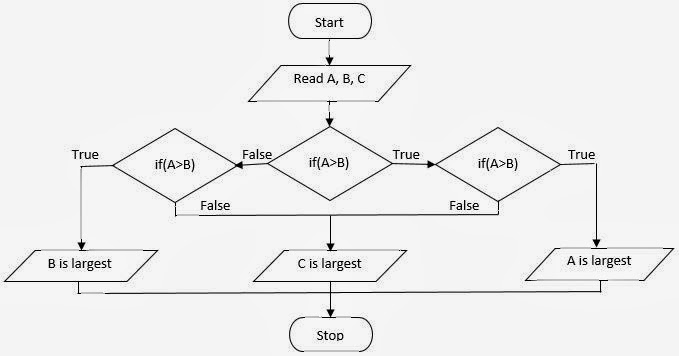
Algorithm:
Step1:    Read:A, B, C
Step2:    if(A>B)
if(A>C)
Write: “A is largest”
else
Write: “C is largest”
          [End of if]
else
if(B>C)
Write: “B is largest”
    else
Write: “C is largest”
         [End of if]
    [End of if]
Step3:    Exit

Nested If statement in computer programming, c language

I am writing a C program to find largest number among the three given number.

main()
 {
intA,B,C;
clrscr();
printf(“Enter any three integer number here:\n”);
scanf(“%d%d%d”,&A,&B,&C);
if(A>B)
     {
if(A>C)
    printf(“Number %d is largest”,A);
else
    printf(“Number %d is largest”,C);
      }
else
     {
if(B>C)
    printf(“Number %d is largest”,B);
else
    printf(“Number %d is largest”,C);
     }
getch();
}

Nested If statement in computer programming, c language

Advantages:

  • There are situations involving series of decisions where we have to use if or if-else statement in another if or if-else statement. In such situations, nested if statements are used.
  • Each and every condition may be evaluated to true or false and may involve expressions of various data types.

Disadvantages:

  • The nested if-statements are difficult to understand and modify.
  • As the depth of nesting increases, the readability of the program decreases.
Nested If or If-Else Statement in Computer Programming: C Language
© Copyright 2013 Computer Programming | All Right Reserved