Definition : "Data types are means to identify the type of data and associated operations for handling it." In other words, " The type of the value that a variable can store in the memory is called the data type."
There are three types of Data types in C :
User defined data type enables a programmer to invent his/her own data types and define what values it can take on. This can help programmer listing more readable, in the case of a complicated program or when more than one programmer works on it. Therefore this data type would help a programmer to reduce programming errors.
Definition : " A special data type that is defined by user from the derived data type is called user-defined data type or user-defined derived data types."
typedef, structure, union and enumeration are user-defined Data Types. Now let discuss these data types in detail.
(1) Structure: It is defined as collection of logically related variables under a single name. All these, variables may contain data items of similar or dissimilar data types. Using these variables each item of a structure can be selected. Each variable in the structure represents an item & is called member or field or element of the structure. Each field has a type. You can also use a user- defined Data type called structure using struct keyword.
struct (keyword): This keyword groups variables (same type or different type) into a single record and is used to create user-defined data type called structure.
Syntax:
struct [<struct_type_Name>] {
[<type> <variable_name [, variable_name, ]>];
[<type> <variable_name> [,variable_name, ]>];
[<structure_variables>];
There are three types of Data types in C :
- Basic or simple or Primitive data types
- User-defined data type
- Derived-type
Basic or Simple or Primitive data types
Definition : "Basic data types are those that are not composed of other data types."
The various primitive data types of C Language are classified as:
- int
- char
- float
- double
- void
Note: The primitive data types are also called basic data types or simple data types or fundamental data types.
int
It is a keyword which is used to define integer numbers. Normally they are associated with the variables to store signed integer values in memory locations. That is, using this data type both positive and negative numbers can be stored in the memory. To represent only unsigned numbers it is normally associated with a qualifier unsigned.
For example, unsigned int is used to define only positive numbers. Negative numbers cannot be stored if a variable is associated with unassigned int. The size and the range of integer vary from machine to machine as shown below:
float
It is a keyword which is used to define floating point numbers. The floating point numbers are also called real numbers. Normally they are associated with the variables (also called identifiers) to store floating point numbers in memory locations. That is, using this data type both positive and negative floating point numbers can be stored in the memory.
double
It is a keyword which is used to define high precision floating point numbers. Normally they are associated with the variables to store large floating point numbers in memory locations. That is, using this data type both positive and negative large floating point numbers can be stored in the memory.
char
It is a keyword which is used to define single character or a sequence of character called string. Normally , they are associated with the variables to store a character or a string in memory locations. Each character stored in the memory is associated with a unique value called an ASCII (American Standard Code For Information Interchange) value.
void
It is an empty data type. It is normally used in functions to indicate that the function does not return any value. Since no value is associated with this data type, it does not occupy any space in the memory . Normally, It is not associated with any variable (except pointers).
int
It is a keyword which is used to define integer numbers. Normally they are associated with the variables to store signed integer values in memory locations. That is, using this data type both positive and negative numbers can be stored in the memory. To represent only unsigned numbers it is normally associated with a qualifier unsigned.
For example, unsigned int is used to define only positive numbers. Negative numbers cannot be stored if a variable is associated with unassigned int. The size and the range of integer vary from machine to machine as shown below:
float
It is a keyword which is used to define floating point numbers. The floating point numbers are also called real numbers. Normally they are associated with the variables (also called identifiers) to store floating point numbers in memory locations. That is, using this data type both positive and negative floating point numbers can be stored in the memory.
double
It is a keyword which is used to define high precision floating point numbers. Normally they are associated with the variables to store large floating point numbers in memory locations. That is, using this data type both positive and negative large floating point numbers can be stored in the memory.
char
It is a keyword which is used to define single character or a sequence of character called string. Normally , they are associated with the variables to store a character or a string in memory locations. Each character stored in the memory is associated with a unique value called an ASCII (American Standard Code For Information Interchange) value.
void
It is an empty data type. It is normally used in functions to indicate that the function does not return any value. Since no value is associated with this data type, it does not occupy any space in the memory . Normally, It is not associated with any variable (except pointers).
Type
|
Size (bits)
|
Range
|
Format
|
char or
signed char
|
8
|
-128 to
127
|
%c
|
unsigned
char
|
8
|
0 to 255
|
%c
|
short
signed int
|
16
|
-32768 to
+ 32767
|
%d
|
short
unsigned int
|
16
|
0 to 65535
|
%u
|
signed int
|
16
|
-32768 to
+ 32767
|
%d
|
unsigned
int
|
16
|
0 to 65535
|
%u
|
long
signed int or long int
|
32
|
-2147483648
to +2147483647
|
%ld
|
long
unsigned int
|
32
|
0 to
4294967295
|
%lu
|
float
|
32
|
-3.4e38 to
+3.4e38
|
%f
|
double
|
64
|
-1.7e308
to +1.7e308
|
%lf
|
long
double
|
80
|
-1.7e4932
to +1.7e4932
|
%Lf
|
User-defined data type
"what are user defined data types?"User defined data type enables a programmer to invent his/her own data types and define what values it can take on. This can help programmer listing more readable, in the case of a complicated program or when more than one programmer works on it. Therefore this data type would help a programmer to reduce programming errors.
Definition : " A special data type that is defined by user from the derived data type is called user-defined data type or user-defined derived data types."
typedef, structure, union and enumeration are user-defined Data Types. Now let discuss these data types in detail.
(1) Structure: It is defined as collection of logically related variables under a single name. All these, variables may contain data items of similar or dissimilar data types. Using these variables each item of a structure can be selected. Each variable in the structure represents an item & is called member or field or element of the structure. Each field has a type. You can also use a user- defined Data type called structure using struct keyword.
struct (keyword): This keyword groups variables (same type or different type) into a single record and is used to create user-defined data type called structure.
Syntax:
struct [<struct_type_Name>] {
[<type> <variable_name [, variable_name, ]>];
[<type> <variable_name> [,variable_name, ]>];
[<structure_variables>];
A struct, like a union, groups variables into a single record.
Where,
(1) <struct_type-Name> is an optional tag name that refers to the structure type.
(2) <structure_variables> are the data definitions, also optional.
Though both <struct_type_name> and <structure_variables> are optional, one of the two must appear.
Elements in the record are defined by naming a <type>, followed by one or more <variable_name> that are separated by commas (,). Different variable type can be separated by a semicolon(;).
Let us see
struct my_struct {
char name [80],
phone_number[80];
int age, height;
} my_friend;
This struct declares an array of records containing two strings (name and phone_number) and two integers (age and height).
To access elements in a structure, we use a record selector (.). For example,
strcpy (my_friend.name, "Mr. jacob");
When a variable is associated with a structure, the compiler allocates the memory for each member.
(2) Union (Keyword): A union is similar to a struct, except it allows you to define the variables that share storage space and are created using union keyword.
Syntax :
Union [<uniontype_name>] {
<type> <variable_names>;
) [<union variables>];
Let us see an example :
union int_or_long {
int i;
long l;
} a_number;
Turbo C will allocate enough storage in a_number to accommodate the largest element in the union Unlike a structure(struct), the variable a_number.i and a_number.l occupy the same location in memory. Thus, writing into one will overwrite the other. Elements of a union are accessed in the same manner as a struct.
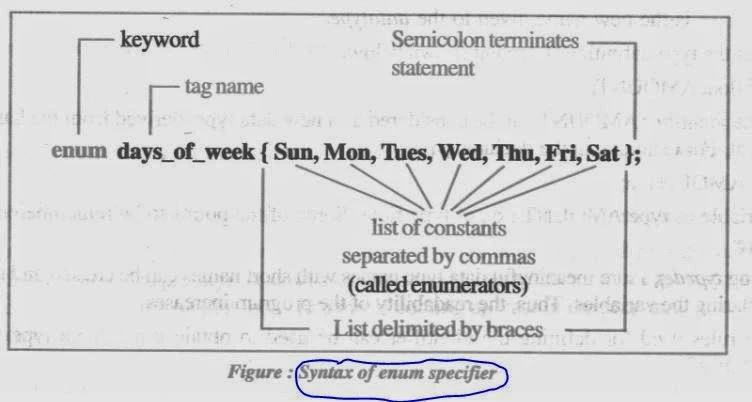
(3) Enumeration : A enumerated data type is another user-defined type which provides a way for attaching names to numbers. The enum keyword gives you an opportunity to define your own data type and also define what values the variable of this data type can take. This can help in making the program listing more readable, which can be an advantage when a program gets complicated or when more than one programmer would be working on it. Using enumerated data type can also help you reduce programming errors. The enum keyword (from C language) automatically enumerates a list of words by passing them values 0,1,2 and so on. This facility provides an alternative method for creating symbolic constants. The syntax of an enum statement is similar to that of the struct or union statement.
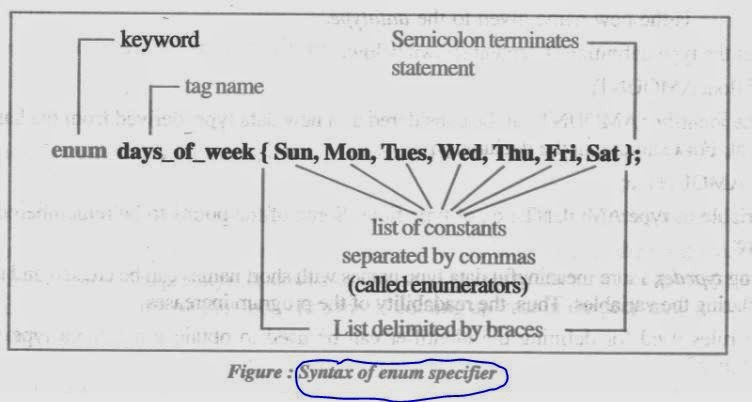
Now let us see an example to understand enumeration data type.
enum shape {rectangle, square, triangle, circle}; Enum position {off, on};
enum color {black, white, red, blue, green, yellow};
enum months {Jan, Feb, Mar, Apr, May, Jun, Jul, Aug, Sep, Oct, Nov, Dec.};
enum emp_dept {Assembly, manufacturing, accounts, stores};
In C, the tag names shape, position, color, months and emp_dpt becomes new type names, using these tag names, we can declare new variables. For examples:
shape ellips; //ellips is of type shape
color background; // background is of type color
emp_dept IT; // IT is of type emp_dpt
ANSI C defines the types of enums to be int. Let us see some examples:
In C, By default, the enumerators are assigned integer values starting with 0 for the first enumerator, 1 for the second, 2 for the third and so on. However, you can over-ride the default explicitly assigning integer values to the enumerators. Let us see the examples:
enum months {Jan, Feb, Mar, Apr = 10, May, Jun, Jul};
enum monts {Jan = 2, Feb, Mar, Apr, May, Jun = 20, Jul};
are valid definitions. In the first case, Jan is 0 by default. In the second case, Jan is 2, Feb is 3. Mar is 4, Apr is 5, May is 6 and Jun is 20, Jul is 21.
(4) typedef: C supports a feature known as "type definition" that allows users to define an identifier that would represent an existing data type. Consider the syntax, typedef data_type identifier;
Where
typedef is the keyword.
datatype can be basic or derived or any other user defined data type.
identifier is the new name given to the datatype. Consider the type definition statement shown below:
typedef float AMOUNT;
Here, the identifier AMOUNT can be considered as a new data type, derived from the basic data type float. For example, in the declaration :
AMOUNT a;
a is variable of type AMOUNT i.e., of type float. Some of the points to be remembered at this point are:
(1) Using typedef, more meaningful data type names with short names can be created and used for declaring the variables. Thus, the readability of the program increases.
(2) The rules used for defining the identifier can be used to obtain a new data type such as AMOUNT.
(3) If the typedef statement is situated within a function, the scope of this typedef is limited only to that function and the new data type thus obtained, cannot be used outside this function. If the typedef is in the beginning of all the functions, then it will be global and can be used by any function.


