-->

Wednesday, September 17, 2014

Types of Java Programs

Java is a programming language, by which we can design a new program or a software. It have many features, such as

  • Object Oriented Language
  • Support Cross Platform
  • Platform independent
  • Strongly typed language
  • Machine Dependent(JVM- Java Virtual Machine)
  • Use Reference in place of pointer
So you can make a new application in it. Java Support four types of application such as
  1. Console Based Application(Core Java)
  2. Client Based Application (Applet, Swings)
  3. Web Based Application (Applet, Servlet, JSP)
  4. Mobile Based Application (Android)
1. Console Application- It also known as command based application. In which we can work only with non-GUI application. Suppose we want to create a new folder in system then what to do in DOS(console based). First of all we write a command for this, like mkdir. If you solve same problem in window(GUI) then do not need to write command for this, simply use mouse pointer and make a new folder.

Diagrammatic view of console window

Diagrammatic view of console window


2. Client based application : That application, which is install on client machine. That application create for single person or a organization. Also known as off line application. Client application design in java is very easy through applet and swings. Through the client application user use pointing device rather then command. In the client application user can put any input by the user interface. 

Diagrammatic view of client based application(GUI)

Diagrammatic view of client based application(GUI)

3. Web Based Application:  These application run on web browser. For this types of application we create a web pages, you can select any language for making web pages like jsp, html, asp, php etc. Here we select servlet and JSP for designing the web pages. Servlet is a class file which is compiled by the servlet engine and JSP is a extension of servlet. For making easier we use JSP for dynamic web pages.

Diagrammatic view of web based application(GUI)

Diagrammatic view of web based application(GUI)
4. Mobile Based Application : These application run on mobile platform, in current market java has already launched android platform for mobile application. In the later article i will discussed more about java-mobile(android ).

Diagrammatic view of Mobile based application(GUI)

Diagrammatic view of Mobile based application(GUI)


Wednesday, September 10, 2014

How to Bind DropDownList with Enum MVC

Earlier article was about to bind DropDownList with simple select list of type selectlistitems. These select list may by any type of list either from database or temporary for that view only. In this article we will create an enum, then create a select list through that enum and finally will bind that to drop-down list.

Create an Enum like I have, named OptionType

enum OptionTypes
{
value1,
value2,
value3,
value4
}

After creating enum, write a class that will work like a helper to create select list for that enum:

public static class EnumHelper
{
// Get the value of the description attribute if the   
// enum has one, otherwise use the value.  
public static string GetDescription<TEnum>(this TEnum value)
{
var fleid = value.GetType().GetField(value.ToString());

if (fleid != null)
{
var attributes = (DescriptionAttribute[])fleid.GetCustomAttributes(typeof(DescriptionAttribute), false);

if (attributes.Length > 0)
{
return attributes[0].Description;
}
}

return value.ToString();
}

/// <summary>
/// Build a select list for an enum
/// </summary>
public static SelectList SelectListFor<T>() where T : struct
{
Type t = typeof(T);
return !t.IsEnum ? null
: new SelectList(CreateSelectList(t), "Value", "Text");
}

/// <summary>
/// Build a select list for an enum with a particular value selected 
/// </summary>
public static SelectList SelectListFor<T>(T selected) where T : struct
{
Type t = typeof(T);
return !t.IsEnum ? null
: new SelectList(CreateSelectList(t), "Text", "Value", selected.ToString());
}

private static IEnumerable<SelectListItem> CreateSelectList(Type t)
{
return Enum.GetValues(t)
  .Cast<Enum>()
  .Select(e => new SelectListItem { Value = e.ToString(), Text = e.GetDescription()                            });
}
}

Go to your controller and write the line as I have:

ViewBag.values = EnumHelper.SelectListFor<OptionTypes>();

Open your view page and write

@Html.DropDownList("values");

Run this view in browser and check, your drop-down list has been bind. This will create a simple list named “values” as specified as parameter. If we want to create a drop-down list for a model then:

@Html.DropDownListFor(model => model.property, (IEnumerable<SelectListItem>)ViewBag.values, new { html parameters })

This will bind this drop-down list as strongly with the property of the model.

Wednesday, September 3, 2014

Student Information Project in PHP

Introduction

Student information management system is a software application to  maintain the records related to student information , Fees status , marks and attendance.

Objective of the project

The main objective of application is to automate the existing system manually maintain the record of student information ,marks , attendance and student search to be computerized. So searching  will be faster.

Applications

This software covers following area

  1.     It  is very  useful for schools and colleges.
  2.    All record is computerized to we can use it for colleges.

Hardware and Software requirements

1. Dual core pc for server machine.
2. XAMPP for server machine

Future Scope


  1. Can be used for ERP Application

Project Snap Shot

Home page of online student information system project in php

Student Search in PHP

Student result in php

How to Download the project

Mail to me : narenkumar851@gmail.com

Project contains

  1. Project Report
  2. Project Code
  3. Project PPT

Online result showing project in ASP.NET

Introduction

This is the web application, in which you can get result of your all semester exam. After completing the exam you will get total result via this application. The main objective of this application is to get the result from any where, Suppose you are  a student, and  you loss your mark sheet when you go for interview. Before taking interview you can get result via college website.

Hardware and Software requirement

Hardware : Dual Core PC for Server machine, where you setup your project.
Software : IIS Web Server, DOTNET framework 4.0, SQL Server 2008.

How to run the application on client machine

Step-1 : Open this website in visual studio 2010
Step-2 : Run the application via ctrl+f5
Step-3 : Search the result via SPN Number, which is include in database
Step-4 : Insert new record via admin panel.

Project nap Screen


Home screen show the links for navigate the application. After enter the SPN number into the project you can enter into the result page, which is shown above.

Download the project

mail to me :  narenkumar851@gmail.com

Project contains some resources

1. Project Source code
2. Project report
3. Project PPT

Saturday, August 30, 2014

Basics about JQUERY, Types of Selectors

To change the web page after rendered programmer has to change the coding done for the page and then refresh again. To manipulate a web page after it has been rendered without change the coding part, programmer often uses Jquery. Jquery library makes it easy to change the functionality of web page smoothly.

Jquery library provides tools that enable user to interact with the page or to include animations on page. This article will describe about some basic elements of jquery library, later we will implement some functionality on the page with tools provided by the library. To user jquery library programmer must have a reference on the web page or layout file.

Selecting an element/control on which programmer will perform some action, jquery library provides selectors. These selectors can select any element/control on the basis of their id, class or their type as per the requirement.

Showing an alert just after loading of the page, jquery provides an in-built function. Programmer can enable any functionality on loading of the page using below syntax.

$(document).ready(function(){
alert("page loaded");
});

First we need to know about how to select an element/control in jquery
Element Selector: To select an element on the page like <p/> (paragraph tag), <a/> (anchor tag), <input /> or any other element, programmer has to write something following below syntax:

$(document).ready(function(){
$('p').click(function(){
alert('<p> element selected');
});
$('a').click(function(){
alert('<a> element selected');
});
$('input').click(function(){
alert('<input> element selected');
});
});

Id selector: to select a control on basis of the id of that element, programmer needs to know about id selector. '#' symbol is used to select according to control's id like "$('#btnInput')" will select the control having id "btnInput". As we know that each control has its own id on the page and that is unique.

$(document).ready(function(){
$('#btnInput').click(function(){
alert('input button clicked');
});
});

Class selector: to select control(s) according to their CSS class property, this selector is used. Suppose we have multiple buttons having same class i.e. "button" so to apply some change on all of then we can do by using this selector.

$(document).ready(function(){
$('.button').click(function(){
alert('button clicked having class "button" ');
});
});

There are many jquery selectors in the library, we will use them one by one in later articles.

How to Create Layout page and set for View: MVC

After creating default MVC application in Visual Studio there is a default layout file has been added in shared folder under views having name _Layout.cshtml. This file is used to provide consistent look on all of the pages having default layout page set. Changes done in this file will set for all the pages/views under this layout.

The above extension ".cshtml" is used only in case of Razor and this will be changed for aspx views. Programmer can even change this layout file as per requirements or can use multiple layout files according to the roles/group  defined. All the scripts, styles and custom files must be included in this layout file if necessary for all views.

If Programmer don't want to use any layout for the view then "Layout = null" must be set in the view page. This feature can only be set for that particular view. Now to create new layout file programmer have to add new item as "MVC Layout Page(Razor)" and change the name if required otherwise default will be used.

MVC set layout null


After adding the layout file create html and use “@RenderBody()” statement wherever you want to render the body of view page which will have this layout. Whatever change we do in this file, will be changed for all the views having this file as a layout.

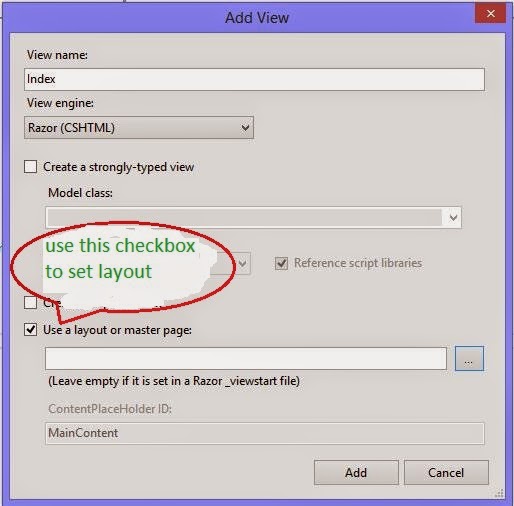
Whenever programmer adds a new view there is an option for using a layout or master file with a checkbox and browse button. Check that checkbox and browse for the layout file created above. This will set that file as a layout for that new view.

MVC set null in new view

Wednesday, August 27, 2014

How to view DLL function and properties in visual studio

You are a developers and you want to create a new project. Lots of code are hidden behind the .dll file, its a symbol of good programmer. Learn how to hide code from user in asp.net(How to create .DLL file in asp.net).   A .DLL file contains some namespaces, class definition, methods and some properties. You want to view the functions used in that dll so you should go for Object browser, which is available in visual studio. Lets take a step to view the .DLL file in visual studio.
Step-1: Right click on any .DLL file, Open selected file in Object Browser and press 'ok' Button.


Step-2 : Expand the file, which is contain namespace and methods.


Left panel contains files and right panel contains methods and properties and many more item which is related to selected file in left panel. So you can easily use namespace and their methods. Learn How to use this.
© Copyright 2013 Computer Programming | All Right Reserved